


Participating Frequently
Nov 26, 2021 11:25 PM UTC
Answered

Knockout for smooth shadow opacity

Puppets with separate shadow files. Shadow files duplicates of puppet with each group (head, torso, leg(s) arm(s) ) merged and filled to black. When imported and opacity set to 25% (anything less than 1) the overlapping section have less opacity, of course, and the shadow effect is clumsy. I've been unable to port over a knockout effect from PS into CA. Is this unsupported in CA? Should I be approaching this differently?

This is probably appropriate for both Beta and Standard, but I'm doing all of this in Beta. 

Thanks so much!!
This topic is closed to new replies. Start a new post to keep the conversation going.
dmwilkCorrect answer
Adobe Employee
Dec 3, 2021 7:30 PM UTC

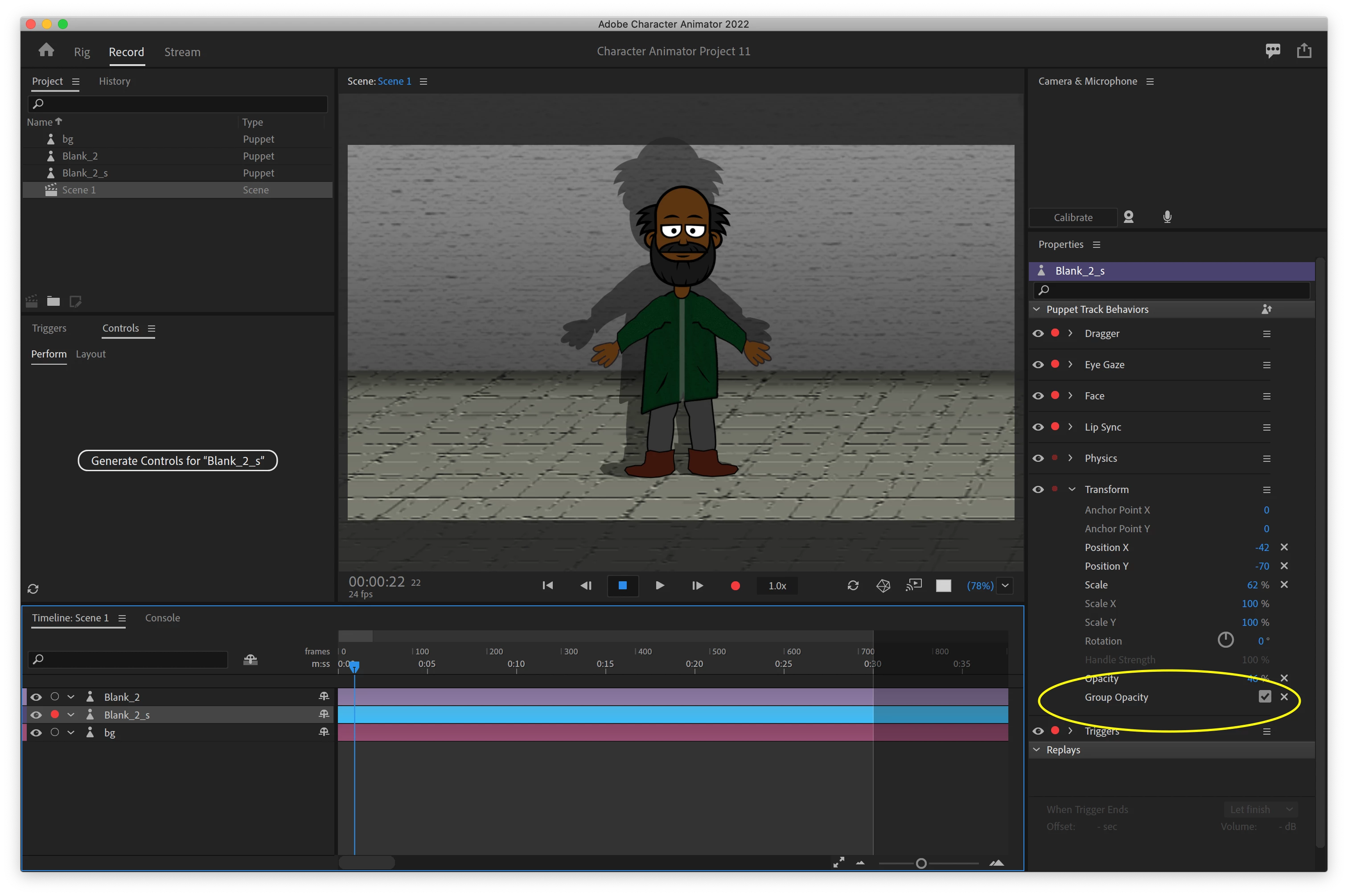
It was not clear from the screenshot (would need to see more of the UI) but it sounds like you are adding two puppets to the scene and using the transform behavior on the shadow variant to position/scale/opacity the shadow?


if this is the case, all you need to do is click "group opacity" in the shadow puppet's transform behavior. I'm not sure why ungrouped transparency is the default, that seems error prone/weird. 🙂


6 replies

Adobe Employee
Dec 2, 2021 8:10 PM UTC

Would it be possible to see the puppet that was giving you trouble with the overlapping opacity? I think that might be either a bug or something you can fix upstream in the rig. Thanks!

Translate
Participating Frequently
Dec 3, 2021 12:27 PM UTC

That would be great, Daniel!! I couldn't sleep so I am sitting here at 3:30 a.m. working on it. 😛

I've attached the shadow PS version of the puppet (Blank_2_s.psd) along with the original color version (Blank_2.psd), plus a frame of the general set-up for the scene. Let me know if I need to attach anything differently. 


Thanks so much!!

Translate
dmwilkCorrect answer
Adobe Employee
Dec 3, 2021 7:30 PM UTC

It was not clear from the screenshot (would need to see more of the UI) but it sounds like you are adding two puppets to the scene and using the transform behavior on the shadow variant to position/scale/opacity the shadow?


if this is the case, all you need to do is click "group opacity" in the shadow puppet's transform behavior. I'm not sure why ungrouped transparency is the default, that seems error prone/weird. 🙂


Translate
oksamurai
Legend
Nov 29, 2021 6:52 PM UTC

Yeah, the only time I've done this is Almasol on okaysamurai.com/puppets - and you're right, it is clumsy. I did what I think you described - duplicated everything, made it black and transparent, and put it behind the character. Ideally we would make this easier in the future. For more recent stuff like Consoles, I've been doing all my shadows in After Effects, which gives me a lot more flexibility for positioning, blurring, etc.

Translate
Participating Frequently
Dec 1, 2021 7:37 PM UTC

Hmmm... I'll have to see about working in AE; I've not done that yet. Thanks!

As an aside, I'll say that I've been extremely impressed with the Beta CA!! The possibilites are endless, and it's been a bit of a windfall for me. I'm a musician, and shooting big music videos is not only $$, but due to COVID, greatly limited. Using animation, from a minimalist shadow puppet approach to a complicated "realistic" format offers a huge array of ways to create an emotional reaction from the audience. Nicely done!!! 

Translate