
Known Participant
December 14, 2015
Question

Array length bug?

  • December 14, 2015
  • 2 replies
  • 442 views

I added 3 objects in my document and gave them a graphic style that is named "mute".

Then I used Object > insert HTML.

I want to find those 3 objects with the mute style.

<script>

    console.log("ok");

    var player_frames = document.getElementsByClassName('mute');


    //console.log(player_frames.length);

    for (var i = 0; i < player_frames.length; i++) {

       console.log(i);

    }


    console.log(player_frames);

</script>

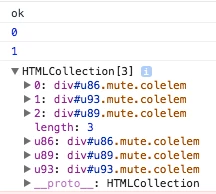
But I only get 0 and 1. The array.length is 2 while I expect 3.

If I print player_frames then I do see all 3 items.

What is happening?
    This topic has been closed for replies.

    2 replies

    sinious
    Legend
    December 16, 2015

    Which browser is this? Your code works perfectly fine for me:

    getElementsByClassName - JSFiddle

    Output in Chrome on Win7:

    Just a quick note, I ran it in an inline executed function (e.g. (function(){})()) to delay the execution so the DOM could build. The scripts from services are typically properly appended to the bottom of the <body> so HTML should exist but you might want to consider making sure your content is present before trying to work with it. From your screenshot however, it appears captured properly. And you didn't start off on the wrong index, you started properly at 0 not 1. So I'd be very curious what your browser is, or more importantly, if you have a bunch more code than this example that might be interfering with your results.

    esermons
    Community Manager
    Community Manager
    December 14, 2015

    I'm moving this discussion to Adobe's Coding Corner forums, where you may be able to find developer experts that can help you out with this code-specific question.

    -Emily