Inspiring
November 6, 2015
Answered

jQuery newbie is having some trouble with links and page redirection and page caching.

  • November 6, 2015
  • 1 reply
  • 2398 views

Hi all,

I have been attempting to update an older legacy multipage website (each page has html headers etc.), adding in jQuery Mobile. For the most part it is going well but I'm having some issues with links, page redirection and caching.

I am writing javascript like this...

<script>

--- do stuff - then ---

window.location.replace("page1.html");

</script>

and links like this


<a class="ui-btn  ui-btn-b tsize1" href="page2.html" rel="external">page 2</a>


CACHING ISSUES


On many pages – Like the ones I'm having problems with I have added no caching code like...

<head>

<META HTTP-EQUIV="Pragma" CONTENT="no-cache">

<META HTTP-EQUIV="Expires" CONTENT="-1">

... more....

<head>

Problem: as an example, I may go from Page 1 and click on a link to go to page 2, and page 2 has the "no cache" lines in the header. The problem is that a fresh edit of page 2 is not showing up even with the no cache Lines above and even if I hit refresh in the browser which I thought it was supposed to reload the page (get direct from site). Instead it seems to keep seeing the old content prior to the update.

In another case I might be on page21, And click a link which goes to Page22 and does some data base processing and then goes to page33. In this case, my fresh page22 updates are not showing up and showing just the older cache data.

Q: so what is the best way, At least while I am writing code, To force Page refreshing (no-cache), that I can see my updates all the time, Because otherwise it gets very confusing as I'm sure you know.

Thanks in advance– Dave

This topic has been closed for replies.
Correct answer sinious

Hi Dave,

Are you handy with your developer tools? That's always where I head when I need to peek inside something. Before getting anywhere further or elaborate, check the response code you're getting for the page request and see what the numeric code is. If it's 200, you're getting a new copy. If it's 304 then your browser is grabbing the same content or something in your UI is preserving the previously loaded document fragment.

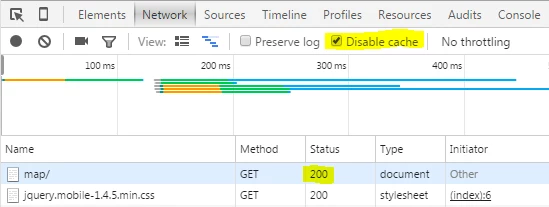
Pictures make it easy, here's Chrome grabbing a small page for the first time, and with disable cache enabled, and we get 200 status code:

If I keep refreshing it with "Disable cache" enabled then I continue to get GET/200, fresh copies.

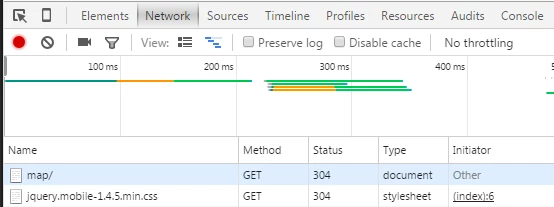
However, remove the "Disable cache" to speed things up and the server and client will negotiate and check if it even needs to send you the document (if it thinks it has changed), and if not, sure enough you will GET/304, or "loaded cache":

Each time I refresh I keep getting GET/304, hitting cache.

Make sure your requests are GET/200 if you expect them not to cache.

1 reply

revdaveAuthor
Inspiring
November 7, 2015

I could use some help with this - thanks

sinious
siniousCorrect answer
Legend
November 9, 2015

Hi Dave,

Are you handy with your developer tools? That's always where I head when I need to peek inside something. Before getting anywhere further or elaborate, check the response code you're getting for the page request and see what the numeric code is. If it's 200, you're getting a new copy. If it's 304 then your browser is grabbing the same content or something in your UI is preserving the previously loaded document fragment.

Pictures make it easy, here's Chrome grabbing a small page for the first time, and with disable cache enabled, and we get 200 status code:

If I keep refreshing it with "Disable cache" enabled then I continue to get GET/200, fresh copies.

However, remove the "Disable cache" to speed things up and the server and client will negotiate and check if it even needs to send you the document (if it thinks it has changed), and if not, sure enough you will GET/304, or "loaded cache":

Each time I refresh I keep getting GET/304, hitting cache.

Make sure your requests are GET/200 if you expect them not to cache.

revdaveAuthor
Inspiring
December 24, 2015

Thanks so much - this is super helpful info - I will try it now...

BTW: sorry for the delay getting back to you.

AND HAPPY HOLIDAYS!