
Participating Frequently
July 24, 2014
Answered

503 errors after ~3 months w/ CF10

  • July 24, 2014
  • 1 reply
  • 2726 views

Server is not responding about every other day now. The service states that it's running. Restarting fixes it temporarily.

My first thought was that this was a client variables issue, since the 90 day purge causes people a lot of problems. But I've confirmed that the codebase doesn't reference "clientmanagement". I moved client variable storage to a database anyway (nothing is getting populated there), and turned global updates off. It still hangs after doing this.

There's not much in the logs (there are no hs*.log files, and no exceptions in the regular CF logs), and so far Fusion Reactor has not pointed to any smoking guns. About the only thing I can find is in the isapi_redirect.log file (ColdFusion10/config/wsconfig/1/):

[Wed Jul 23 18:44:05.215 2014] [13144:10964] [info] ajp_process_callback::jk_ajp_common.c (2066): current reuse count is 118 of max reuse connection 250 and total endpoint count 500

[Wed Jul 23 18:44:05.217 2014] [13144:6856] [info] ajp_process_callback::jk_ajp_common.c (2066): current reuse count is 119 of max reuse connection 250 and total endpoint count 500

[Wed Jul 23 19:48:52.294 2014] [13144:6344] [info] jk_open_socket::jk_connect.c (626): connect to 127.0.0.1:8012 failed (errno=61)

[Wed Jul 23 19:48:52.295 2014] [13144:6344] [info] ajp_connect_to_endpoint::jk_ajp_common.c (1047): Failed opening socket to (127.0.0.1:8012) (errno=61)

[Wed Jul 23 19:48:52.299 2014] [13144:6344] [error] ajp_send_request::jk_ajp_common.c (1669): (cfusion) connecting to backend failed. Tomcat is probably not started or is listening on the wrong port (errno=61)

[Wed Jul 23 19:48:52.301 2014] [13144:6344] [info] ajp_service::jk_ajp_common.c (2692): (cfusion) sending request to tomcat failed (recoverable), because of error during request sending (attempt=1)

[Wed Jul 23 19:48:53.402 2014] [13144:6344] [info] jk_open_socket::jk_connect.c (626): connect to 127.0.0.1:8012 failed (errno=61)

[Wed Jul 23 19:48:53.406 2014] [13144:6344] [info] ajp_connect_to_endpoint::jk_ajp_common.c (1047): Failed opening socket to (127.0.0.1:8012) (errno=61)

This leads me to believe the problem may be either with the IIS Connector, or with Tomcat itself, but I'm not sure where to go from here, if that's the case. We ran all the CF10 updates through update 12, and didn't initially redo the IIS Connector through wsconfig.exe, and restart IIS, but did about a month or so ago.

We also adjusted the JVM settings a bit:

-XX:MaxPermSize=192m --> 256m


and set the min and max JVM heap size to 2048 (from 1024). We have 6GB of RAM on the dedicated server.


Here's the JVM memory usage from the hour of the crash (green dots at the bottom indicate the server restart)
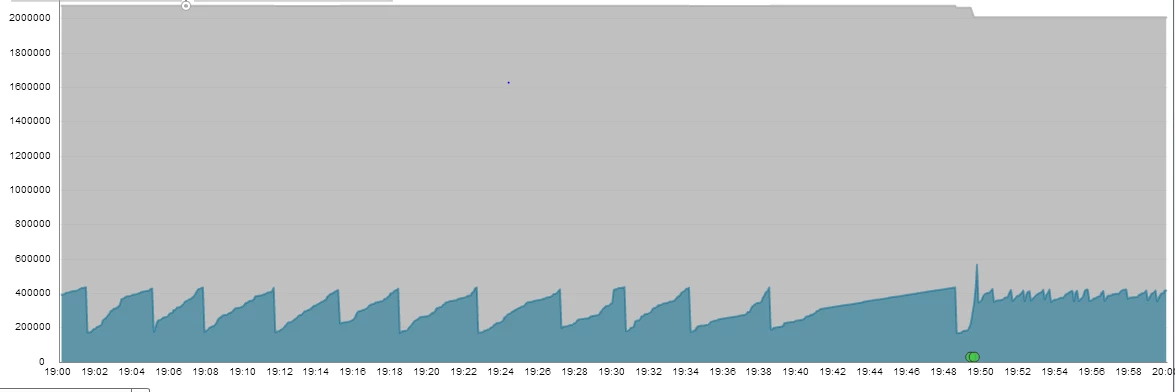
The ramp up without any garbage collection is the same thing we saw the last time the server crashed as well. I have the Fusion Analytics logs from the latest crash, if anybody would like to see a specific chart.

Any suggestions would be greatly appreciated. Thanks.

This topic has been closed for replies.
Correct answer carl type3

hi,

From isapi log errors would appear tomcat at the CF end is not responding to the iis tomcat connector. Likely you need to make some adjustments or tune values to server.xml in cfusion\runtime\conf.

What values? This CF11 blog entry may help since the details also apply to CF10.

http://blogs.coldfusion.com/post.cfm/coldfusion-11-iis-connector-tuning

Keep in mind when making adjustments to server.xml matching changes need to be applied to workers.properties in config\wsconfig\N.

You could also do some monitoring with free jdk tools like jconsole to help know what tuning values would suit the type of load best. Java and tomcat monitoring tho is time and effort so reply  on thread if you want to know more about how to do monitoring.

HTH, Carl.

1 reply

carl type3Correct answer
Legend
July 25, 2014

hi,

From isapi log errors would appear tomcat at the CF end is not responding to the iis tomcat connector. Likely you need to make some adjustments or tune values to server.xml in cfusion\runtime\conf.

What values? This CF11 blog entry may help since the details also apply to CF10.

http://blogs.coldfusion.com/post.cfm/coldfusion-11-iis-connector-tuning

Keep in mind when making adjustments to server.xml matching changes need to be applied to workers.properties in config\wsconfig\N.

You could also do some monitoring with free jdk tools like jconsole to help know what tuning values would suit the type of load best. Java and tomcat monitoring tho is time and effort so reply  on thread if you want to know more about how to do monitoring.

HTH, Carl.

Participating Frequently
July 25, 2014

Carl,

Thanks for the info. That's actually the last thing I adjusted yesterday - making the server.xml file match workers.properties, so I'm glad to see you suggesting doing the same. The Connector node didn't have the maxThreads nor connectionTimeout attribute, so maybe that's the issue. We also did a planned server restart last night, as I had read that this is sometimes the only way to get IIS Connector changes to stick.

One thing I did notice is that the Executor node values are different as well:

<Executor name="tomcatThreadPool" minSpareThreads="4" maxThreads="65" namePrefix="catalina-exec-"></Executor>


  Should maxThreads be the same as on Connector?

> reply  on thread if you want to know more about how to do monitoring.


  I'd definitely like to use JConsole for tuning, especially if my last changes don't help. Any advice you can give me about this would be greatly appreciated.

Thanks,

Dave

Anit_Kumar
Inspiring
July 25, 2014

Just, as a caution, make sure that the AJP entry in server.xml should look like

<Connector port="8012" protocol="AJP/1.3" redirectPort="8445" tomcatAuthentication="false" maxThreads="500" connectionTimeout ="60000"> </Connector>

vertizonal wrote:

<Executor name="tomcatThreadPool" minSpareThreads="4" maxThreads="65" namePrefix="catalina-exec-"></Executor>


  Should maxThreads be the same as on Connector?

Thanks,

Dave

Also, the maxThreads value is equivalent to the connection_pool_size in the worker.properties.

Regards,

Anit Kumar