A0018207 Error
Not sure what's going on here, but wanted to get down a preliminary discussion before I try any remedies. I will keep this updated with my findings.
Problem:
Closed out Adobe ColdFusion Builder last evening - no issues. Shut down my computer for the evening, again, without any noted discrepancies with "the norm." When attempting to launch CF Builder this morning, I'm receiving a small pop-up error message for a program named "A0018207" which states: "The A0018207 executable launcher was unable to locate its companion shared library."
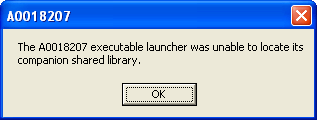
As I stated, preliminary at this point. I've not clicked the only button ("OK") yet. I've searched Google with nothing worthwhile coming up for "ColdFusion A0018207" or "Eclipse A0018207." In a search of the Adobe forums, the only thing close that I can find is http://forums.adobe.com/message/2190302 which discusses another "executable launcher" problem, but with Gumbo under Adobe's Flash Builder.
A search for the executable "a0018207.exe" has turned up only one candidate (exact match on the name) but it is located in a directory under a restore point within the System Volume Information (C:\System Volume Information\_restore-{AABE6867-4DB1-B0CE-2B8D1192C931}\RP71). Curiously though, Windows has decided to display the file's icon as the blue-box Adobe ColdFusion icon.

Intersting note - when trying to find the version of CF Builder I am running to place in my "Setup" information below, I brought up CFBuilder.ini in the root install directory for CF Builder. It reads:
-startup
plugins\org.eclipse.equinox.launcher_1.0.101.R34x_v20081125.jar
--launcher.library
plugins\org.eclipse.equinox.launcher.win32.win32.x86_1.0.101.R34x_v20080731
-vmargs
-Xmx512m
-Xms128m
-XX:MaxPermSize=256m
-XX:PermSize=64m
-Djava.net.preferIPv4Stack=true
-Duser.language=en
-Duser.country=US
I wonder if this is the "launcher" in question. I'll have to do some looking into Eclipse too, I guess.
Plan:
Click OK. I know, sounds stupid - but I like to know what I'm getting in to - not sure with this one. If I can't load CF Builder or if it comes up, but things aren't working as they were then I'll try a reinstall of CF Builder and see what happens.
Setup:
Microsoft Windows XP Professional x64 Edition Version 2003 w/ SP2
AMD Athlon 64 x2 Dual Core Processor 6000+ 3.00GHz
4GB RAM
 AdChoices