
Participating Frequently
March 22, 2010
Answered

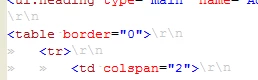
Accidently showed hidden characters \r\n, can't work out how to hide again

  • March 22, 2010
  • 3 replies
  • 3927 views

Accidently showed hidden characters \r\n, can't work out how to hide again

I can't figure this out

It's not hidden characters, or whitespace characters (I've hidden both in the editor preferences).

Anyone know how to re hide these things?
This topic has been closed for replies.
Correct answer MaryJo

Oh yeah, I had this happen accidentally as well. Try Ctrl-. to toggle it off (period character on the keyboard)

3 replies

Participant
September 15, 2016

For this just press (Ctrl + >) for windows.

benalembick
Known Participant
March 23, 2010

:-)

Absolute GENIUS, i had searched everywhere for this and everything pointed towards the whitespace stuff but that just duplicated my problem (literally over the top but darker - maybe a bug).

For those on Mac OSX it is "CMD" + "-" + "." (command, dash & fullstop)

Thanks for this

PS to replicate the dupliacted characters do the following - command (or ctrl on PC), dash & fullstop to turn on the light grey characters then go to Preferences > general > Editors > Text Editors > check the box - show whitespace characters > click apply and you code should now look messy.

I have reported as a bug http://cfbugs.adobe.com/bugreport/flexbugui/cfbugtracker/main.html#bugId=82485

Adam_Tuttle
Participating Frequently
March 23, 2010

The dash is not necessary. Just Control or Command and the period key.

benalembick
Known Participant
March 23, 2010

I was so excited that it worked, I didn't realise :-)

Good Call,

Cheers

Ben

MaryJoCorrect answer
Inspiring
March 23, 2010

Oh yeah, I had this happen accidentally as well. Try Ctrl-. to toggle it off (period character on the keyboard)

Participating Frequently
March 23, 2010

Thank you I've been looking for that for a while