Is there a way to adjust the formatting settings used by the vsCode ColdFusion Builder extension?
I installed the extension mainly to try to take advantage of its code formatting options. Unfortunately the formatting does not seem to obey my vsCode preferences (tab indentation, equal to 2 spaces). It also does almost no formatting of html inside a cfoutput block (all html tags are stacked evenly).
Does anyone know if there’s a way to adjust the formatting settings? I would like to recommend this to our team of several developers, as a standard tool for formatting our files.
Mike, good news for you: the answer to your question is YES, you can control the formatting used for the “format document” feature, as used in the CFBuilder VSCode extension, when editing a cf file.
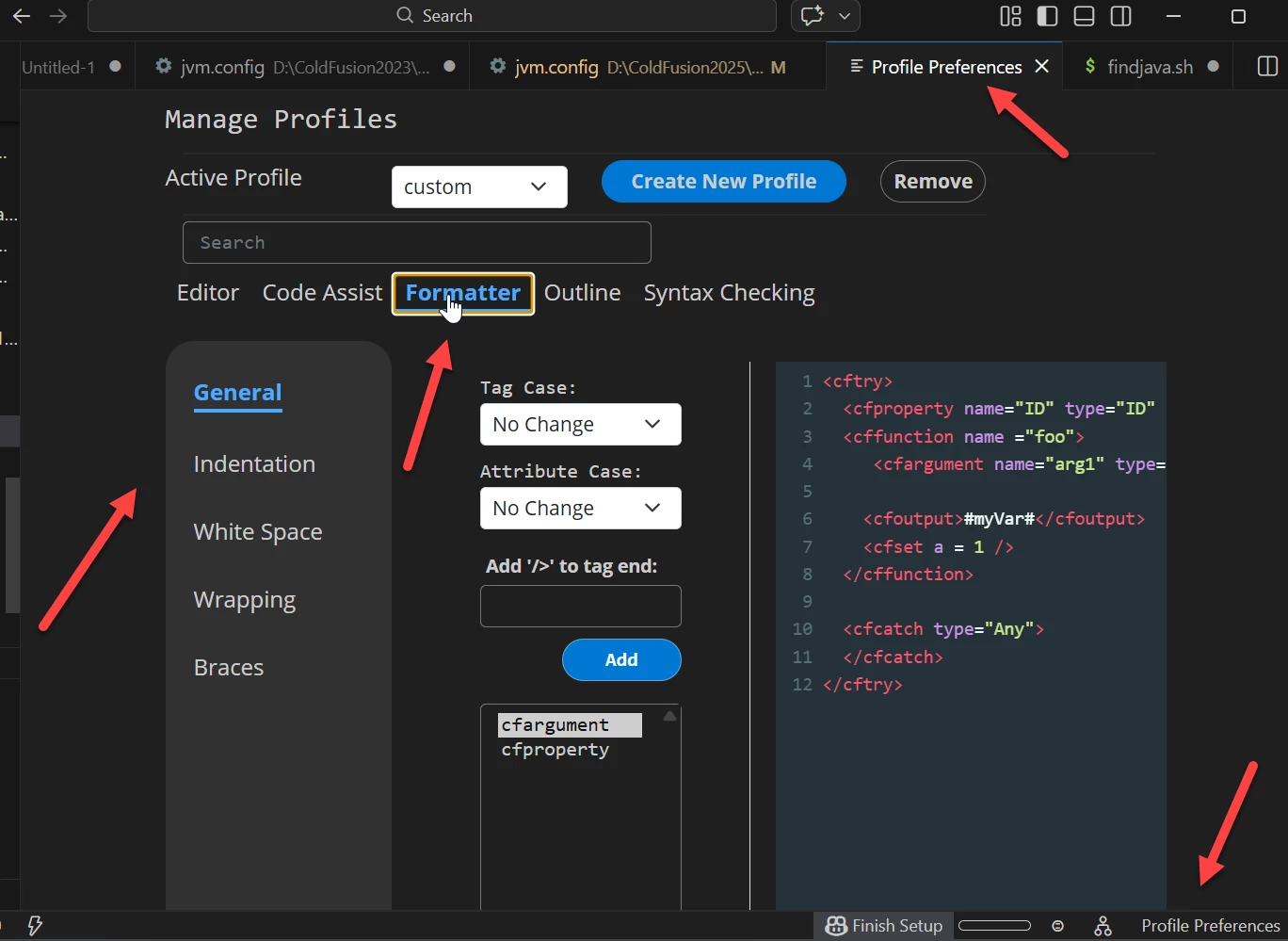
1 - First, let’s clarify that this is assuming that if you open a cfm file, you do see it indicated in VSCode as being a cf file--which can be judged by things like the cf logo in the tab for the file, but more important look at the bottom right of the screen: do you see the word “profile preferences”? Click that.
You ‘ll find that feature opens a number of configuration options including what you sought. See the tabs (below the ‘search” box) for controlling not just formatting but also code assist, outlining, syntax checking and more. Under formatter you can control over a dozen things, including indentation, whitespace within tags/functions, setting the case for tags/functions, wrapping, braces, and more. You can even create new profiles with different preferences.
I’ve attached a screenshot to the bottom here. I realize you may be excited to check it out. :-) I hope you’ll come back (or keep reading now) for just a few more thought related to your question.
1a - Note that this profile preferences feature (and the formatting, etc.) is indeed documented (though sadly with no screenshot) in a specific page on profile preferences within the larger CFB docs. Of course, with lots of docs many can’t find what they seek, but then many are unaware that CFB even has docs. (Just be careful not to miss if the top of the page warns that it’s docs about the OLD CFB which was based on Eclipse, which was often quite different.)
1b - FWIW, note that you can also launch that “profile preferences” from the VSCode command palette (again, assuming the CFBuilder extension is enabled) by searching simply for “profile preferences”. As some know f1 is a shortcut for the palette, so one can use f1 then type “profile preferences”, just like to quickly format a document one can use f1 then type “format document” (and if you had just done it, it would be pre-selected to just hit enter to execute it).
2 - Finally no, you’re not alone in finding that some things about CFBuilder don’t work out of the box as you’d expect. Others face the same dilemma...and often it has to do with what editor folks have come from, regarding what their expectations will be.
Then lots of people using CFB (and even VSCode itself) don’t think to look around the UI, or they don’t leverage the palette.
Or they don’t know or or think to use the docs. Or they search online and might get pointed to docs about the OLD Eclipse-based CFBuilder. Or they get answers from folks online who only lament that CFB seems broken...because those people also suffer from the above. It can be a vicious cycle.
2a - You’ve done the right thing asking here. Even then sometimes you’ll get a correct answer or sometimes one that misses the mark. CFB on VSCode is still relatively new, and everyone’s still grokking it. :-)
And the community has been pretty slow to adopt it. You mentioned using other CFML extensions for VSCode--that is what many had done before CFB came out, and many STILL do despite it having come out.
And then some may struggle with it and retreat to their comfy CFML extension (even if it may not have been updated for years). This is sadly just life with CFB these days. We do what we can to help spread the word and evangelize as well as solve problems. Sometimes it can feel like pushing rope: but keep on asking. Hope we can be here for you.
So, below is that screenshot. Does all this get you going? I realize something about it may still not suffice. In that case, then as BKBK offered you can reach out to Adobe to suggest a needed improvement.
Mike, good news for you: the answer to your question is YES, you can control the formatting used for the “format document” feature, as used in the CFBuilder VSCode extension, when editing a cf file.
1 - First, let’s clarify that this is assuming that if you open a cfm file, you do see it indicated in VSCode as being a cf file--which can be judged by things like the cf logo in the tab for the file, but more important look at the bottom right of the screen: do you see the word “profile preferences”? Click that.
You ‘ll find that feature opens a number of configuration options including what you sought. See the tabs (below the ‘search” box) for controlling not just formatting but also code assist, outlining, syntax checking and more. Under formatter you can control over a dozen things, including indentation, whitespace within tags/functions, setting the case for tags/functions, wrapping, braces, and more. You can even create new profiles with different preferences.
I’ve attached a screenshot to the bottom here. I realize you may be excited to check it out. :-) I hope you’ll come back (or keep reading now) for just a few more thought related to your question.
1a - Note that this profile preferences feature (and the formatting, etc.) is indeed documented (though sadly with no screenshot) in a specific page on profile preferences within the larger CFB docs. Of course, with lots of docs many can’t find what they seek, but then many are unaware that CFB even has docs. (Just be careful not to miss if the top of the page warns that it’s docs about the OLD CFB which was based on Eclipse, which was often quite different.)
1b - FWIW, note that you can also launch that “profile preferences” from the VSCode command palette (again, assuming the CFBuilder extension is enabled) by searching simply for “profile preferences”. As some know f1 is a shortcut for the palette, so one can use f1 then type “profile preferences”, just like to quickly format a document one can use f1 then type “format document” (and if you had just done it, it would be pre-selected to just hit enter to execute it).
2 - Finally no, you’re not alone in finding that some things about CFBuilder don’t work out of the box as you’d expect. Others face the same dilemma...and often it has to do with what editor folks have come from, regarding what their expectations will be.
Then lots of people using CFB (and even VSCode itself) don’t think to look around the UI, or they don’t leverage the palette.
Or they don’t know or or think to use the docs. Or they search online and might get pointed to docs about the OLD Eclipse-based CFBuilder. Or they get answers from folks online who only lament that CFB seems broken...because those people also suffer from the above. It can be a vicious cycle.
2a - You’ve done the right thing asking here. Even then sometimes you’ll get a correct answer or sometimes one that misses the mark. CFB on VSCode is still relatively new, and everyone’s still grokking it. :-)
And the community has been pretty slow to adopt it. You mentioned using other CFML extensions for VSCode--that is what many had done before CFB came out, and many STILL do despite it having come out.
And then some may struggle with it and retreat to their comfy CFML extension (even if it may not have been updated for years). This is sadly just life with CFB these days. We do what we can to help spread the word and evangelize as well as solve problems. Sometimes it can feel like pushing rope: but keep on asking. Hope we can be here for you.
So, below is that screenshot. Does all this get you going? I realize something about it may still not suffice. In that case, then as BKBK offered you can reach out to Adobe to suggest a needed improvement.
Thanks Charlie! I have to admit I think I was told about the Profile Preferences during a session at the CF summit last year and I completely forgot. Then, like you said, I didn’t see the link for it, and I didn’t find it in the docs, AND I didn’t see it in the extension’s ‘about’ page in vsCode (that one’s not my fault - there’s no mention of it there).
Anyway - going to spend some time tinkering with this today, thanks again!
Edit: well, I got it to use tabs etc, but it’s still just stacking html and javascript.. :(
You could use Visual Studio Code’s own global settings to change the tab indentation. To do so: (1) Go to File >> Preferences >> Settings. That should show you the Settings. (2) In the Search field, type tab size. You should then see the Tab Size setting. The default tab-size value is 4. (3) Change the value to 2.
As for the various standard or recommended CFM formatting, such as tag indentation, you might be able to might be able to implement them in one go as follows: (1) Navigate to Settings as before. (2) Type coldfusion in the Search field. One of the settings you should see is Default Formatter. Its default value is None. (3) Click on the dropdown list and select Adobe ColdFusion Builder.
Let us know if these suggestions resolve the issues.
So I was talking mainly about the ability to format an entire document, or a selected batch of code (via right-click > format document, for example), not the indentation settings themselves.
When using the vsCode ColdFusion Builder extension for that, it comes out, frankly, really bad. Maybe I have some settings screwed up and that’s what’s causing it to be so bad though, I don’t know. The extension itself doesn’t have many formatting settings exposed
There are other cfml formatter extensions available, and I think I’ve tried them all. My experience with them has been either A) they don’t work at all, or B) they work, but the formatting is terrible.
Hi @MikeWillisTMHNA , Sorry to hear that. If you’ve used the settings as expected, but the formatting remains bad, you should report a ColdFusion Builder Extension bug.




 AdChoices