

WolfShade
Legend
December 22, 2015
Answered

Another odd serializeArray() issue

  • December 22, 2015
  • 1 reply
  • 2166 views

Hello, all,

I'm working on a form that uses AJaX (jQuery) to submit the form data, after the fields have been serialized.

I've done this several times, and never had a problem.. until this.  I've compared this code to the code that is working elsewhere, and I'm just not seeing any differences that could cause my issue.

Here is some pseudo-code:

<form name="peopleSave" id="peopleSave" method="post">

    <input type="text" name="firstName" id="firstName" value="" />  First Name

    <br /><input type="text" name="lastName" id="lastName" value="" />  Last Name

    <br /><input type="button" name="submitBtn" id="submitBtn" value="Submit" class="sbmt" />

</form>

Here is actual code:

<script type="text/javascript" src="/scripts/jquery/jquery.min.js"></script>

<script type="text/javascript" src="/scripts/jquery/jquery-ui.js"></script>

<script type="text/javascript">

    function validateData(formObjId){

        var formObj = document.forms[formObjId],

        postURL = "/components/recs.cfc?method=updMuster",

        postData,

        contentType = "application/json";

        postData = $('#' + formObjId).serializeArray();

        $.ajax({

            type: "post",

            url: postURL,

            data: postData,

            contentType: contentType

            }).done(function(data){

                switch(data.length){

                    case 0:

                        $('#content div').html('Update Failed');

                    break;

                    default:

                        $('#content div').html(data);

                    break;

                    }

                });

        }

    $(document).ready(function(){

        $('.sbmt').on('click',function(e){

            validateData($(this).parent('form').attr('id'));// use ID of form as argument - it works.

            });

        });

</script>

Now, in the component (set for output just for debugging), all I'm doing is "cfdump var='#form#'" which returns an empty struct.  Nothing.  Form exists with a structcount of 0 (zero).

I can see in FireBug that the data is being posted.  The form _is_ sending the data - but the component isn't seeing any data, just an empty form.

This is working on three other forms on another project.  Why is this _not_ working, here?

V/r,

^_^
    This topic has been closed for replies.
    Correct answer Carl Von Stetten

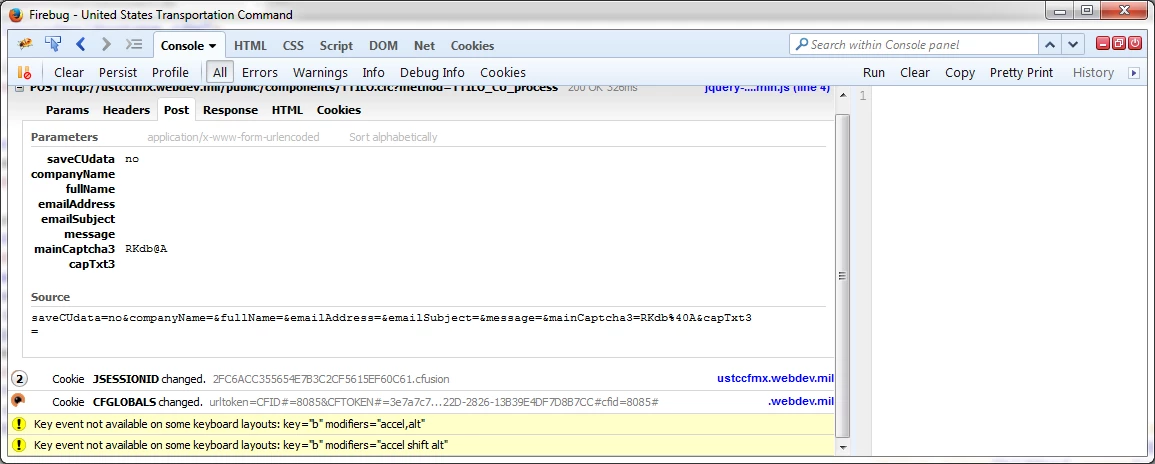
    I'm including two screenshots of FireBug, here, hoping that someone might be able to identify what is going wrong.

    The first one is of the POST data captured from a form submit (using the same code) that is successful.

    Next is a screencap of what is POSTed from the project that is giving me this issue.  I'm not sure what is going on, here, but it seems pretty obvious that (despite being the same code) this isn't the same process.

    So the working form is including "Parameters" that the second form isn't.  Yet the code is the same.  Both are using the same version of jQuery (1.11.2).

    What could be causing this?

    V/r,

    ^_^


    In my previous post, when I said the form data would appear in the ARGUMENTS scope, I didn't mean ARGUMENTS.form.  Each form input would land in the ARGUMENTS scope individually, so a form input named "input1" should result in an ARGUMENTS.input1 variable. Maybe this old Ben Nadel blog post will illustrate it better: Ask Ben: Building An AJAX, jQuery, And ColdFusion Powered Application

    I don't know if this is related to your problem, but I notice the screencap where it is working shows "application/x-www-form-urlencoded" alongside the Parameters heading, while the broken screencap doesn't. Is there something different in the form tag definition between the working and non-working pages?  How about comparing the headers?

    -Carl V.

    1 reply

    Carl Von Stetten
    Legend
    December 22, 2015

    I haven't worked with jQuery's serializeArray() in a while, but does it actually send a normal form post payload, or does it send a JSON packet?

    WolfShade
    WolfShadeAuthor
    Legend
    December 22, 2015

    Hi, Carl Von Stetten‌,

    According to the jQuery Docs:

    The .serializeArray() method creates a JavaScript array

    of objects, ready to be encoded as a JSON string. It operates

    on a jQuery collection of forms and/or form controls.

    The thing that is really confounding me is that it works on one project, but not on this project, and they are both on the same dev server, so it's not the environment that is killing it.

    V/r,

    ^_^

    Carl Von Stetten
    Legend
    December 22, 2015

    I read those docs.  What isn't clear to me is whether that is transmitted to your server side code as a typical form post or as a JSON packet that you then have to deserialize.  If the latter, than I would not expect to see the form inputs/values end up as ColdFusion form scope variables.  In your other projects, is the .serializeArray() resulting in a typical form post on the server?

    It also looks like jQuery's serialize() method will build a typical URL query string (variable1=value1&variable2=value2).  Would that work?

    -Carl V.