
July 14, 2010
Question

Can't get into CF admin after upgrade to 9.0.1
  • July 14, 2010
  • 7 replies
  • 8210 views

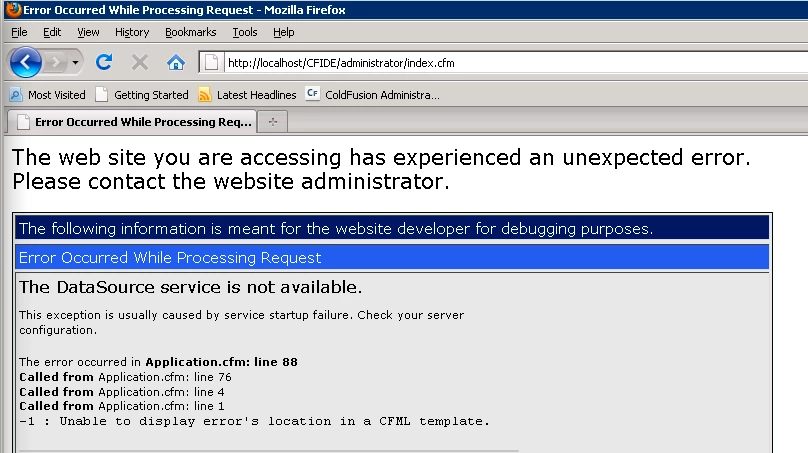
I upgraded a few of our dev and staging servers from 9.0 to the latest 9.0.1 update. For the most part everything went fine except on a couple servers, I can't get into the CF admin. It's giving the above error saying the datasource is not available.

Has anyone come across this or have any idea how to fix this issue? Is there an easy way to uninstall the update besides uninstalling/reinstalling CF?

Thanks for any help.

    This topic has been closed for replies.

    7 replies

    Inspiring
    August 2, 2010

    After working with Adobe, I was able to resolve this problem. It seems there is a conflict between the CF 9 Hot Fix 1 and the Updater for some systems. I was able to resolve the problem by performing the following:

    1. Stop ColdFusion Server
    2. In [CF Root]/lib/updates rename the shf9000001.jar file to shf9000001.jar.bak
    3. Restart ColdFusion Server

    Adobe mentioned that the Hot Fix 1 updates are included in the 9.0.1 Updater. Thus, there should not be a problem removing the hot fix.

    This restored my administrator and I did not receive any errors upon ColdFusion startup.

    Hope this helps!

    Inspiring
    August 2, 2010

    Thank you cmschofield. This solved the problem on my system.

    Participant
    July 15, 2010

    This is how I was able to fix the problem on my system, which is comprised of a Windows 2003 Server, all sites operating under IIS 6.  Basically, I rebuilt the connectors from scratch, and everything came up the way it was supposed to, including Administrator (which had not worked after the first time I ran the 9.0.1 update).

    1. Ran the Web Server Configuration Tool (found in All Programs > Adobe > ColdFusion 9)
    2. Clicked on the one entry I had in 'Configured Web Servers', highlighting it, then clicked [ Remove ]
    3. Clicked [ Exit ]
    4. Restarted the IIS web service from Services, letting it update the changes.
    5. Ran Web Server Configurator Tool again, clicking [ Add... ] this time.
    6. (optional) Checked the box for 'Configure web server for ColdFusion 9 applications'

      Looking like this so far:


    7. Clicked [ OK ], receiving the dialog box regarding restarting the web server. Clicked [ Yes ], of course.  You can now [ Exit ] from the tool.
    8. And since I didn't trust the tool to restart services, I went ahead and restarted the Word Wide Web Publishing Service manually.

    Waited a few seconds, and Administrator popped right back up.  I think Adobe should probably list this as a step to do after each update.

    Known Participant
    July 16, 2010

    Tried this process on my Windows 7 desktop with IIS 7 and it had no affect. Still white pages.

    Like they said, doesn't someone from Adobe care that this update is NFG?

    Participant
    July 15, 2010

    Same issue here on Mac OSX.

    After the upgrade, when the server starts, there is an error in the cfserver.log : "Unable to initialize SQL service" and I cannot connect to any applications.

    Hopefully, I could revert back to ColdFusion 9.0 thanks to TimeMachine...

    Participant
    July 14, 2010

    I could make it happens only apply CF901 on fresh installed copy CF9..... not sure if that is the right way to do that, but definitely something wrong with CF901.

    July 14, 2010

    You mean you could do it to a copy of CF9 that you just installed but a copy of CF9 that has been around for a bit fails?  It should work either way.

    Participant
    July 14, 2010

    I agree it should, but it doesnt for some reason.......I have tried different scenarios and it was failed, even if rollback as it described in http://www.adobe.com/support/documentation/en/coldfusion/901/cf901install.pdf

    July 14, 2010

    Im not getting this exact error but not able to login to my CF admin page.  Its just a blank white page.  I can read cfm pages on some of my other IIS7 instances.  I also tried rollign back the 9.0.1 patch but its still hosed.

    Windows 2008R2 standard

    64 bit

    ColdFusion 9 enterprise

    July 14, 2010

    Installed again on another installation and now getting the 'Datasource service is not available'.  I think im skipping this update as im 0 for 2, wasted plenty of time and just sick of this.

    I never used to have patch or update problems in the Allaire/Macromedia days.

    July 14, 2010

    Yeah, I just downgraded one of our boxes successfully. Only a couple more to go...such a pain. It looks like there are quite a few people that are having some major problems with this update.

    Participant
    July 14, 2010

    I have exact the same problem. OS Win 2008 Standard / 64 Bit.

    I have tried roll back updates as per suggestions (http://www.adobe.com/support/documentation/en/coldfusion/901/cf901install.pdf), but it doesnt work, the same error.

    Any suggestions are welcome

    Thanks

    Inspiring
    July 14, 2010

    Same thing here. ColdFusion Developer version on local Win XP box is OK, but ColdFusion Standard on Windows Server 2003 gets this error.