
Participant
December 4, 2019
Answered

cannot update fresh install of coldfusion 2018 (no update and install button??)

  • December 4, 2019
  • 2 replies
  • 4142 views

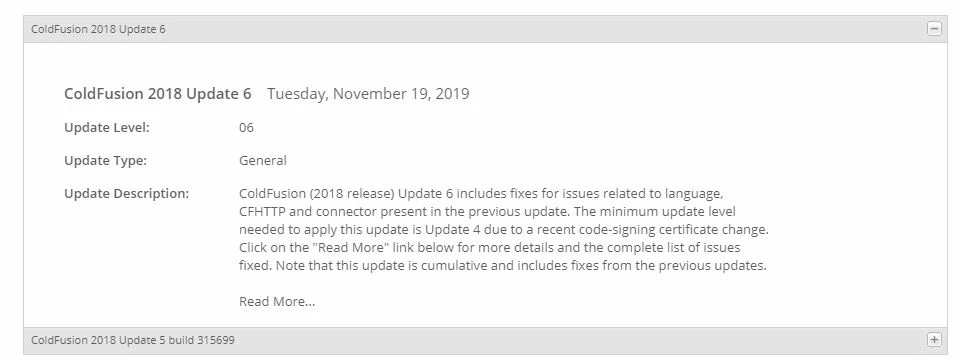
In ColdFusion2018 administrator, on the server updates page, the available updates are listed but there is no "download" or "download and install" button to click (on any of the available updates).
This topic has been closed for replies.
Correct answer carl type3

Hello,


Do you mean like this:


Click onto text press tab button twice.


HTH, Carl.

2 replies

AlHolden
Inspiring
May 30, 2020

Thank heavens I found this post.

"The next update will fix the ability to update". What a paradox, like "we don't want to loose the combination, so we keep it locked in the safe".

It's six months later, and the version they're shipping on the Download page still hides the button.


Anyway, thanks again!

Al

Inspiring
August 1, 2020

Annoying.. 


These UI issues are completely annoying..   

Charlie Arehart
Community Expert
Community Expert
August 2, 2020

FWIW, the issue you are reporting (of being unable to easily see the 2 available updates below the current one, and of the positioning of that popup window showing the state of the current update) are actually different ones than first mentioned above. I know that's of little consolation, but I wanted to clarify, for readers.


What was first brought up (in early Dec 2019) was that folks couldn't see within the update UI the buttons to download or install the update. It was THAT which was fixed by the update that came out just a week later (update 7 in CF2018).


As for the one you've raised, I'm not aware if anyone has filed a bug report for it. You could, at tracker.adobe.com (and if it's deemed a duplicate, Adobe will report back).


FWIW, folks frustrated by these things don't HAVE to use the CF Admin UI to do the updates. You can opt instead to run the update jar via Java (such as from the command line), which opens a more traditional installer (like is used to install CF itself). This is discussed in the technote for each update, in its section, "Installing the update manually".


But of course, the Admin UI SHOULD work as expected, and like I said in a previous comment, it would be SO MUCH BETTER if Adobe would create a new installer for CF2018 (and 2016) that included not only the latest updates but especially to get us past the problems of the June 2019 update (that currently must be done first) and the critical need to update the web server connector (from March 2020). 

/Charlie (troubleshooter, carehart. org)
carl type3Correct answer
Legend
December 4, 2019

Hello,


Do you mean like this:


Click onto text press tab button twice.


HTH, Carl.

jbngAuthor
Participant
December 4, 2019

Thanks, Carl.