Inspiring
December 17, 2014
Answered

cf 11 install location

  • December 17, 2014
  • 1 reply
  • 4894 views

Hi,

I am trying to locate information on where Cold Fusion 11 should be installed.

Currently, CF 9 is installed on the C drive where IIS is and there are no issues.

I have replaced CF 9 with CF 11, but I have installed CF 11 on the D drive and having issues.

Should CF 11 be installed at the default location on the C drive?

Thanks,

Mike

    This topic has been closed for replies.
    Correct answer userCold9

    The problem is with your IIS configuration, as per the error in command prompt. Moreover, you have two connectors - one to "BUS" and the other to "All" sites including "BUS". Thus there is redundancy. Here is what you need to do:-

    1. Remove both the connectors one by one.
    2. Ensure that there are no handlers for cfm, cfml, cfr, cfswf, cfc (look both at Server and website level).
    3. Restart IIS, to be on the safer side.
    4. Create a connector with "BUS" site only.
    5. If it still shows the error in the command prompt, as it shows now in the screenshot, then the problem is with IIS configuration.
    6. Then, check the permission at C:\Windows\System32\inetsrv\config\ or reinstall IIS.

    Regards,

    Anit Kumar


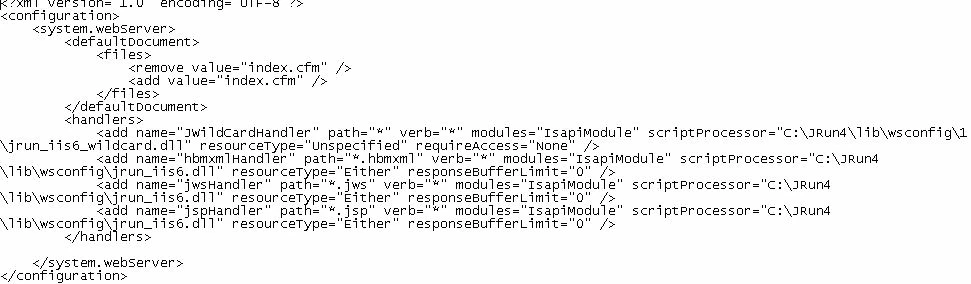
    I noticed in the web.confif file for the website the following:

    I would think the wsconfig tool would change the entries.

    Also below is the complete information in the web.config file:

    1 reply

    Inspiring
    December 17, 2014

    Coldfusion can be installed where ever you like (within reason). The issue you are having is probably related some something a lot different.

    What are the issues you are having? Did you uninstall CF9 or just install CF11. Is it possible still are both running together?

    userCold9Author
    Inspiring
    December 17, 2014

    CF 9 has been uninstalled.

    With CF 11 when the page initially loads the image appears. But when the page is refreshed the image disappears (there is a red x in place of the image).

    I have applied all the latest updates for CF 11.

    Mike

    Anit_Kumar
    Inspiring
    December 17, 2014

    Sounds like a connector issue. Can you recreate the connector (launching the tool as Administrator) and test the site?

    Regards,

    Anit Kumar