


Inspiring
November 22, 2025
Answered

CF 2025 Installation Error - Windows 2025

  • November 22, 2025
  • 2 replies
  • 617 views

Hi,


I am getting the following error message as I try to install the Trial version of ColdFusion 2025 GUI WWEJ Win64 on a Windows Server 2025 (VMware) :


"This application has Unexpecedly Quit  Invocation of this Java Application has cause an Invocation TargetException. This application will now exi (LAX)."


- The server already has CF2021 installed and I am trying to install CF2025 as a distinct installation.

- I have also installed JDK 25 as I thought it was a pre-requisite to have JDK 17 or higher installed but I still get the same error.

- I have disabled the Anti-virus hoping that it may help - still get same error message


Below are the details regarding the erro message I get:
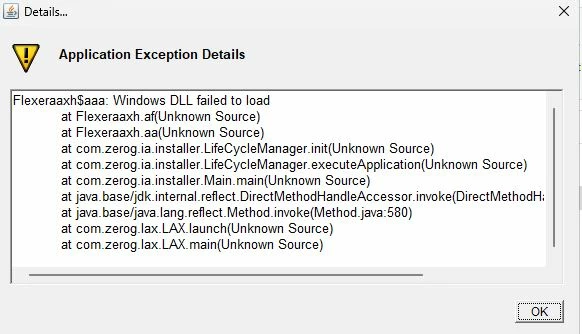
 

I tried creating a "Package" from the Admin Console (FRL Online) but the zip file I get doesn't get me anywhere... I get a successfull Installation message but CF2025 is nowhere to be found. 


Installation sure have changed since I installed CF2021!! ... and not necessarily for the better!


I am clueless and any help would be much appreciated.


Thanks,

Claude

    Correct answer Charlie Arehart

    Claude (and future readers), this error happens every time a new Windows version comes out. Expanding on what bkbk had told you, the issue is not technically whether cf itself can run on the new OS, Windows 2025 in this case. Instead it's solely about the underlying installanywhere software that Adobe uses for the cf installer, and the fact that IT is an old installer (from early 2025) that didn't then yet support Windows 2025.


    Some good news is that (If past experience is a guide) we can expect that in coming months (perhaps even weeks) they'll come out with a "refreshed installer" for cf2025 which WILL support windows 2025 (because it will be built using the new installanywhere software which will include windows 2025 support). They often do that late in the year the new OS comes out, or early the next year


    BTW, the cf installation always includes a built-in Java which IS the version that that CF currently supports, which as bkbk notes is currently Java 21 for cf2025.


    And FWIW, sometimes the refreshed installer also includes a new Java version (like Java 25, the current latest Oracle LTS version). And sometimes they include SUPPORT for the newer Java version by way of a cf UPDATE, for those who have already installed CF. 


    But if they don't do that refreshed installer, they would almost certainly use that Java 25 version for the next cf version, due to be CF2026. (No telling how many months away that will be.)


    Hope that's helpful, again perhaps more for future readers who may find the error message you offered here. 

    2 replies

    Charlie Arehart
    Community Expert
    Charlie ArehartCommunity ExpertCorrect answer
    Community Expert
    November 22, 2025

    Claude (and future readers), this error happens every time a new Windows version comes out. Expanding on what bkbk had told you, the issue is not technically whether cf itself can run on the new OS, Windows 2025 in this case. Instead it's solely about the underlying installanywhere software that Adobe uses for the cf installer, and the fact that IT is an old installer (from early 2025) that didn't then yet support Windows 2025.


    Some good news is that (If past experience is a guide) we can expect that in coming months (perhaps even weeks) they'll come out with a "refreshed installer" for cf2025 which WILL support windows 2025 (because it will be built using the new installanywhere software which will include windows 2025 support). They often do that late in the year the new OS comes out, or early the next year


    BTW, the cf installation always includes a built-in Java which IS the version that that CF currently supports, which as bkbk notes is currently Java 21 for cf2025.


    And FWIW, sometimes the refreshed installer also includes a new Java version (like Java 25, the current latest Oracle LTS version). And sometimes they include SUPPORT for the newer Java version by way of a cf UPDATE, for those who have already installed CF. 


    But if they don't do that refreshed installer, they would almost certainly use that Java 25 version for the next cf version, due to be CF2026. (No telling how many months away that will be.)


    Hope that's helpful, again perhaps more for future readers who may find the error message you offered here. 

    /Charlie (troubleshooter, carehart. org)
    cld007Author
    Inspiring
    November 23, 2025
    Thank you so much Charlie for all these clarifications. It all makes sense now...
    Charlie Arehart
    Community Expert
    Community Expert
    November 23, 2025

    Thanks, and glad to have helped. It's such a common problem...but only comes up every couple of years. 🙂 Indeed, if you want to help others find it more readily, you could mark it as an answer.


    In that case, it would show as an ADDITIONAL answer rather than replacing the one from bkbk, which was marked (by you or him) this morning as an answer. Just saying (for you and others reading these forums) that it's OK to have multiple responses marked as an answer. 🙂 

    /Charlie (troubleshooter, carehart. org)
    BKBK
    Community Expert
    Community Expert
    November 22, 2025

    The ColdFusion 2025 Support Matrix says that Java 25 and Windows Server 2025 are not supported. For ColdFusion 2025 you should use instead Windows Server 2022, 2019 or 2016, and Java 21 (of which you can download the latest version from the ColdFusion downloads page).

    cld007Author
    Inspiring
    November 22, 2025
    Hello BKBK,

    And I thought I was being pro-active by installing CF2025 on the latest platform!!!

    I should have known better!

    Thanks a bunch!

    Claude
    BKBK
    Community Expert
    Community Expert
    November 22, 2025

    My pleasure, Claude.

    Happy coding!