
Inspiring
May 12, 2019
Answered

CF Admin dysfunctional after changing webroot

  • May 12, 2019
  • 2 replies
  • 952 views

Hi all,

After changing the "server.xml" to point to my new (built-in server) webroot and pointing the appropriate Resources to the CFIDE and WEB-INF folders, the CF 2018 Admin webpage becomes unusable.  The login page loads.  I am able to log in.  The buttons show up for a split second, but are then greyed out as the Search Bar becomes the only thing I can click and type in.  Typing something in the Search Bar and submitting it does nothing.  Clicking the X on the Search Bar does not close it and the other function buttons are unclickable.

I am using the same 'change webroot' method outlined for CF 2016, which works great on that version.  I fear that by using this method somehow messes up the new 2018 Admin interface.  Any help or ideas would be appreciated.  Below are the code in the "server.xml" file and a screenshot of the CF Admin page...

(yes, I installed CF on my 😧 drive...I like to keep things off of my Windows directory.  I am using Windows 10)

        <Context path="" docBase="E:/webroot" WorkDir="D:/ColdFusion2018/cfusion/runtime/conf/Catalina/localhost/tmp" >

          <Resources>

            <PreResources base="D:\ColdFusion2018\cfusion\wwwroot\CFIDE" className="org.apache.catalina.webresources.DirResourceSet" webAppMount="/CFIDE"/>

            <PreResources base="D:\ColdFusion2018\cfusion\wwwroot\WEB-INF" className="org.apache.catalina.webresources.DirResourceSet" webAppMount="/WEB-INF"/>

          </Resources>

        </Context>
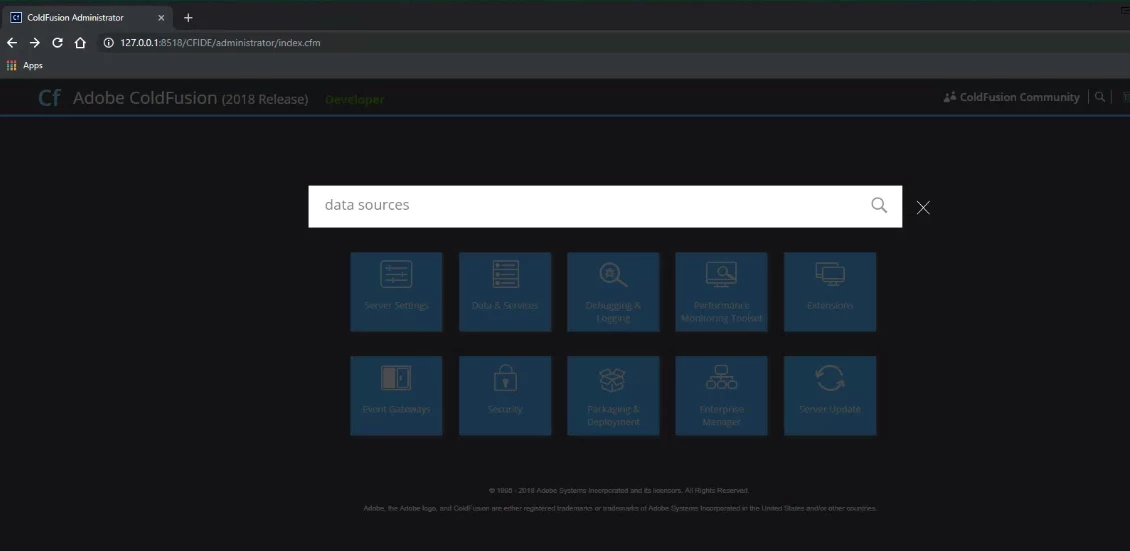
TIA

Zach

This topic has been closed for replies.
Correct answer yukonzach1

Charlie that worked.  Here is what is in my server.xml now (I also put the new 'restplay' in there):

        <Context path="" docBase="E:/webroot" WorkDir="D:/ColdFusion2018/cfusion/runtime/conf/Catalina/localhost/tmp" >

          <Resources>

            <PreResources base="D:\ColdFusion2018\cfusion\wwwroot\CFIDE" className="org.apache.catalina.webresources.DirResourceSet" webAppMount="/CFIDE"/>

            <PreResources base="D:\ColdFusion2018\cfusion\wwwroot\WEB-INF" className="org.apache.catalina.webresources.DirResourceSet" webAppMount="/WEB-INF"/>

            <PreResources base="D:\ColdFusion2018\cfusion\wwwroot\cf_scripts" className="org.apache.catalina.webresources.DirResourceSet" webAppMount="/cf_scripts"/>

            <PreResources base="D:\ColdFusion2018\cfusion\wwwroot\restplay" className="org.apache.catalina.webresources.DirResourceSet" webAppMount="/restplay"/>

          </Resources>

        </Context>

To answer your first question, yes, there is no reason to do this.  But for years I have partitioned my drives to keep content away from installs and installs away from Windows.  This also places the webroot in a convenient spot for me and (just like the old days of CF) keeps the CFIDE out of your actual webroot.  I realize this practice probably isn't needed anymore, but it just works for me anyway.

Thank you for your help!

Zach

2 replies

Vikram Kumar M
Community Manager
Community Manager
May 13, 2019

Hi Zach,

Let's try this:

Take a backup of neo-runtime.xml located at \ColdFusion2018\cfusion\lib and then open it in text editor.


Search for “CFFormScriptSrc” and make sure it's pointing to  /cf_scripts/scripts/.

Restart the ColdFusion service and try again.

Thanks,

Vikram 

Charlie Arehart
Community Expert
Community Expert
May 14, 2019

Vikram, can you consider and offer any thoughts on my response which preceded yours? 

/Charlie (troubleshooter, carehart. org)
Charlie Arehart
Community Expert
Community Expert
May 13, 2019

There's really no reason to make that change. Can you point to what docs tell you to? I think you'll find you can do whatever you want another way. Are you using a web server other than cf's? If not, why not?

Anyway,. If you insist on changing things this way, see if solve it by creating another preresouces line for cf_scripts, pointing to the folder of that name in the cfusion/wwwroot.let us know if that solves this.

/Charlie (troubleshooter, carehart. org)
yukonzach1AuthorCorrect answer
Inspiring
May 14, 2019

Charlie that worked.  Here is what is in my server.xml now (I also put the new 'restplay' in there):

        <Context path="" docBase="E:/webroot" WorkDir="D:/ColdFusion2018/cfusion/runtime/conf/Catalina/localhost/tmp" >

          <Resources>

            <PreResources base="D:\ColdFusion2018\cfusion\wwwroot\CFIDE" className="org.apache.catalina.webresources.DirResourceSet" webAppMount="/CFIDE"/>

            <PreResources base="D:\ColdFusion2018\cfusion\wwwroot\WEB-INF" className="org.apache.catalina.webresources.DirResourceSet" webAppMount="/WEB-INF"/>

            <PreResources base="D:\ColdFusion2018\cfusion\wwwroot\cf_scripts" className="org.apache.catalina.webresources.DirResourceSet" webAppMount="/cf_scripts"/>

            <PreResources base="D:\ColdFusion2018\cfusion\wwwroot\restplay" className="org.apache.catalina.webresources.DirResourceSet" webAppMount="/restplay"/>

          </Resources>

        </Context>

To answer your first question, yes, there is no reason to do this.  But for years I have partitioned my drives to keep content away from installs and installs away from Windows.  This also places the webroot in a convenient spot for me and (just like the old days of CF) keeps the CFIDE out of your actual webroot.  I realize this practice probably isn't needed anymore, but it just works for me anyway.

Thank you for your help!

Zach

BKBK
Community Expert
Community Expert
May 15, 2019

Hi yukonzach1​, please mark this as correctly answered.