Participant
November 24, 2015
Question

CF Builder 3 Not opening in Internal Browser

  • November 24, 2015
  • 2 replies
  • 351 views

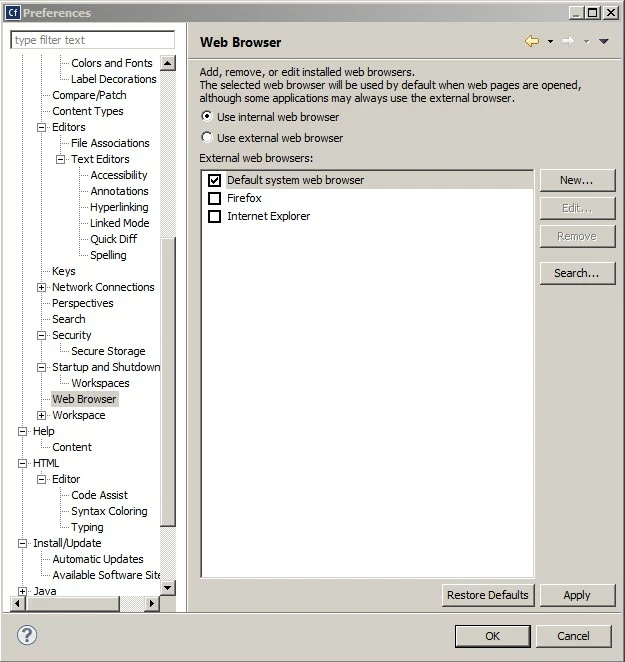
I have tried to get this to open within the internal browser and even with the settings, I can't remove the check mark for the default browser, not sure what I'm missing here.

This topic has been closed for replies.

2 replies

Carl Von Stetten
Legend
November 27, 2015

Well, it does say at the top of the dialog that some applications may always use the external browser.  Maybe that's the case here?  That looks like a setting for Eclipse, not necessarily the ColdFusion Builder plugin parts.  Have you tried exploring the Eclipse forums?

-Carl V.

Participant
November 27, 2015

So true - I will try it on another install and see what happens. Thank you sir for noticing the post.

Carl Von Stetten
Legend
November 27, 2015

I don't think the checkbox matters until you change the radio button above it from "Use internal web browser" to "Use external web browser". Otherwise the checkbox settings are igonored.

-Carl V.

Participant
November 27, 2015

Hello

After spending a load of time on the phone and a remote connection with Adobe, still no solution. I have checked and unchecked. It opens in my default browser per my computer. Still stumped. And Adobe support has been silent.