CF Builder B2 Remote Server Configuration
Hello,
I'm trying to setup a remote server under CF Builder B2 per http://help.adobe.com/en_US/ColdFusionBuilder/Using/WS0ef8c004658c1089-38317734121cdfd5fd3-7fff.html. My intent is to setup remote debugging to a JBOSS 4.2.3 EAR deployment of CFUSION 9 instance (which is running fine).
I have a clean installation of Eclipse (Galileo 3.5.1 SR1) with a "plugin installation" of CF Builder B2.
RDS configuration for the remote server is tested and working fine (RDS configuration test function and access to remote services, file system and data sources are all succesful).
The problem is I'm not able to complete the server setup under the "Servers view" according to the referenced documentation. Specifically, when selecting the New -> Server option from the Servers view context menu, there is no "ColdFusion" option under the available server types. Per the instructions:
Specify the remote server settings in ColdFusion Builder
In the Servers view, do one of the following:
Right-click and select Add Server.
Click
 . Select ColdFusion and click OK in the Add Server dialog box.
The "Add Server" option is not available, but I suspect this is just an Eclipse version issue. In any case, this is what I see when selecting New -> Server:
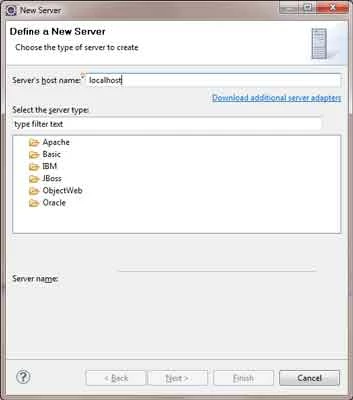
There is no option to add a "ColdFusion" server. Additionally, as soon as I replace "localhost" in the "Server's Host Name" field, all of the available servers disappear except "Basic -> HTTP Server".
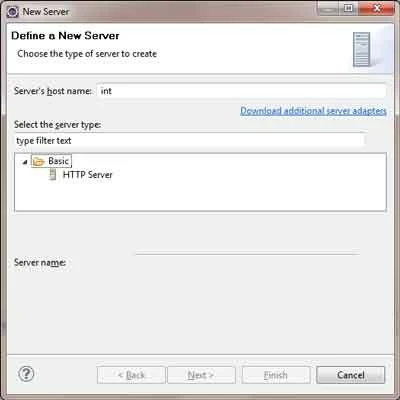
Am I missing step or doing something else wrong? Advice?
Thanks,
Dave
 AdChoices