Bk,
There are only three files in this test project and they are pictured here:
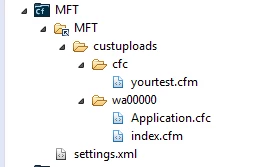
yourtest.cfm simply returns the current date time:
<cfoutput>Current Date Time Stamp: #now()#</cfoutput>
index.cfm contains a simple cfinclude:
<cfinclude template="/deptCFC/yourtest.cfm" >
Application.cfc is pretty simple straight forward with little code:
<cfcomponent displayname="ApplicationCFC" output="true" >
<cfscript>
this.name = "MyFireTouch_Mapping";
this.mappings['/deptCFC']=ExpandPath('../cfc/');
this.applicationTimeout = createTimeSpan(0,0,0,0);
this.sessionManagement = "false";
</cfscript>
<cfdump var="#this#">
<cffunction name="onApplicationStart" returntype="boolean" output="true">
<cfset application.dsn = "myfiretouchdb">
<cfset application.debugMode = 0>
<cfreturn true>
</cffunction>
<cffunction name="onRequestStart" returntype="boolean" output="false">
<cfargument name="thePage"type="string"required="true">
<cfif isDefined('url.reinit')>
<cfset onApplicationStart()>
</cfif>
<cfreturn true>
</cffunction>
</component>
The applicaiton will reinitialize upon starting everytime so no need to change the name, but i have tried that part too.
This is all the code there is, and it returns an error stating if cannot locate /deptCFC/yourtest.cfm but the dump of the mappings shows a full path to the correct directory:
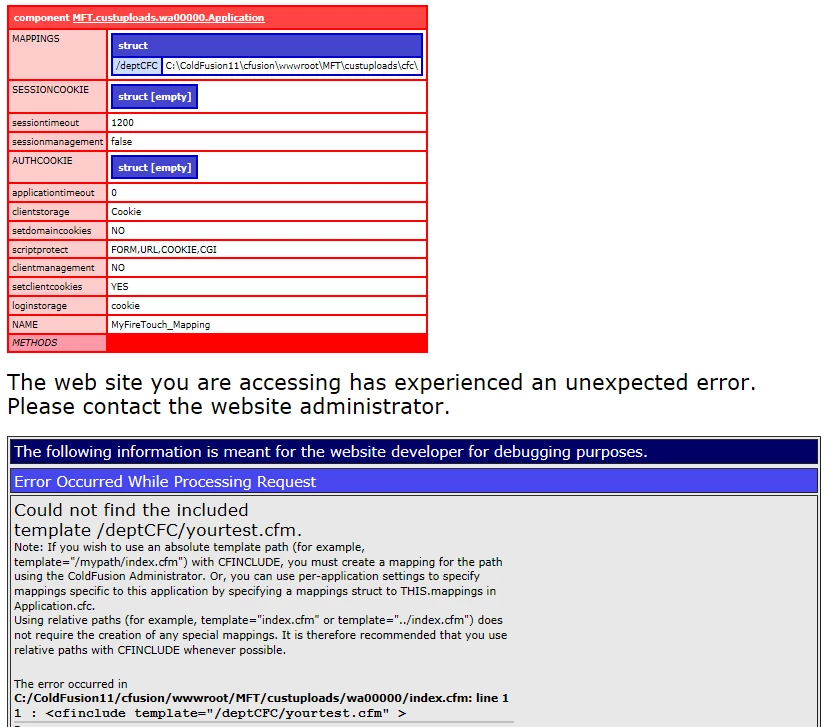
It just might be that the application falters or fails. Seeing the 0 timeout confirmed my instincts.
So, let's rule one thing out, and at least avoid complications: give the application a non-zero timeout. For example, this.applicationTimeout = createTimeSpan(1,0,0,0);
P.S.: As a rule, the Application file should not be used for display. Hence, delete the cfdump.




 AdChoices