Inspiring
December 20, 2022
Answered

CF Update 5 Error

  • December 20, 2022
  • 2 replies
  • 1162 views

I installed CF2021 Update 5 and im getting errors in my administrator in the "Server Setting Summary" and the "Updates" page.  Can i back out a hotfix manually and try to reapply it?

    This topic has been closed for replies.
    Correct answer BKBK

    A suggestion:

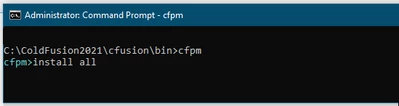
    • (Assuming you are on Windows) Open the Command Prompt (cmd) as Administrator;
    • Use the DOS cd command to navigate to  {CF2021_HOME_DIR}/cfusion/bin;
    • Type cfpm and press ENTER. You should get ColdFusion's package manager prompt cfpm;
    • Run the command install all

    • Keep running the command install all till the result is either an irreversible error or ColdFusion tells you that "All the packages are already installed".
    • If the former, then share the error message with the forum. If the later, then restart ColdFusion in the usual way, and you're set to go.


    2 replies

    carlosh79283604
    Participant
    March 2, 2023

    We had a similiar issue installing the CF2021 Update 5 using the "Install" method in the CF Admin Package Manager.  After the installation we notice the error,


    "Error invoking CFC /CFIDE/administrator/updates/download.cfc"


    This was most likely caused by having two instances of CF and the package manager not being able to restart the servers automatically.


    Our solution was to:

    1) Uninstall the CF2021 Update 5 following the instructions here: 

    ColdFusion (2021 release) Update 5 (adobe.com)

    2) Install the update in offline mode manually.

    ColdFusion (2021 release) Update 5 (adobe.com)

    Run the .jar file in the correct \Coldfusion2021\jre\bin.

    Select or update one instance at a time.


    Restart your CF2021 server for each instance.


    That's it, no more error and updated installed succcessfully!


    Priyank Shrivastava.
    Community Manager
    Community Manager
    March 2, 2023

    Hi @carlosh79283604 


    Can you please confirm which version of Java you have installed in your CF2021? Are you using CF shipped java or you have installed the latest version?


    Thanks, Priyank Shrivastava
    RaviShankar Chagnur
    Adobe Employee
    Adobe Employee
    December 20, 2022

    You can uninstall the update manually.

    Run the uninstaller.jar under "C:\ColdFusion2021\cfusion\hf-updates\hf-2021-00005-330107\uninstall" , you need to run the uninstaller.jar from the java which ColdFusion is using.

    Open command prompt as admin and run the below command, if the ColdFusion is using default JRE which is shipped 

    C:\ColdFusion2021\jre\bin>java -jar C:\ColdFusion2021\cfusion\hf-updates\hf-2021-00005-330107\uninstall\uninstaller.jar


    Inspiring
    December 20, 2022

    tried this and i istill get the "Error invoking CFC /CFIDE/administrator/updates/download.cfc" error on the updates page

    RaviShankar Chagnur
    Adobe Employee
    Adobe Employee
    December 20, 2022

    Please follow the manual steps for installing the update and let us know if the issue still occurs.


    Refer to the below document under the section "INSTALL THE UPDATE IN OFFLINE MODE MANUALLY"

    https://helpx.adobe.com/coldfusion/kb/coldfusion-2021-update-5.html

    If you are unable to connect to internet you need to download the repository 

    Note: Make sure you launch command prompt as admin