Participant
June 25, 2014
Answered

CF11 and CF8 on same server.

  • June 25, 2014
  • 2 replies
  • 591 views

Hi,

I need to install cf11 on the same windows 2008 server as an existing cf8 install.

I realise it would be better to have 2 servers but in this case thats not an option open to us so I need specific help with the 2 installs.

The current CF8 is using IIS7.

I have done a bit of spade work and I believe the best way to do this cleanly would be to install a 2nd web server, e.g apache on windows and then configure it with CF11.

I had hoped that I could actually install CF11 and just configure specific iis sites with it, hoping this would leave the cf8 configured sites intact.

Any help would be appreciated.

    This topic has been closed for replies.
    Correct answer vishu_13

    If you have 2 webistes, one you want to run with ColdFusion 8 and other you want to run with ColdFusion 11 on the same server then yes it is possible. However, two different versions of ColdFusion cannot server same website in the same server.

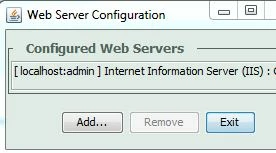
    Launch the Web Server Configuration tool of CF8 and if CF 8 is configured with ALL IIS websites, then remove the connector for all and add the website/websites one by one which you want to run with ColdFusion 8.

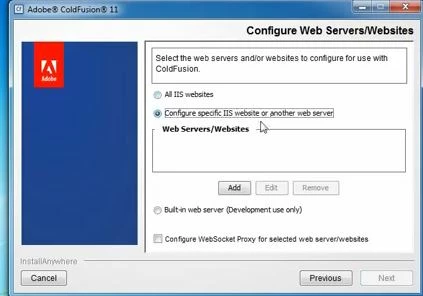
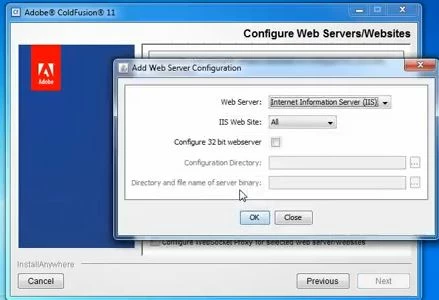
    Now, go ahead and install ColdFusion 11 and in the "Configure Web Server" Window choose the website that you want to run with CF 11

    NOTE : Two most important points to remember :

    1. Do not remove the CF 8 connector if it is a production server

    2. Do not choose All with CF 8/ CF 11 under IIS Website, because if you choose ALL then all the websites under IIS will be configured with that version of CF.

    HTH

    Thanks

    VJ

    2 replies

    vishu_13
    vishu_13Correct answer
    Inspiring
    June 25, 2014

    If you have 2 webistes, one you want to run with ColdFusion 8 and other you want to run with ColdFusion 11 on the same server then yes it is possible. However, two different versions of ColdFusion cannot server same website in the same server.

    Launch the Web Server Configuration tool of CF8 and if CF 8 is configured with ALL IIS websites, then remove the connector for all and add the website/websites one by one which you want to run with ColdFusion 8.

    Now, go ahead and install ColdFusion 11 and in the "Configure Web Server" Window choose the website that you want to run with CF 11

    NOTE : Two most important points to remember :

    1. Do not remove the CF 8 connector if it is a production server

    2. Do not choose All with CF 8/ CF 11 under IIS Website, because if you choose ALL then all the websites under IIS will be configured with that version of CF.

    HTH

    Thanks

    VJ

    Participant
    June 25, 2014

    thank you, I figured this is how I would do it but had a fear it would screw up my server but it seems the 2 versions can live happily along beside each other.

    thanks again.