pierredupli
Participating Frequently
May 22, 2014
Answered

cf11 installation issue on windows 2003 R2 : installer crashes

  • May 22, 2014
  • 1 reply
  • 298 views

Below are the steps I went through :

. download the installer exe (ColdFusion_11_WWEJ_win.exe) : 571 106 928 octets

. launch it --> nothing happen (I can see in tasklanager some cpu activity during few seconds then nothing)

. then I have tried to open the archive with 7zip and I have found two directories : windows and InstallerData

. then I have tried to execute "windows\adobe_cf.exe" and I got immediatly the message : "Impossible to execute LaunchAnywhere - Error Windows 2 when loading Java VM"

My java version is :

java version "1.7.0_55"

Java(TM) SE Runtime Environment (build 1.7.0_55-b14)

Java HotSpot(TM) Client VM (build 24.55-b03, mixed mode, sharing)

Thank you for your support.

Pierre.

    This topic has been closed for replies.
    Correct answer Anit_Kumar

    Hi Pierre,


    Please try the following Steps :-

    1. Launch Command prompt as Administrator.

    2. Navigate to the location of ColdFusion 11 installer.

    3.Type the command as shown below in the command prompt and press Enter


    4. The installer will launch. Please follow the onscreen steps further.


    Hope this helps.

    Regards,

    Anit Kumar

    1 reply

    Anit_Kumar
    Anit_KumarCorrect answer
    Inspiring
    May 22, 2014

    Hi Pierre,


    Please try the following Steps :-

    1. Launch Command prompt as Administrator.

    2. Navigate to the location of ColdFusion 11 installer.

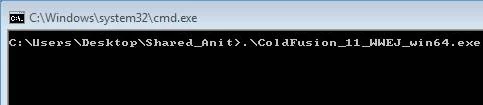
    3.Type the command as shown below in the command prompt and press Enter


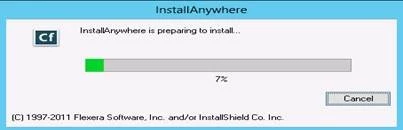
    4. The installer will launch. Please follow the onscreen steps further.


    Hope this helps.

    Regards,

    Anit Kumar