
Inspiring
May 20, 2024
Answered

CF2021 poi lib issue

  • May 20, 2024
  • 1 reply
  • 1715 views

Greetings,

We have ColdFusion (2021 release) Update 13. 

The POI version should be 4.1.2 according to the next article

What are the version numbers of the libraries underlying CF2021 - ColdFusion (adobe.com)

The CF package in the laptop show the same version
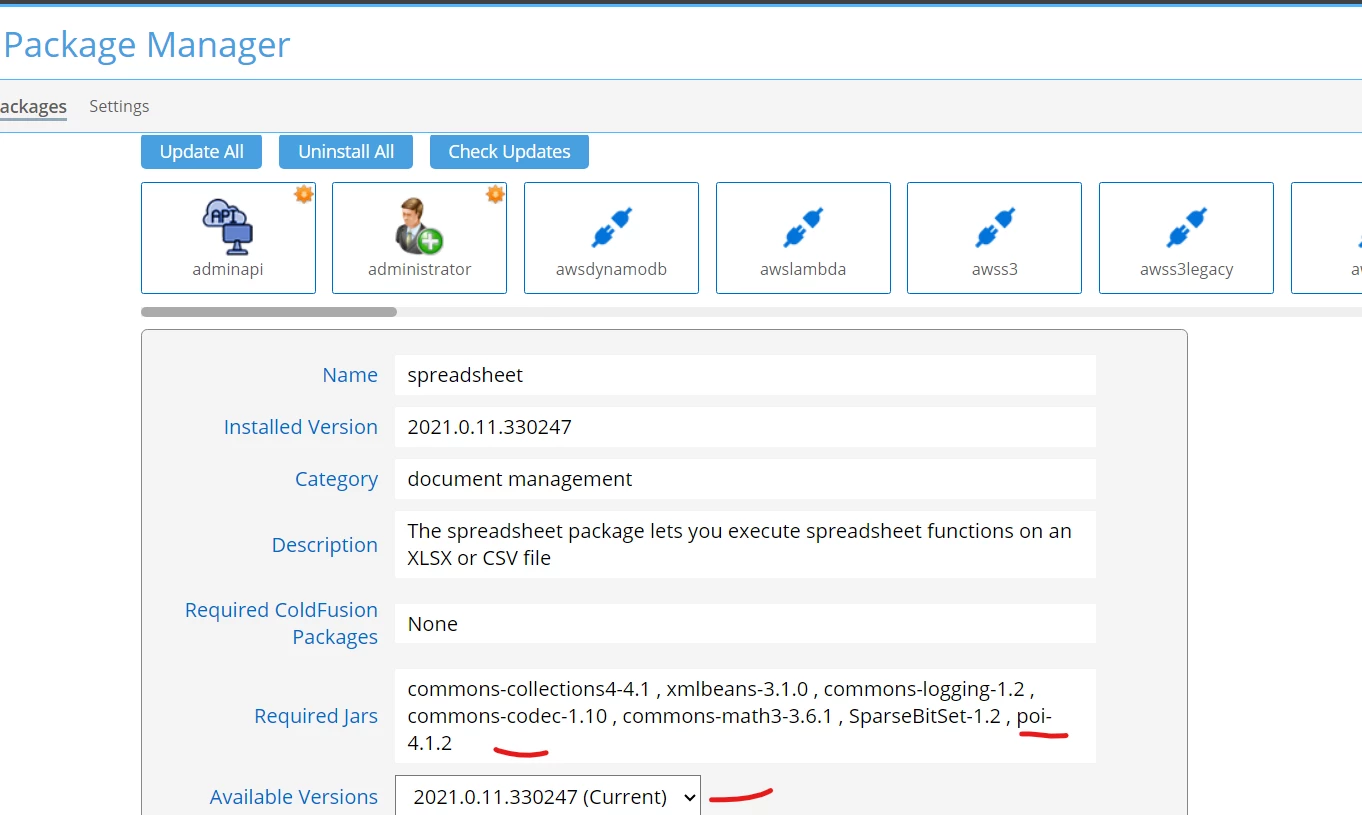
But the version show 3.1.7 using the next code

variables.objPoi = createObject( 'java', 'org.apache.poi.Version' ).getVersion();
writeOutput('<h2>'&variables.objPoi&'</h2>');

We reinstall the update and reboot the laptop, still show the old poi version.

Any ideas about this issue?

How can we resolve this issue? Do we need to reinstall CF?

Thanks,

Johnny
 

    This topic has been closed for replies.
    Correct answer BKBK

    Thanks for your reply, the restart didn't work.


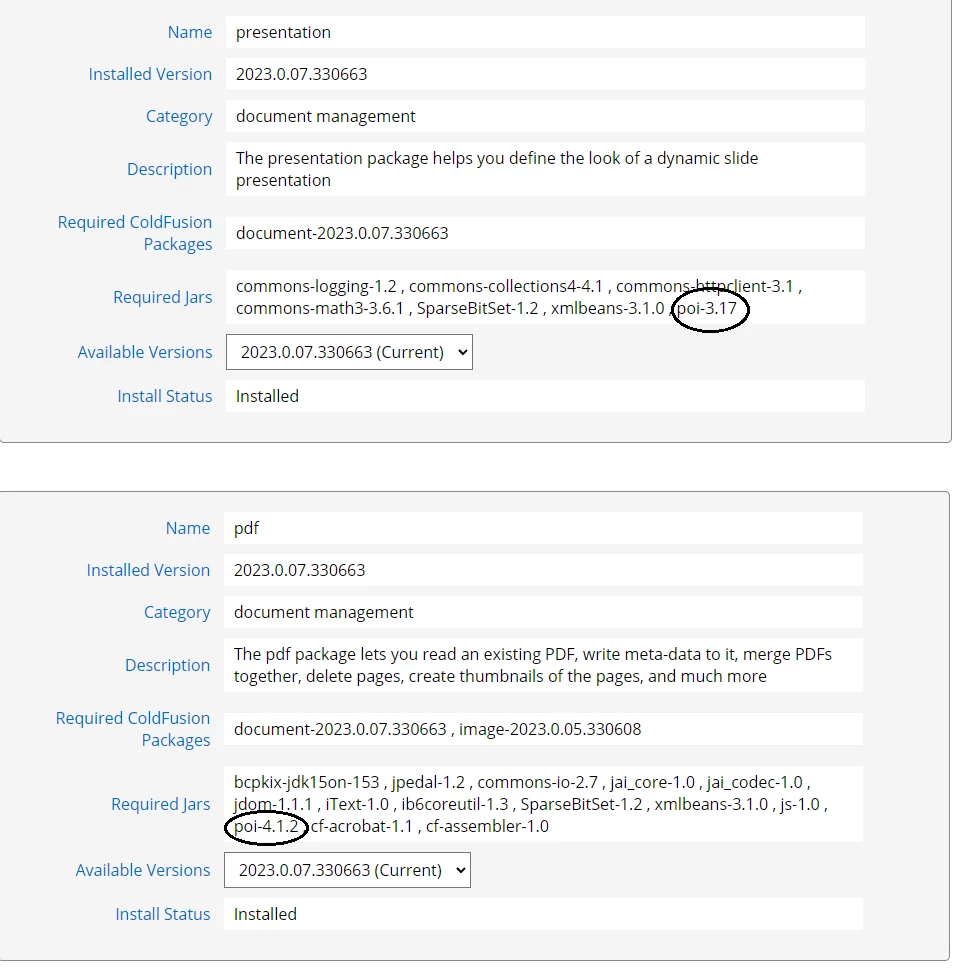
    Hi @jfb00 , it is futile to look for the POI version that ColdFusion 2021 uses. There is no such thing. Not at the moment at least.


    That is because ColdFusion 2021 uses POI 3.1.7 as well as POI 4.1.2. Some packages that ColdFusion uses depend on POI 3.1.7 (for example, the "Presentation" package). Whereas other packages depend on POI 4.1.2 (such as the "PDF" package, and the "Spreadsheet" package pictured in your original post).


    1 reply

    Participating Frequently
    May 21, 2024

    Uninstall the presentation package or add a version to createobject.

    variables.objPoi = createObject( 'java', 'org.apache.poi.Version','poi','4.1.2' ).getVersion();
     

    https://helpx.adobe.com/coldfusion/cfml-reference/coldfusion-functions/functions-c-d/CreateObjectJavaorEJBobject.html

    Note: 

    For ColdFusion (2021 release) and later, use the following syntax:

    • createObject("java", "org.apache.poi.xssf.usermodel.XSSFWorkbook","jarname", "jar_version"). You can get the values for jarname and jar_version from the file, <cfroot>/bundles/bundlesdependency.json.

    For example, createObject("java", "org.openxmlformats.schemas.spreadsheetml.x2006.main.CTDataValidation","poi", "4.1.2")


    jfb00Author
    Inspiring
    May 29, 2024

    We uninstall the presentation and it doesn't work. Even reinstall CF 2021 and install the package 13 and still show poi 3.17 version.

    We have multiple applications and many files that will affect to add the jar version, the issue is only in one developer laptop.

    We are pointing CF to the java jdk 23 to pass IT security.

    Any other ideas in how to fix this issue?

    Thanks,

    Johnny


    Charlie Arehart
    Community Expert
    Community Expert
    May 29, 2024

    Since the problem happens on only one machine, I would assume it's happening there because you have some other poi jar within the cf folders. There are a few that are on what is called the Java classpath.


    Look at the cf admin "system information" page ("i" in the top right corner) or the "settings summary" page, which both have a section showing jars on the "CF Server Java Class Path", to see if any refer to "poi".  (I find none by default, but CF obviously finds its poi classes in some jar listed there. And don't look for the specific version number you are observing: the jar filenames may not have the number you refer to. Java doesn't care about file names; if a jar is in a folder in the classpath, the classes within it can be found.) 


    Finally, I'll assume that by "jdk23" you mean jdk 11 and its latest update, which is 23. Java/jdk 23 is not out yet (and cf2021 supports only Java 11, not any of the later versions still updated by Oracle. More here). 

    /Charlie (troubleshooter, carehart. org)