


CCnyPH
Participant
August 4, 2012
Question

CF8 - Install fails

  • August 4, 2012
  • 1 reply
  • 810 views

My main server's install of ColdFusion 8 just died it's been running fine for years not sure why yet.

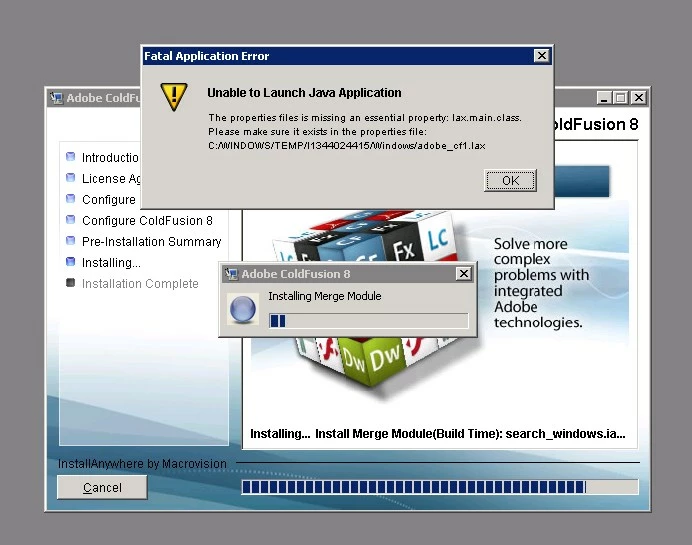
I'm trying to install CF8 on my backup server so I can move all of my data over but the install fails no matter what I try.

The Server is running Windows Server 2003 (64-bit), The only other software on this machine is SQL 2008 R2, Visual Studio 2010 and Micosoft Forefront.

I'm using the original ColdFusion 8 DVD. I've found solutions to similar issues online but none of them fix this issue.

Any suggestions would be appreciated.  Thanks
This topic has been closed for replies.

1 reply

Legend
August 5, 2012

That might be the CF8.0.0 installer on your media. Perhaps try CF8.0.1 installer.

Could also be CF8.0.0 which as I recall had Java 1.6.0 release and CF8.0.1 has the newer (tho still very old now) 1.6.0_04 Java.

How to get CF8.0.1 installer?

Login here like your going to download CF10:

https://www.adobe.com/cfusion/tdrc/index.cfm?product=coldfusion

Then change URL to following and download / save file when prompted:

http://trials.adobe.com/Applications/ColdFusion/801WWE/coldfusion-801-win64.exe

HTH, Carl.

CCnyPH
CCnyPHAuthor
Participant
August 6, 2012

The updated installer worked better, no warning windows during install.

But at the end it said there was still errors.

It looks like most of the errors have to do with the Windows\temp\ folder.

I cleaned out windows\temp\ before installing the new file.

CCnyPH
CCnyPHAuthor
Participant
August 7, 2012

Support sent me this link, which fixes this issue in case anyone else comes here and needs to do the same thing.

http://blogs.coldfusion.com/post.cfm/coldfusion-installation-failure-if-username-contains