
CFChart Bar Chart Node Issue
Hello,
I have a graphing routine that charts with a grade description as the item column and the count for each as the value column, I am using cfchart and cfchartseries. I am using a .json file for the styling. A graph is produced for each student, with an arrow (using Zingchart labels) pointing to the students grade. I use cffile to write the chart to a .jpg.
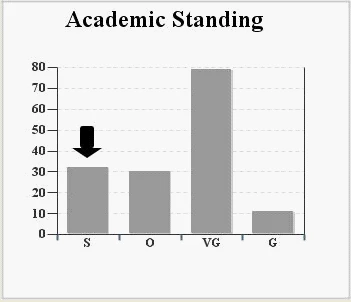
We are currently at CF - 11,0,13,303668 (Update level 13) and Java Version: 1.8.0_25. This routine runs once a year and has been working fine for a few years now. Last year at this time, when it ran successfully, we were at CF 11, Update level 12.
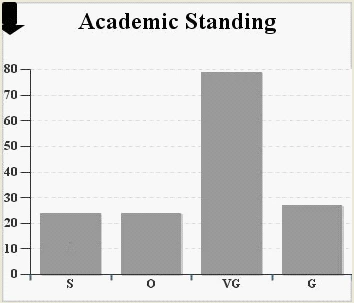
Upon running this graphing process this year, the graph is produced fine, but the arrow is stuck on the left side of the chart. It is almost as if the charting engine doesn't know what node to point to.
Here is the CF chart code....
<cfchart showygridlines="yes"
format="jpg"
style="bar_chart_use.json"
showborder="yes"
rotated="no"
pieslicestyle="solid"
chartheight="300"
chartwidth="350"
name="myChart"
databackgroundcolor="##FFFFFF"
showmarkers="yes"
seriesplacement="default"
scaleto="#max_cnt#">
<cfchartseries type="bar"
seriescolor="##999999"
itemcolumn="the_desc_bar"
valuecolumn="the_count"
serieslabel="Series Label"
query="get_graph_data"
paintstyle="raise"
datalabelstyle="value">
</cfchartseries>
</cfchart>
Here is the bar_chart_use.json
{"graphset":[
{
"background-color":"white",
"border-color":"#cccccc",
"scale-x":{"line-color":"#333333","font-family":"Arial",
"items-overlap": true,
"item":{"angle":"0", "font-family":"Times New Roman","color":"#333333","font-size":14, "fontWeight": "bold"},
"color":"#333333",
"autoFit":1,
"label":{"color":"#333333","text":""},
"bold":"true",
"tick":{"line-color":"#333333","size":10,"line-width":"1","line-gap-size":0},
"tick": {"visible": true},
"guide":{"line-width":0},
"line-width":1,
"font-size":"24",
"margin":0},
"plot":{
"bars-space-left":10,
"bars-space-right":10,
"bar-width":0,
"value-box":{"color":"black","font-size":"0","font-family":"Arial","text":"","placement": "middle"}},
"scale-y":{"line-color":"#333333","font-family":"Arial",
"item":{"font-family":"Times New Roman",
"color":"#333333","font-size":14, "fontWeight": "bold", "offset-x":"0px", "offset-y":"5px"},
"format":"%v","color":"#333333",
"label":{"color":"#333333","text":""},
"bold":"true",
"tick":{"line-color":"#333333","size":10,"line-width":"1","line-gap-size":0},
"line-width":1,"font-size":"12"},
"plotarea":{"border-color":"black","margin-left":"10", "margin-right":"0", "margin-top":"20","margin-bottom":"20","adjust-layout":true,"border-width":"0"},
"labels":[
{
"text": " ",
"background-color": "black",
"font-size": "10px",
"font-family": "arial",
"font-weight": "normal",
"font-color": "#FFFFFF",
"padding": "6%",
"border-radius": "3px",
"offset-y":-30,
"shadow": false,
"callout": true,
"callout-height": "10px",
"callout-width": "30px",
"hook":"node:index=2"
}],
"title":{"text":"Academic Standing",
"border-color":"white",
"border-width":2,
"font-family":"Times New Roman",
"adjust-layout":true,
"color":"black",
"bold":true,
"margin-left":"10",
"margin-right":"10",
"margin-top":"10",
"margin-bottom":"150",
"wrap-text":true,
"font-size":24,
"background-color":"white"
},
"type":"bar",
"scale-y-2":{"line-width":1,"font-size":"12","font-family":"Arial","bold":"true","label":{"text":""},"line-color":"#333333"}
}]}
My thought was that something in the Update level 13 patch must have broken the chart, but I reviewed the release notes and nothing is jumping out at me. I am not sure if it could be Java related. I am quite confident that the code is pretty solid, since it is broken in both our PROD and DEVL environments. I tried tweaking the .json file to no avail. I also tried putting the "label" in cfchart and that didn't work.
Should I try upgrading to Update level 14? Any assistance or ideas would be greatly appreciated!
Thanks,
Jim


 AdChoices