Known Participant
March 18, 2010
Answered

cfchart combine 3 data on single bar?

  • March 18, 2010
  • 1 reply
  • 1840 views

Hi guys,

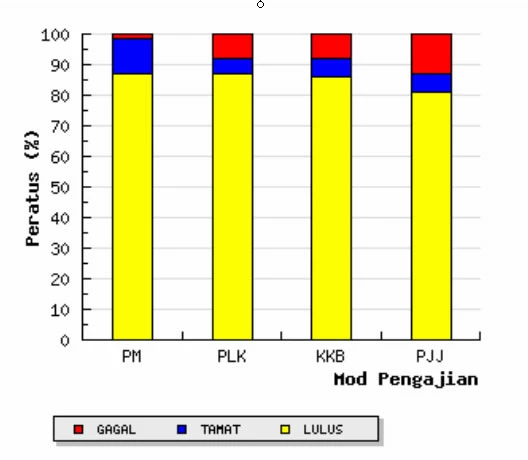
i use to create chart using CFCHART, but in this case, i don't have any ideas on how to display this kind of chart.

this sample chart is generated from excel file, and i want to create the same chart using coldfusion.

the chart will combine 3 data on a single bar. if i could display just one bar with 3 different color is enough for an example...

any suggestion or example how to do this kind of chart? thank you very much...
This topic has been closed for replies.
Correct answer Fernis

<cfchart format="png" show3d="yes" seriesplacement="stacked">
    <cfchartseries type="bar">
        <cfchartdata item="Col1" value="30">
        <cfchartdata item="Col2" value="60">
    </cfchartseries>

    <cfchartseries type="bar">
        <cfchartdata item="Col1" value="20">
        <cfchartdata item="Col2" value="110">
    </cfchartseries>

    <cfchartseries type="bar">
        <cfchartdata item="Col1" value="80">
        <cfchartdata item="Col2" value="25">
    </cfchartseries>
</cfchart>

This should get you started.

--

- Fernis - fernis.net - ColdFusion Developer For Hire

1 reply

Fernis
FernisCorrect answer
Inspiring
March 18, 2010

<cfchart format="png" show3d="yes" seriesplacement="stacked">
    <cfchartseries type="bar">
        <cfchartdata item="Col1" value="30">
        <cfchartdata item="Col2" value="60">
    </cfchartseries>

    <cfchartseries type="bar">
        <cfchartdata item="Col1" value="20">
        <cfchartdata item="Col2" value="110">
    </cfchartseries>

    <cfchartseries type="bar">
        <cfchartdata item="Col1" value="80">
        <cfchartdata item="Col2" value="25">
    </cfchartseries>
</cfchart>

This should get you started.

--

- Fernis - fernis.net - ColdFusion Developer For Hire

haireAuthor
Known Participant
March 19, 2010

thanks Fernis... that what i love about coldfusion... simple and easy to display...