
Participant
April 18, 2017
Répondu

CFChart - Need to know how to pass NULL values from a query in CF11

HI Everyone,

I am really hoping this is an easy question to answer because I have been searching everywhere and all I try is not working.

I have a SQL query (created by Oracle DB) that creates multiple cfchartseries using date as the column item and a number for the value. My issue is there are null values for the value field but I need it to plot

<cfchartseries

  label="LRF"

  scales= "x,y"

  >

       <cfloop query="qTrend">

            <cfif qTrend.LRF gt 0>

                 <cfchartdata item="#qTrend.report_date#" value="#qTrend.LRF#">

            <cfelse>

                 (i have tried:

                     <cfchartdata item="#qTrend.report_date#" value=" ">

<cfchartdata item="#qTrend.report_date#" value="null">

<cfchartdata item="#qTrend.report_date#" value="">

<cfchartdata item="#qTrend.report_date#" value="0">

and none work)

            </cfif>

       </cfloop>

  </cfchartseries>

The ERROR I get is
Attribute validation error for CFCHARTDATA. The value of the VALUE attribute is invalid. The value cannot be converted to a numeric because it is not a simple value.Simple values are booleans, numbers, strings, and date-time values

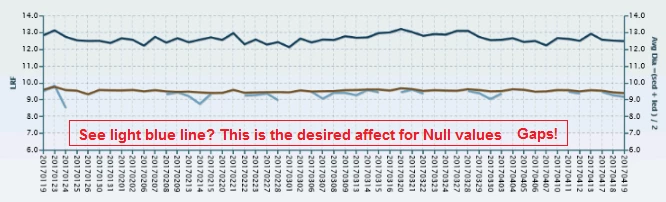
The Chart will display when I use the value ="0" but this pulls the line down instead of just STOPPING and then starting again when a numeric value is in the next record.

Here is my query

THANKS for help... I need it quickly if possible

JV
Ce sujet a été fermé aux réponses.
Meilleure réponse par Jacki_Felice

The issues is that when using the <cfchartdata> tag it will not accept a blank, null, space without creating an error. I did not find a resolve in using this method to insert my chart values so I created a work around that is working.

I removed the <cfchartdata> tag all together and built an ArrayNew(2) to pass both item and value data. Like shown here

<cfset a_data=ArrayNew(2)>

   <cfloop query="qTrend">

       <cfset a_data[#qTrend.currentrow#][1]="#qTrend.report_date#">

       <cfif qTrend.LRF gt 0>

            <cfset a_data[#qTrend.currentrow#][2]="#qTrend.LRF#">

       <cfelse>

            <cfset a_data[#qTrend.currentrow#][2]="null">

       </cfif>

  </cfloop>

THEN pass in the Array in the <cfchartseries> tag as show below:

  <cfchartseries

  label="LRF (InMill)"

  scales= "x,y"

data=#a_data#

  >

NOTE: this attribute will only take an Array of Arrays so make sure you do not attempt to insert an Array with a Struct in it... ERROR!

There were many ways to write this but for some reason between CF11, Tomcat, and ZingCharts this is the only way I found other then completely removing the <cfchartseries> tags and completely working around CF11 and using the "style" .js file to built the entire chart.

I really hope this helps the next person looking for this FIX....!!

I am also open to other ways ... so if you like please continue to post to this if you find a better simpler way...THANKS

JV

2 commentaires

Jacki_FeliceAuteurRéponse
Participant
April 20, 2017

The issues is that when using the <cfchartdata> tag it will not accept a blank, null, space without creating an error. I did not find a resolve in using this method to insert my chart values so I created a work around that is working.

I removed the <cfchartdata> tag all together and built an ArrayNew(2) to pass both item and value data. Like shown here

<cfset a_data=ArrayNew(2)>

   <cfloop query="qTrend">

       <cfset a_data[#qTrend.currentrow#][1]="#qTrend.report_date#">

       <cfif qTrend.LRF gt 0>

            <cfset a_data[#qTrend.currentrow#][2]="#qTrend.LRF#">

       <cfelse>

            <cfset a_data[#qTrend.currentrow#][2]="null">

       </cfif>

  </cfloop>

THEN pass in the Array in the <cfchartseries> tag as show below:

  <cfchartseries

  label="LRF (InMill)"

  scales= "x,y"

data=#a_data#

  >

NOTE: this attribute will only take an Array of Arrays so make sure you do not attempt to insert an Array with a Struct in it... ERROR!

There were many ways to write this but for some reason between CF11, Tomcat, and ZingCharts this is the only way I found other then completely removing the <cfchartseries> tags and completely working around CF11 and using the "style" .js file to built the entire chart.

I really hope this helps the next person looking for this FIX....!!

I am also open to other ways ... so if you like please continue to post to this if you find a better simpler way...THANKS

JV

WolfShade
Legend
April 20, 2017

I suspect that the issue lies in how you are comparing values in your conditional.

Change this: <cfif qTrend.LRF gt 0>  to this: <cfif val(qTrend.LRF) gt 0> to force the value to numeric.  If it's blank (CF interprets database nulls as empty strings), then val('') is 0.

HTH,

^_^