
CFDocument and localURL weird behaviour
Tried posting earlier, but looks like my post wasn't successful so here goes again..
We have an old legacy application that we migrated from CF11 to CF2018. On migration I had noticed that pdfs were taking significant time to generate compared to the previous site/server version. Looking further I found Charlie's post regarding the localURL attribute setting. So trying this I have encountered some weird behaviour in that images/styles still don't load.
I ran the test code below:
<cfdocument name="pdfContent" saveAsName="test.pdf"  format="pdf" localurl="yes">
    <table width="100%" border="0" cellpadding="0" cellspacing="0">
      <tr>
        <td align="left">
          <font face="Arial, Helvetica, sans-serif" size="+2"><strong>Testing CFDOCUMENT </strong></font>
        </td>
      </tr>
      <tr><td colspan="6">
        using back slashes e.g. img src="images\googleLogo.png" <img src="\images\googleLogo.png"><!--- Works ---><br/>
        using back slashes and image e.g. image src="images\googleLogo.png" <image src="\images\googleLogo.png"><!--- Doesn't work ---><br/>
        using forward slashes e.g. src="images/googleLogo.png" <img src="/images/googleLogo.png"><!--- Doesn't work ---><br/>
        using forward slashes e.g. image src="images/googleLogo.png" <image src="/images/googleLogo.png"><!--- Doesn't work ---><br/>
      </td></tr>
    </table>
</cfdocument>

<cfheader name="Content-Disposition" value="inline; filename=test.pdf">
<cfcontent variable="#toBinary(pdfContent)#" type="application/pdf" reset="Yes">
and get the following output:
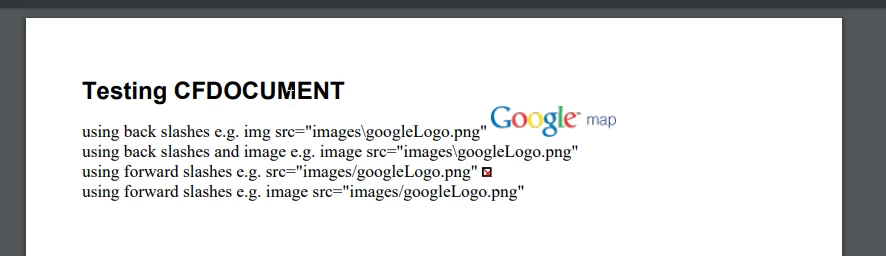
Edited: to include correct screenshot.
Things I am noticing:
Forward slashes vs backslashes make a difference. Coldfusion's documentation for cfdocument uses the forward slashes in their example, and this doesn't work.
and the <img> vs <image> tags make a difference.
Am I missing something simple here?


 AdChoices