Inspiring
January 4, 2023
Question

CFDocument problème de présentation
  • January 4, 2023
  • 2 replies
  • 686 views

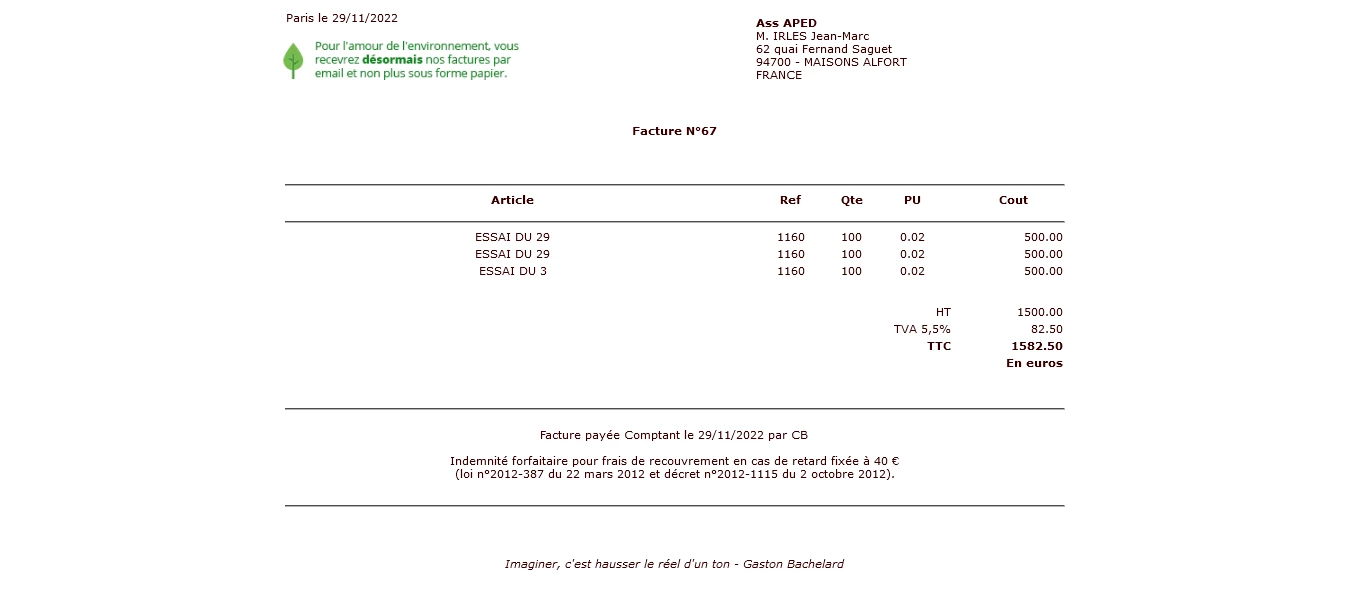
Sans CFdocument !

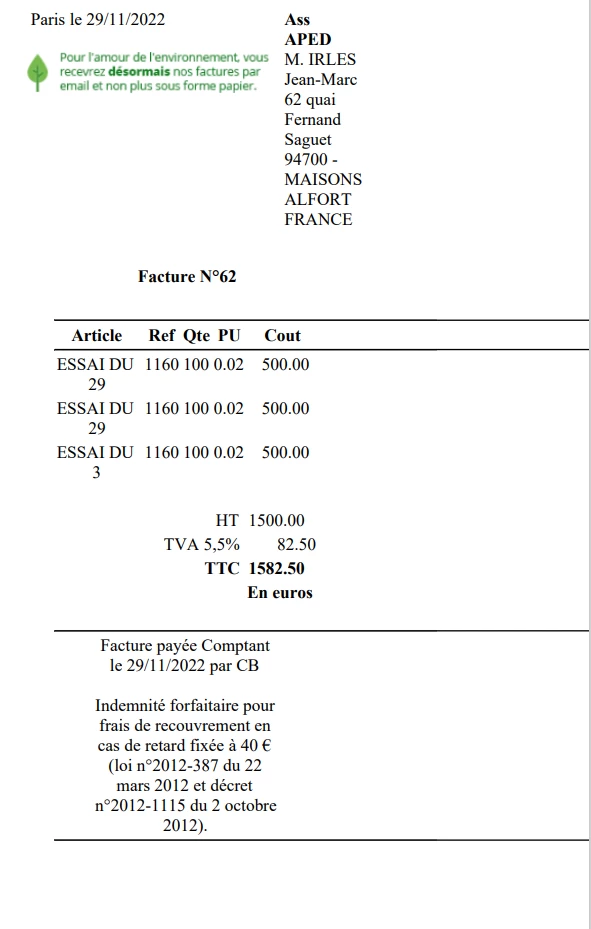
Avec CFdocument !  La présentation n'est plus la même ! Problème de police de caractères et de mise en place, ...

Le fautif : <CFDOCUMENT format="pdf" filename="../../#session.site#/_Facturier/Facture_#Session.Fac#.pdf" pagetype="A4" unit="cm" overwrite="true">

De plus, joint à email, il ne s'ouvre pas !

Merci par avance pour votre aide.

MEILLEURS VOEUX pour 2023.

This topic has been closed for replies.

2 replies

BKBK
Community Expert
Community Expert
January 5, 2023

Cfdocument is "back-end" code. As such, it is not responsible for presentation.


The tag expects you to do the presentation yourself. For example, you could use "front-end" tools such as HTML, Javascript and Cascading Style Sheets to get the exact presentation you want. Then use cfdocument to convert the result to PDF.

ZNBAuthor
Inspiring
January 5, 2023

Bonjour,

Je fais déjà la mise en page. (voir le document sans CFDocument).

Je joins mon code de la facture et le résultat en PDF.

Merci pour vos conseils.

NB : je ne comprends pas que sur un site Coldfusion les .cfm ne soient pas pris en charge (Le type de fichier (.cfm) n'est pas pris en charge).

Charlie Arehart
Community Expert
Community Expert
January 5, 2023

Again, take all that content that was generated between your now-commented cfdocument tags, save that to a file, and call that via cfhttp, as a test of things. See all else I said in my first reply. I'd asked specific questions to help us help you. 


As for your second comment about .cfm pages not working, can you elaborate? Are you not running this code via cf, as a .cfm file? Is your web server iis? Does the site you are running show having a Jakarta virtual directory? If not, does the site's "isapi filters" feature show one for tomcat? If so, create a virtual directory named jakarta pointing to the same folder as is listed for that tomcat isapi filter. 

/Charlie (troubleshooter, carehart. org)
Charlie Arehart
Community Expert
Community Expert
January 4, 2023

Are you saying that the code worked previously? If so, what changed? New cf version? Update?


If it's "never worked", you may want to consider alternatives.


First, can you try the localurl attribute for cfdocument?


If it doesn't help, can you try switching to the tag cfhtmltopdf instead of cfdocument? You'd need to have the cf "add on service" enabled.


If you really want to try to diagnose things instead, is it that you have the code creating the "working" page as html saved  in a file? And you are browsing that file, when things "work"?


If so, what happens if you create a test page doing a cfhttp that calls that file instead. Then wrap #cfhttp.filecontent# in a cfoutput. How does that look? 


The difference is that Cf is calling that page (and loading the images and other files referenced in the html), whereas when you browse it (even if on the server) it's the browser rendering it. It the same "problem" is there, then the issue is not with cfdocument itself.


Those are just some ideas to try to help. Let us know how it goes. 

/Charlie (troubleshooter, carehart. org)