

Inspiring
November 24, 2014
Question

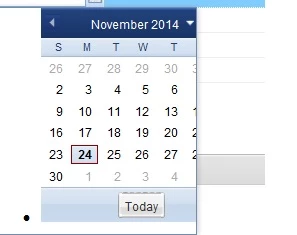
CFGRID Calendar not aligned and not fully useable.
  • November 24, 2014
  • 1 reply
  • 374 views


Calendar is off center, the dot on the left appears and the dates on the right are not accessible.

All help appreciated.

B.

    This topic has been closed for replies.

    1 reply

    Inspiring
    November 25, 2014

    BACFL,

    Which version of CF are you using? Do you have any CF updates applied? Which browser are you using to view the output?

    Looks like you are using the cfcalendar control. Can you clarify the relevance of cfgrid here, are you using cfgrid in conjunciton with cfcalendar in some way. It would be great if you can share the relevant code extract (you can of course do away or fudge any details in there that you may not want to share ).

    I tried a simple cfcalendar example from the CF11 wiki (https://wikidocs.adobe.com/wiki/display/coldfusionen/cfcalendar) and it appears to render without the symptoms mentioned in your note on Chrome. I used CF11 release build.

    BACFLAuthor
    Inspiring
    November 25, 2014

    You are correct Piyush, CF11 the calendar works very nicely.  It's a different looking calendar completely.  Unfortunately I have to use CF 10 because of an issue with CF11.

    I am using IE 9 on Windows 7.

    Here is my code which uses type="date" to get the calendar.

    <CFGRIDCOLUMN NAME="doh" HEADER="Date of Hire"

            HEADERALIGN="LEFT" DATAALIGN="right"

            BOLD="Yes" ITALIC="No"

            SELECT="Yes" DISPLAY="Yes"

            HEADERBOLD="YES" HEADERITALIC="No" type="date"
       font="arial" fontsize="12">

    Thanks!

    B.