Participant
April 24, 2024
Answered

CFGrid not displaying anything

  • April 24, 2024
  • 4 replies
  • 1362 views

I have the following code:

  <cfform action="updateinfodone.cfm?needsupdate=ANILIST&clientid=#clientid#" method="POST">
    <cfgrid name="grid3" query="getanilist" selectmode="EDIT" delete="Yes" deletebutton="Delete Row" width="690" height="400" format="html">
      <cfoutput query="getanilist">
      <cfgridcolumn name="ANIID" display="no">
      <cfgridcolumn name="ANINameID" display="no">
      <cfgridcolumn name="PhoneNo" header="Phone" headeralign="CENTER">
      <cfgridcolumn name="Carrier" header="LEC" headeralign="CENTER">
      <cfgridcolumn name="CSR" header="CSR" headeralign="CENTER">
      <!---
      <cfgridcolumn name="SS" header="SS" headeralign="CENTER">
    --->
      <cfgridcolumn name="CP" header="BTN" headeralign="CENTER">
      <cfgridcolumn name="Hunt" header="Hunt" headeralign="CENTER">
      <cfgridcolumn name="Response" header="IssueNo" headeralign="CENTER">
      <cfgridcolumn name="LineTypeFeat" header="Ln Type/Feat" headeralign="CENTER">
      <cfgridcolumn name="CustomerUse" header="Customer Use - - - - " headeralign="CENTER">
      <cfgridcolumn name="AniDate" header="LD Carrier" headeralign="CENTER">
      <!---
      <cfgridcolumn name="Cost" header="Cost" headeralign="CENTER" numberformat="_____.__">
    --->
    </cfgrid>
  </cfform>
and its not displaying anything. It was working on previous version of coldfusion but upgrading it broke the grid.
 
    Correct answer BKBK

    @conners40482221 , to settle matters definitively, I decided to recreate your entire scenario. In doing so, I quickly found the reason why the grid was not displaying anything. The grid code contains the following redundant line

     <cfoutput query="getanilist">

    That would have resulted in an error. Hence the grid would not have been displayed.


    I shall now provide a 100% simulation of your scenario. If you run it you will see that the grid is displayed.

     <cfscript>
        // Create the initial query,"getanilist", with column names and data types
        getanilist = queryNew("ANIID, ANINameID, PhoneNo, Carrier, CSR, SS, CP, Hunt, Response, LineTypeFeat, CustomerUse, AniDate, Cost",
                              "varchar, integer, varchar, varchar, varchar, varchar, varchar, varchar, varchar, varchar, varchar, date, decimal");
    
        // Add the first row of data
        queryAddRow(getanilist, {
            ANIID: "12345",
            ANINameID: 101,
            PhoneNo: "+1-555-123-4567",
            Carrier: "AT&T",
            CSR: "Jane Doe",
            SS: "Active",
            CP: "Enabled",
            Hunt: "Default",
            Response: "Success",
            LineTypeFeat: "VoIP",
            CustomerUse: "Support",
            AniDate: createDate(2025, 9, 4),
            Cost: 15.75
        });
    
        // Add a second row of data
        queryAddRow(getanilist, {
            ANIID: "67890",
            ANINameID: 102,
            PhoneNo: "+1-555-987-6543",
            Carrier: "Verizon",
            CSR: "John Smith",
            SS: "Inactive",
            CP: "Disabled",
            Hunt: "Overflow",
            Response: "Timeout",
            LineTypeFeat: "PSTN",
            CustomerUse: "Sales",
            AniDate: createDate(2025, 8, 20),
            Cost: 20.50
        });
    
        // Add a third row of data
        queryAddRow(getanilist, {
            ANIID: "11223",
            ANINameID: 103,
            PhoneNo: "+1-555-111-2222",
            Carrier: "T-Mobile",
            CSR: "Lisa Jones",
            SS: "Active",
            CP: "Enabled",
            Hunt: "Default",
            Response: "Success",
            LineTypeFeat: "VoIP",
            CustomerUse: "Marketing",
            AniDate: createDate(2025, 7, 15),
            Cost: 18.25
        });
    
        // Output the query to verify its contents
       // writeDump(getanilist);
    </cfscript>
    
    <!--- Set the client ID --->
    <cfset clientID=1234>
    
    <!--- Display the grid --->
     <cfform action="updateinfodone.cfm?needsupdate=ANILIST&clientid=#clientid#" method="POST">
        <cfgrid name="grid3" query="getanilist" selectmode="EDIT" delete="Yes" deletebutton="Delete Row" width="690" height="400" format="html">
          <cfgridcolumn name="ANIID" display="no">
          <cfgridcolumn name="ANINameID" display="no">
          <cfgridcolumn name="PhoneNo" header="Phone" headeralign="CENTER">
          <cfgridcolumn name="Carrier" header="LEC" headeralign="CENTER">
          <cfgridcolumn name="CSR" header="CSR" headeralign="CENTER">
          <cfgridcolumn name="SS" header="SS" headeralign="CENTER">
          <cfgridcolumn name="CP" header="BTN" headeralign="CENTER">
          <cfgridcolumn name="Hunt" header="Hunt" headeralign="CENTER">
          <cfgridcolumn name="Response" header="IssueNo" headeralign="CENTER">
          <cfgridcolumn name="LineTypeFeat" header="Ln Type/Feat" headeralign="CENTER">
          <cfgridcolumn name="CustomerUse" header="Customer Use - - - - " headeralign="CENTER">
          <cfgridcolumn name="AniDate" header="LD Carrier" headeralign="CENTER">
          <cfgridcolumn name="Cost" header="Cost" headeralign="CENTER" numberformat="_____.__">
        </cfgrid>
      </cfform>


    The output:
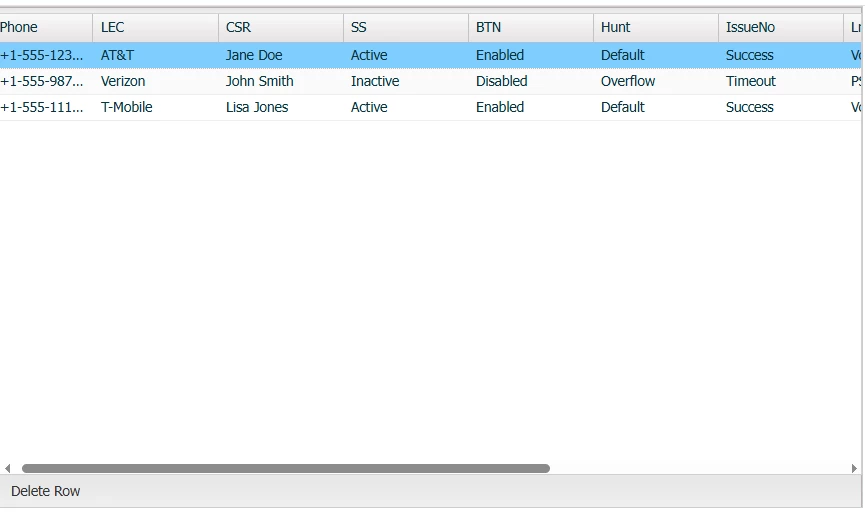
     

    4 replies

    BKBK
    Community Expert
    BKBKCommunity ExpertCorrect answer
    Community Expert
    September 4, 2025

    @conners40482221 , to settle matters definitively, I decided to recreate your entire scenario. In doing so, I quickly found the reason why the grid was not displaying anything. The grid code contains the following redundant line

     <cfoutput query="getanilist">

    That would have resulted in an error. Hence the grid would not have been displayed.


    I shall now provide a 100% simulation of your scenario. If you run it you will see that the grid is displayed.

     <cfscript>
        // Create the initial query,"getanilist", with column names and data types
        getanilist = queryNew("ANIID, ANINameID, PhoneNo, Carrier, CSR, SS, CP, Hunt, Response, LineTypeFeat, CustomerUse, AniDate, Cost",
                              "varchar, integer, varchar, varchar, varchar, varchar, varchar, varchar, varchar, varchar, varchar, date, decimal");
    
        // Add the first row of data
        queryAddRow(getanilist, {
            ANIID: "12345",
            ANINameID: 101,
            PhoneNo: "+1-555-123-4567",
            Carrier: "AT&T",
            CSR: "Jane Doe",
            SS: "Active",
            CP: "Enabled",
            Hunt: "Default",
            Response: "Success",
            LineTypeFeat: "VoIP",
            CustomerUse: "Support",
            AniDate: createDate(2025, 9, 4),
            Cost: 15.75
        });
    
        // Add a second row of data
        queryAddRow(getanilist, {
            ANIID: "67890",
            ANINameID: 102,
            PhoneNo: "+1-555-987-6543",
            Carrier: "Verizon",
            CSR: "John Smith",
            SS: "Inactive",
            CP: "Disabled",
            Hunt: "Overflow",
            Response: "Timeout",
            LineTypeFeat: "PSTN",
            CustomerUse: "Sales",
            AniDate: createDate(2025, 8, 20),
            Cost: 20.50
        });
    
        // Add a third row of data
        queryAddRow(getanilist, {
            ANIID: "11223",
            ANINameID: 103,
            PhoneNo: "+1-555-111-2222",
            Carrier: "T-Mobile",
            CSR: "Lisa Jones",
            SS: "Active",
            CP: "Enabled",
            Hunt: "Default",
            Response: "Success",
            LineTypeFeat: "VoIP",
            CustomerUse: "Marketing",
            AniDate: createDate(2025, 7, 15),
            Cost: 18.25
        });
    
        // Output the query to verify its contents
       // writeDump(getanilist);
    </cfscript>
    
    <!--- Set the client ID --->
    <cfset clientID=1234>
    
    <!--- Display the grid --->
     <cfform action="updateinfodone.cfm?needsupdate=ANILIST&clientid=#clientid#" method="POST">
        <cfgrid name="grid3" query="getanilist" selectmode="EDIT" delete="Yes" deletebutton="Delete Row" width="690" height="400" format="html">
          <cfgridcolumn name="ANIID" display="no">
          <cfgridcolumn name="ANINameID" display="no">
          <cfgridcolumn name="PhoneNo" header="Phone" headeralign="CENTER">
          <cfgridcolumn name="Carrier" header="LEC" headeralign="CENTER">
          <cfgridcolumn name="CSR" header="CSR" headeralign="CENTER">
          <cfgridcolumn name="SS" header="SS" headeralign="CENTER">
          <cfgridcolumn name="CP" header="BTN" headeralign="CENTER">
          <cfgridcolumn name="Hunt" header="Hunt" headeralign="CENTER">
          <cfgridcolumn name="Response" header="IssueNo" headeralign="CENTER">
          <cfgridcolumn name="LineTypeFeat" header="Ln Type/Feat" headeralign="CENTER">
          <cfgridcolumn name="CustomerUse" header="Customer Use - - - - " headeralign="CENTER">
          <cfgridcolumn name="AniDate" header="LD Carrier" headeralign="CENTER">
          <cfgridcolumn name="Cost" header="Cost" headeralign="CENTER" numberformat="_____.__">
        </cfgrid>
      </cfform>


    The output:

     

    BKBK
    Community Expert
    Community Expert
    September 4, 2025

    @Charlie Arehart , in response to your question, I have duly taken action.

    Charlie Arehart
    Community Expert
    Community Expert
    September 4, 2025

    Good catch on Conner's original 2024 issue. (To be clear to readers, that "settles" only his issue, not the others raised subsequently here.) Would be nice to hear back from him, but it seems reasonable that you've presumed it will be the answer for him.


    And thanks also for marking my reply to the more recent (2025) matters here as another "answer". 

    /Charlie (troubleshooter, carehart. org)
    Known Participant
    April 26, 2024

    Greetings,


    I had the same issue with cfgrid and other CF UI.  If you have complete access to CF installation, you can replace some content on you new CF  with content from the old CF (the same diectories) that had no issues with cfgrid. The following worked for me:

    Under your application CF instance ..wwwroot\cf_scripts\scripts\ajax

    1. Replace content of new ext directory with old ext directory. 

    2.  Add yui directory (new CF doesn't have it).

    Under your application CF instance ..wwwroot\cf_scripts\scripts\ajax\package

    1. Replace new cfgrid.js with old cfgrid.js

    Under your application CF instance ..wwwroot\cf_scripts\scripts\ajax\resources

    1.  Replace  content of new ext folder with old ext folder

    2. Add yui folder 


    I hope that works for you.  Important to know that every CF update may cause you to make those changes again.


    It is very strange that CF Adobe team didn't fix number of UI issues tha were working nicely in CF11, but completelly unusable in newer CF versions.  Yes, you can use UI from the available third party tools but it makes CF programmers life much harder  if you need to look at other people CF code and also watch for those third party tools updates.


    Regards,

    Simon


    Known Participant
    July 21, 2025

    hello,

    I'm not a developer - I am a sys admin - however, my developer came to me with an issue with a call they make using cfgrid - which since update 15 is not working. I tried the suggestion from Simon above and still no luck 

    BKBK
    Community Expert
    Community Expert
    July 21, 2025

    Hi @Pete220652393l9r , I am assuming you are on ColdFusion 2023. Is that so?

    In any case, please share with the forum what you mean by "not working". For instance, is there an error? If there is, please share:

    • the steps you followed. The more detailed the better.
    • the error message in full.
    Legend
    April 24, 2024

    According to Adobe, CFGrid was "retired" in CF2018.  Check out DataTablesJS.  It's super easy and customizable.

    Participant
    April 25, 2024

    Hi! Thanks for the help. I tried using datatables to recreate what I had, but the problem is I can't figure out how to make it editable. I went down a rabbit hole using data tables "editor" but seems to be a paid subscription thing? Was wondering if you knew any way to make the table editable. Thanks!

    Legend
    April 26, 2024

    I have not used DataTables for editting, sorry.  I'm no help there.

    I might suggest you look at DHTMLX Spreadsheet.   I have not used their spreadsheet product, but I have used some of their other products and they are excellent. 

    BKBK
    Community Expert
    Community Expert
    April 24, 2024

    You should not be using cfgrid in a recent ColdFusion version. For some years now, the general advice in the ColdFusion community is to stop using ColdFusion's User Interface tags, of which cfgrid is one.


    See, for example,  


    https://www.raymondcamden.com/2014/01/23/Im-not-going-to-tell-you-to-stop-using-ColdFusion-UI-tags-anymore

    https://stackoverflow.com/questions/22635588/what-issues-coldfusion-ui-tags-have


    Some of the UI tags, such as cfgrid, are no longer actively developed by Adobe's engineers. Other ColdFusion UI tags have been deprecated. Even if a UI tag works today, there is a chance it wont work tomorrow. It is therefore not a good idea to use cfgrid or any other UI tag in a recent ColdFusion version. 


    The solution is to use an alternative for ColdFusion UI tags. See, for example,

    https://github.com/cfjedimaster/ColdFusion-UI-the-Right-Way


    You could of course cook up your own solution, using JQuery or HTML 5, with CSS Grid Layout or Flex Box, for example. In fact, you could just ask ChatGPT to tell you how to use any of these to generate a grid.


    Participant
    April 25, 2024

    Hi! Thanks for the help. I tried using the github and datatables to recreate what I had, but the problem is I can't figure out how to make it editable. I went down a rabbit hole using data tables "editor" but seems to be a paid subscription thing? Was wondering if you knew any way to make the table editable. Thanks!


