I think I see the problem, Bala, and I do appreciate how frustrating it would be.
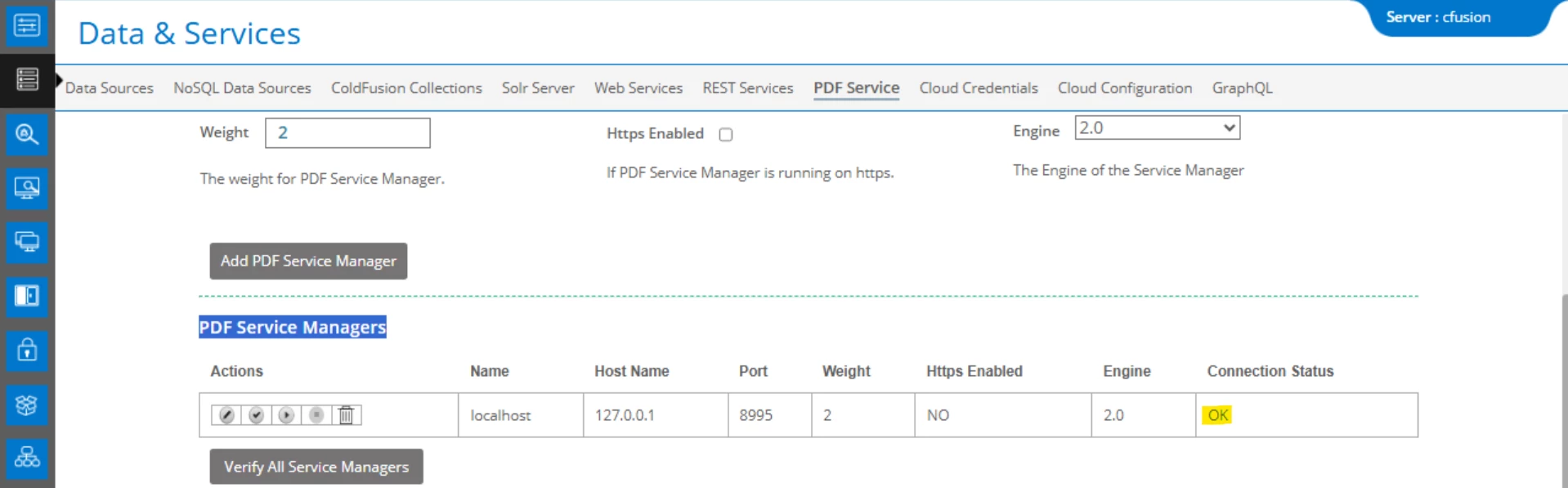
First, I think you'll find that what you're "missing" is that you assert that you "Verified "PDF Service Managers" is enabled", but your screenshot shows it is NOT enabled. Instead, you likely mean you clicked the (second) "Verify" button...and the "connection status" column indeed shows "ok". But that's only verifying that with those values CF COULD indeed REACH the PDF service, but it does not test also that the PDF service is in fact ENABLED.
Your screesnhot shows that the the (third) "Enable" button is black while the (fourth) "Disable" button is greyed out. Click the enable button and try your test again.
Does that get things going?
Assume it does, and as for the frustrating experience, we could contend first that the verify button should do both, but it does not. This is similar to how the mail page in the CF admin works, with its option to "Verify mail server connection": that also merely checks if CF can REACH the SMTP server...but in some situations no email will actually be deliverable to that mail server for other reasons.
And next you may well wonder why "it didn't tell you that was the problem", but note first that if you look in the application.log, coldfusion-out.log, or exception.log you should see it reporting "No Service manager is available." As for why the tag does not fail in such a way as to show an error (or even be able to be caught in error handling), note that someone raised a bug report about that, which Adobe has marked as "verified" and "to fix".
Finally, if you may find that simply trying to "enable" the service now fails, that can be a result of any number of problems. If it happens, let us know and we can guide you to next steps.
/Charlie (troubleshooter, carehart. org)




 AdChoices