
cfinput calendar type shows up behind fields
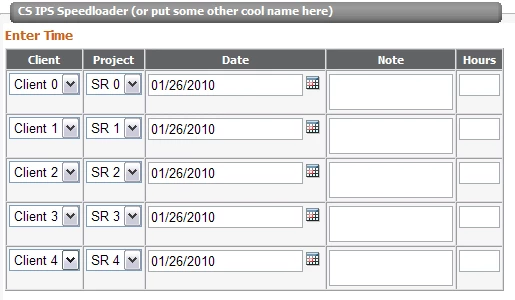
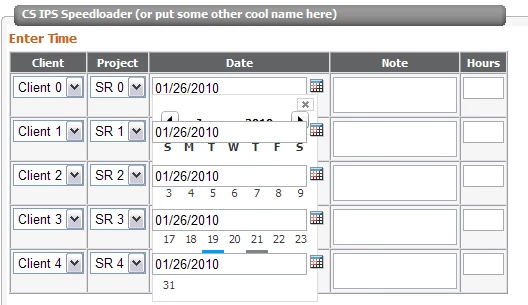
I've Googled this thing to death and tried everything I can think of regarding style attributes, absolute/relative positioning, different z-index values, etc. I've read articles about CSS bleed-through, etc. Whether I use cfinput or regular old html input fields, I just can seem to keep this from happening. Can anyone enlighten me? Maybe I'm just headed down the wrong path. Any input would be great!
Before clicking calendar:
After clicking:
code snippet:
<cfform
method="POST" action="speed.cfm" name="test">
<table class="DataGrid" cellspacing="0" cellpadding="2" rules="all" border="1" >
<tr class="DataGridHeader">
<th scope="col">Client</th><th scope="col">Project</th><th scope="col">Date</th><th scope="col">Note</th><th scope="col">Hours</th>
</tr>
<cfloop from="0" to="4" index="i">
<tr>
<td valign="top" align="center">
<select name="sIPSAccountID" onchange="">
<option value="">Client <cfoutput>#i#</cfoutput></option>
</select>
</td>
<td valign="top" align="center">
<select name="sIPSAccountID" onchange="">
<option value="">SR <cfoutput>#i#</cfoutput></option>
</select>
</td>
<td valign="top" align="center">
<cfinput type="datefield" enabled="true" name="sBeginDate#i#" value="1/26/2010">
</td>
<td valign="top" align="center"><textarea rows="2" cols="15" style="overflow:hidden;"></textarea></td>
<td valign="top" align="center"><input type="text" size="1" maxlength="2"></td>
</tr>
</cfloop>
</table>
</cfform>
 AdChoices