
Inspiring
March 13, 2012
Answered

cflayout not working

  • March 13, 2012
  • 1 reply
  • 1003 views

Is there a setting in the cf administrator that I need to set to have access to the cflayout methods and tags?

Currently I am using ColdFusion 9 Standard.  When I try this code posted at the bottom of this page: http://help.adobe.com/en_US/ColdFusion/9.0/CFMLRef/WS0ef8c004658c1089-6262c847120f1a3b244-7ff1.html

<html>

<head>

</head>

<body>

<cfform name="layouts">

  <cfinput type="button" name="CreateTab" 

   onClick="ColdFusion.Layout.createTab('tabLayout','tab2',

   'Tab 2','_tabUrl.cfm',{inithide:false,selected:true})"

  value="Create Tab">

</cfform>

<cflayout type="tab" name="tabLayout">

  <cflayoutarea name="tab1" title="Tab 1" align="left">

  Default Tab

  </cflayoutarea>

</cflayout>

</body>

</html>

I get this:
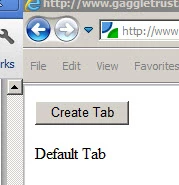
but no tabs, even when I click on the 'Create Tab' button.

Any thoughts?

Thank you!

John

This topic has been closed for replies.
Correct answer john_glynn

Ah!  ColdFusion was unable to locate my CFIDE directory where the required javascripts are located.  I made a virtual directory pointing to this location.  Is there any reason not to solve the problem that way (security, performance, etc...)?  I know I could copy all of those java scripts to the directory of my project but that seems like a lot of hassle, and what do I do when I upgrade CF9? 

Thanks!

1 reply

john_glynnAuthorCorrect answer
Inspiring
March 14, 2012

Ah!  ColdFusion was unable to locate my CFIDE directory where the required javascripts are located.  I made a virtual directory pointing to this location.  Is there any reason not to solve the problem that way (security, performance, etc...)?  I know I could copy all of those java scripts to the directory of my project but that seems like a lot of hassle, and what do I do when I upgrade CF9? 

Thanks!