
Known Participant
August 18, 2014
Answered

CFThread GC Overhead Limit Exceeded

  • August 18, 2014
  • 3 replies
  • 13787 views

I have an application that trades virtual items and have a single page which gets all my accounts and for each one creates a thread that firstly logs the account in and then searches and buys for items for as long as the session is active.  I should point out at this point that this is my first experience of using cfthread.

I'm having issues with it. Every 30 minutes (if not less) my ColdFusion server comes to a standstill and I have to restart the service. Upon restarting the service I check the logs and there are errors that say "GC Overhead Limit Exceeded".

I have looked extensively online but as much as cfthread is new to me, so is the JVM and how it operates. I'm running on CF10 Enterprise Edition and have loaded up the server monitor and surely enough I can see the JVM memory usage grow and grow until the limit has been reached (just now I have it set as 2gb as when I had it set higher the memory seemed to fill up quicker). Even when I select the Run GC option in the monitor it does not reduce the memory usage very much, if at all.

Is this more than likely something to do with my code? At the moment I have just under 50 threads being created but as I add more accounts to the application then the more threads that will be required.

Here is the code from the page...

<script>

  /* RELOAD PAGE EVERY 65 MINUTES */

  setTimeout(function(){

    window.location.reload(1);

  }, 3900000);

</script>

<!--- GET ACTIVE ACCOUNTS --->

<cfquery name="getLogins" datasource="myDB">

SELECT * FROM Logins WHERE active = 1

</cfquery>

<!--- LOOP THROUGH ACCOUNT --->

<cfloop query="getLogins">

  <!--- HAVE A SLEEP SO IP DOESN'T GET FLAGGED FOR SENDING TOO MANY REQUESTS AT ONCE --->

  <cfset Sleep(30000) />

  <!--- CREATE THREAD FOR ACCOUNT --->

  <cfthread

  name="#getLogins.accountName#"

  action="run"

  accountName="#Trim(getLogins.accountName)#"

  email="#Trim(getLogins.email)#"

  password="#Trim(getLogins.password)#"

  resourceId="#Trim(getLogins.resourceID)#">

  <!--- DEFAULT SESSION VARIABLES --->

  <cfset SESSION["#attributes.accountName#LoggedIn"] = 0 />

  <cfset SESSION["#attributes.accountName#LoginAttempts"] = 0 />

  <!--- WHILE ACCOUNT NOT LOGGED IN AND LESS THAN 8 LOGIN ATTEMPTS MADE --->

  <cfscript>

  while (SESSION['#attributes.accountName#LoggedIn'] EQ 0 AND SESSION['#attributes.accountName#LoginAttempts'] LT 😎 {

  // ATTEMPT LOGIN

  THREAD.logInAccount = Application.cfcs.Login.logInAccount(attributes.email,attributes.password);

  // IF LOGIN ATTEMPT UNSUCCESSFUL

  if (THREAD.logInAccount EQ 0) {

  // INCREASE ATTEMPT COUNT

  SESSION['#attributes.accountName#LoginAttempts'] = SESSION['#attributes.accountName#LoginAttempts'] + 1;

  }

  // ELSE IF RETURNED VALUE IS 481 THEN ACCOUNT IS LOCKED

  else if (THREAD.logInAccount EQ 481) {

  // SET LOGIN ATTEMPT COUNT TO STOP LOOP

  SESSION['#attributes.accountName#LoginAttempts'] = 8;

  // UPDATE ACCOUNT TO MARK AS LOCKED

  THREAD.updLogin = Application.cfcs.Login.updLogin(attributes.email);

  }

  }

  </cfscript>

  <!--- IF ACCOUNT LOGGED IN --->

  <cfif SESSION['#attributes.accountName#LoggedIn'] EQ 1>

  <!--- SET ID FOR SEARCHING --->

  <cfset THREAD.definitionID = attributes.resourceID - 1610612736 />

  <!--- WHILE ACCOUNT LOGGED IN --->

  <cfloop condition="SESSION['#attributes.accountName#LoggedIn'] EQUALS 1">

  <!--- GET LATEST LOWEST BUY NOW PRICE --->

  <cfquery name="THREAD.getMinBIN" datasource="FUT" cachedWithin="#CreateTimeSpan(0,0,1,0)#">

  SELECT TOP 1 * FROM v_FUT14BINPrices WHERE resourceID = #attributes.resourceId# ORDER BY lastUpdated DESC

  </cfquery>

  <!--- INCLUDE FILE THAT CALCULATES BUYING AND SELLING PRICES --->

  <cfinclude template="sellingPrices.cfm" />

  <!--- IF BIDDING PRICE HAS BEEN SET --->

  <cfif StructKeyExists(THREAD,"biddingPrice")>

  <!--- MAKE SEARCH REQUEST, TIMING THE REQUEST --->

  <cfset THREAD.requestStart = GetTickCount() />

  <cfset THREAD.search = Application.cfcs.Search.dosearchOld(attributes.resourceId,THREAD.biddingPrice,0) />

  <cfset THREAD.requestDuration = GetTickCount() - THREAD.requestStart />

  <!--- IF SEARCH CONTAINS FILE CONTENT  --->

  <cfif StructKeyExists(THREAD.search,"FileContent")>

  <!--- DECLARE NUMBER OF RESULTS VARIABLE --->

  <cfset THREAD.numResults = 0 />

  <!--- IF JSON RETURNED --->

  <cfif IsJSON(THREAD.search.FileContent)>

  <!--- DESERIALIZE JSON --->

  <cfset THREAD.searchResults = DeserializeJSON(THREAD.search.FileContent) />

  <!---  IF PLAYER SEARCH RETURNS AUCTIONINFO STRUCT --->

  <cfif StructKeyExists(THREAD.searchResults,"auctionInfo")>

  <!--- SET NUMBER OF CARDS RETURNED FROM SEARCH --->

  <cfset THREAD.numResults = ArrayLen(THREAD.searchResults.auctionInfo) />

  <cfset THREAD.statusCode = "Successful" />

  <cfif THREAD.numResults EQ 0>

  <cfset THREAD.statusCode = "Successful - No Results" />

  </cfif>

  <!--- ELSE IF ERROR CODE RETURNED --->

  <cfelseif StructKeyExists(THREAD.searchResults,"code")>

  <cfset THREAD.statusCode = THREAD.searchResults.code />

  <!--- IF CODE 401 THEN SESSION HAS EXPIRED --->

  <cfif THREAD.statusCode EQ 401>

  <!--- SET SESSION AS LOGGED OUT AND ATTEMPT SESSION REFRESH --->

  <cfset SESSION['#attributes.accountName#LoggedIn'] = 0 />

  <cfset THREAD.logInAccount = Application.cfcs.Login.logInAccount(attributes.email,attributes.password) />

  </cfif>

  <!--- ELSE SOMETHING ELSE HAS HAPPENED --->

  <cfelse>

  <cfset THREAD.statusCode = "Something Else - " & THREAD.searchResults.code />

  </cfif>

  <!--- IF RESULTS RETURNED --->

  <cfif THREAD.numResults GT 0>

  <!--- LOOP ROUND RESULTS AND CHECK IF MATCH BUYING CRITERIA --->

  <cfloop index="i" from="1" to="#THREAD.numResults#">

  <!--- ***SAFETY CHECK*** - ENSURE ID OF CURRENT CARD IS SAME AS ONE SEARCHING FOR --->

  <cfif THREAD.searchResults.auctionInfo.itemData.resourceID EQ attributes.resourceId AND THREAD.getMinBIN.resourceID EQ attributes.resourceId>

  <!--- ENSURE BIN PRICE SET AND IS LESS THAN SET BUYING PRICE --->

  <cfif THREAD.searchResults.auctionInfo.buyNowPrice GT 0 AND THREAD.searchResults.auctionInfo.buyNowPrice LTE THREAD.biddingPrice>

  <!--- SET AUCTION END TIME --->

  <cfset THREAD.timeLeft = THREAD.searchResults.auctionInfo.expires />

  <cfset THREAD.auctionEnds = DateAdd("s",THREAD.timeLeft,Now()) />

  <!--- BUY CARD --->

  <cfset THREAD.buyCard = Application.cfcs.Bid.doBIN(THREAD.searchResults.auctionInfo.tradeID,THREAD.searchResults.auctionInfo.buyNowPrice,THREAD.searchResults.auctionInfo.startingBid,THREAD.searchResults.auctionInfo.itemData.ID,THREAD.searchResults.auctionInfo.itemData.resourceID,THREAD.startPrice,THREAD.binPrice,THREAD.lowestBIN,THREAD.searchResults.auctionInfo.itemData.discardValue,THREAD.auctionEnds,THREAD.requestStart,THREAD.requestDuration) />

</cfif>

  </cfif>

  </cfloop>

  </cfif>

  <cfelse>

  <cfset THREAD.statusCode = THREAD.search.FileContent />

  </cfif>

  <cfset THREAD.sleepDuration = 1000 - THREAD.requestDuration />

  <cfif THREAD.sleepDuration GT 0><cfset Sleep(THREAD.sleepDuration) /></cfif>

  </cfif>

  <!--- INSERT SEARCH RECORD --->

  <cfset THREAD.insSearchRecord = Application.cfcs.Search.insSearchRecord(THREAD.definitionID,THREAD.statusCode,THREAD.requestDuration,THREAD.numResults,THREAD.biddingPrice) />

  </cfif>

  </cfloop>

  </cfif>

  </cfthread>

</cfloop>

I would have thought that the memory would have stayed around the same usage as each loop is performing the same set of actions so once the loop has went back to the start then I thought the previous loop would have been removed from memory (freeing up space) and then the same actions would be performed so the same memory total would then be used up but it seems almost as if each loop is being kept in memory and that is why it is growing.

Could someone please help me out and offer some guidance on how I could remedy this issue? If you need any more info then just let me know

Thanks in advance
This topic has been closed for replies.
Correct answer carl type3

Not even getting 30 minutes up-time anymore, memory threshold seems to be getting exceeded after 10-15 minutes for whatever reason...grrrrrrr! Will report back further.


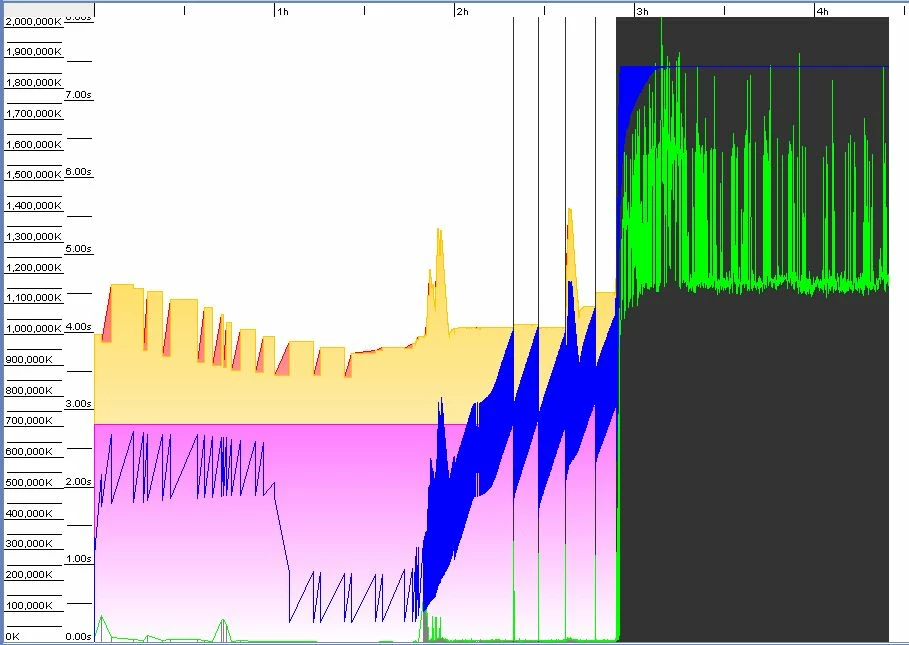
JVM looks like this thanks to gcviewer:


The diagram does not show PermGen details. Tail of log says:

PSPermGen  total 1048576K, used 80172K object space 1048576K, 7% used.

While you may have something to resolve with the CFM code, for now to keep the system up perhaps you can do better to make some JVM adjustments. Keep in mind this is probably not a fix for the overall problem more try this to see if the system stays up while you continue to work on other CFM matters.

I expect JVM details are like this currently:


Minimum heap size: 1024
Maximum heap size: 2048
-XX:MaxPermSize=1024m

The overall system is:

CF10 on a Windows 7 x64 machine with an Intel core i3-2100 processor and 8GB RAM.


Seeing not many objects are maintained in PermGen you can make that smaller. Double heap sizes and set a value for the new part of heap. EG:

Minimum heap size: 2048
Maximum heap size: 4096
-XX:MaxPermSize=324m
-Xmn256m

Or this way if you prefer in CFadmin:

-server -Xmn256m -XX:MaxPermSize=324m -XX:PermSize=192m -XX:+UseParallelGC -Xbatch -Dcoldfusion.home={application.home} -Dcoldfusion.rootDir={application.home} -Dcoldfusion.libPath={application.home}/lib -Dorg.apache.coyote.USE_CUSTOM_STATUS_MSG_IN_HEADER=true -Dcoldfusion.jsafe.defaultalgo=FIPS186Random -XX:+PrintGCDetails -XX:+PrintGCTimeStamps -XX:+PrintHeapAtGC -verbose:gc -Xloggc:cfjvmGC.log

Or this way by editing JVM.CONFIG:

-server -Xms2048m -Xmx4096m -Xmn256m -XX:MaxPermSize=324m -XX:PermSize=192m -XX:+UseParallelGC -Xbatch -Dcoldfusion.home={application.home} -Dcoldfusion.rootDir={application.home} -Dcoldfusion.libPath={application.home}/lib -Dorg.apache.coyote.USE_CUSTOM_STATUS_MSG_IN_HEADER=true -Dcoldfusion.jsafe.defaultalgo=FIPS186Random -XX:+PrintGCDetails -XX:+PrintGCTimeStamps -XX:+PrintHeapAtGC -verbose:gc -Xloggc:cfjvmGC.log


For now it might be advisable to set JVM to perform full garbage collection every 10 minutes but as I post I am undecided so will post again more thoughts on that if it seems more like a good bandaid idea to me. I think stay with UseParallelGC because it tends to keep the heap evacuated rather than alter garbage collector to something that tends to maintain objects in memory.


Java is 7 so not EOL 6 tho fair to say 7u15 is old with 7u67 current. Java 8 is also release however no support statement from Adobe with running  CF10 on Java 8. Since you are not using a newer garbage collection algorithim like G1GC (and for now I do not recommend you do) I think stay with 7u15 for now.

HTH, Carl.

3 replies

cpb071Author
Known Participant
August 31, 2014

I didn't mean that we were focusing on that at the present, I was just inquiring whether I should ignore exploring different JVM settings.

BKBK
Community Expert
Community Expert
September 1, 2014

You actually brought up a good topic. We should have explored your JVM settings, if only to rule them out.

So, what are your JVM settings - particularly maximum heap (Xmx), minimum heap (Xms) and XX:MaxPermSize?

cpb071Author
Known Participant
September 1, 2014

I had tinkered with them previously but at present they are as follows:

-server -XX:MaxPermSize=192m -XX:PermSize=192m -XX:+UseParallelGC -Xbatch -Dcoldfusion.home={application.home} -Dcoldfusion.rootDir={application.home} -Dcoldfusion.libPath={application.home}/lib -Dorg.apache.coyote.USE_CUSTOM_STATUS_MSG_IN_HEADER=true -Dcoldfusion.jsafe.defaultalgo=FIPS186Random -XX:+PrintGCDetails -XX:+PrintGCTimeStamps -XX:+PrintHeapAtGC -verbose:gc -Xloggc:cfjvmGC.log

Minimum and maximum JVM Heap Sizes are both set to 2048mb.

cpb071Author
Known Participant
August 30, 2014

Sometimes the host server returns a message saying that it has reached its max connections so it sometimes takes several attempts until a successful login is achieved, although this isn't particularly common. The only time that an account won't log in at all is if the host server is down or if the account has been banned (usually for continually exceeding the request threshold). Having the login attempt set at 8 is probably a bit overkill.

Yeah it was the version with the 100,000,000 loops that I had tried, I've just ran the one with 500,000,000 loops and again the ColdFusion CPU consumption stays around the 50% mark with the overall CPU usage sitting around 59%.

BKBK
Community Expert
Community Expert
August 30, 2014

Thanks for the explanation. Your result,

I've just ran the one with 500,000,000 loops and again the ColdFusion CPU consumption stays around the 50% mark with the overall CPU usage sitting around 59%.

seems more like it. It shows us the astonishingly high memory consumption of two loops that do practically nothing besides looping. If each was to create objects, the garbage collector might not have the opportunity of cleaning up before the overhead limit is reached.

The moral is clear. We should avoid stagnation wherever possible. A function that fails to return, for example, might hold objects that cannot then be garbage-collected.

Sometimes the host server returns a message saying that it has reached its max connections so it sometimes takes several attempts until a successful login is achieved, although this isn't particularly common. The only time that an account won't log in at all is if the host server is down or if the account has been banned (usually for continually exceeding the request threshold). Having the login attempt set at 8 is probably a bit overkill.

That sounds good. It is crucial for the loops to keep going, without obstruction, and to terminate quickly in case of login failure.

By the way, how many accounts are there in your database? I ask because I have just noticed parts of the code that may cause concurrency issues.

  <!--- INCLUDE FILE THAT CALCULATES BUYING AND SELLING PRICES --->

  <cfinclude template="sellingPrices.cfm" />

I doubt that a thread can do an include like that into the current page. If it can, it will lead to a shambles. Since the threads are generated asynchronously, they run simultaneously, and in no particular order. If the include were possible, the different accounts will each include sellingPrices.cfm, in unpredictable order.

The solution is to copy the content of sellingPrices.cfm to this particular point in the code.

cpb071Author
Known Participant
August 31, 2014

At the moment there are about 70 (although this is likely to increase dramatically over time). In the included sellingPrices.cfm I have set all variables in the thread scope and this seems to work fine (as I keep a record of each item request and all the prices match up the way they should). There is not a great deal amount of code in that page so I shall move it in to the main thread code.

Is it better to avoid focusing on settings in the JVM at the moment as we're trying to eradicate the issue that is causing the overhead limit issue, rather than postponing the inevitable?

BKBK
Community Expert
Community Expert
August 19, 2014

You seem to be generating too many threads in a loop, each of them holding live objects. There is a high chance the heap of live objects that the loop generates keeps growing. The error message is telling you that the garbage collector has been unsuccessful in clearing up (because the objects are live).

For a start, I see no motivation for the use of cfthread and for the calls to sleep(). The page implicitly runs in a thread, the main Coldfusion execution thread. To monitor the number of requests per minute, use a counter in onRequestStart instead of sleep().

You should strip your code down to its bare bones. Something like this

<script>

  /* RELOAD PAGE EVERY 65 MINUTES */

  setTimeout(function(){

    window.location.reload(1);

  }, 3900000);

</script>

<!--- GET ACTIVE ACCOUNTS --->

<cfquery name="getLogins" datasource="myDB">

SELECT * FROM Logins WHERE active = 1

</cfquery>

<!--- LOOP THROUGH ACCOUNT --->

<cfloop query="getLogins">

    <cfset accountName=getLogins.accountName>

    <cfset email=getLogins.email>

    <cfset password=getLogins.password>

    <cfset resourceId=getLogins.resourceID>

    <!--- DEFAULT SESSION VARIABLES --->

    <cfset SESSION["#accountName#LoggedIn"] = 0 />

    <cfset SESSION["#accountName#LoginAttempts"] = 0 />


    <!--- WHILE ACCOUNT NOT LOGGED IN AND LESS THAN 8 LOGIN ATTEMPTS MADE --->

    <cfscript>

    while (SESSION['#accountName#LoggedIn'] EQ 0 AND SESSION['#accountName#LoginAttempts'] LT 8) {


        // ATTEMPT LOGIN

        logInAccount = Application.cfcs.Login.logInAccount(email,password);


        // IF LOGIN ATTEMPT UNSUCCESSFUL

        if (logInAccount EQ 0) {

            // INCREASE ATTEMPT COUNT

            SESSION['#accountName#LoginAttempts'] = SESSION['#accountName#LoginAttempts'] + 1;

        }

        // ELSE IF RETURNED VALUE IS 481 THEN ACCOUNT IS LOCKED

        else if (logInAccount EQ 481) {

            // SET LOGIN ATTEMPT COUNT TO STOP LOOP

            SESSION['#accountName#LoginAttempts'] = 8;

            // UPDATE ACCOUNT TO MARK AS LOCKED

            updLogin = Application.cfcs.Login.updLogin(email);

        }

    }

    </cfscript>

    <!--- IF ACCOUNT LOGGED IN --->

    <cfif SESSION['#accountName#LoggedIn'] EQ 1>

        <!--- SET ID FOR SEARCHING --->

        <cfset definitionID = resourceID - 1610612736 />


        <!--- WHILE ACCOUNT LOGGED IN --->

        <cfloop condition="SESSION['#accountName#LoggedIn'] EQUALS 1">

            <!--- GET LATEST LOWEST BUY NOW PRICE --->

            <cfquery name="getMinBIN" datasource="FUT" cachedWithin="#CreateTimeSpan(0,0,1,0)#">

            SELECT TOP 1 * FROM v_FUT14BINPrices WHERE resourceID = #resourceId# ORDER BY lastUpdated DESC

            </cfquery>


            <!--- INCLUDE FILE THAT CALCULATES BUYING AND SELLING PRICES --->

            <cfinclude template="sellingPrices.cfm" />


            <!--- IF BIDDING PRICE HAS BEEN SET --->

            <cfif StructKeyExists(SESSION,"biddingPrice")>

                <!--- MAKE SEARCH REQUEST, TIMING THE REQUEST --->

                <cfset requestStart = GetTickCount() />

                <cfset search = Application.cfcs.Search.dosearchOld(resourceId,biddingPrice,0) />

                <cfset requestDuration = GetTickCount() - requestStart />


                <!--- IF SEARCH CONTAINS FILE CONTENT  --->

                <cfif StructKeyExists(search,"FileContent")> 

                    <!--- DECLARE NUMBER OF RESULTS VARIABLE --->

                    <cfset numResults = 0 />


                    <!--- IF JSON RETURNED --->

                    <cfif IsJSON(search.FileContent)>

                        <!--- DESERIALIZE JSON --->

                        <cfset searchResults = DeserializeJSON(search.FileContent) />


                        <!---  IF PLAYER SEARCH RETURNS AUCTIONINFO STRUCT --->

                        <cfif StructKeyExists(searchResults,"auctionInfo")>

                            <!--- SET NUMBER OF CARDS RETURNED FROM SEARCH --->

                            <cfset numResults = ArrayLen(searchResults.auctionInfo) />

                            <cfset statusCode = "Successful" />

                            <cfif numResults EQ 0>

                            <cfset statusCode = "Successful - No Results" />

                            </cfif>

                        <!--- ELSE IF ERROR CODE RETURNED --->

                        <cfelseif StructKeyExists(searchResults,"code")>

                            <cfset statusCode = searchResults.code />

                            <!--- IF CODE 401 THEN SESSION HAS EXPIRED --->

                            <cfif statusCode EQ 401>

                                <!--- SET SESSION AS LOGGED OUT AND ATTEMPT SESSION REFRESH --->

                                <cfset SESSION['#accountName#LoggedIn'] = 0 />

                                <cfset logInAccount = Application.cfcs.Login.logInAccount(email,password) />

                            </cfif>

                        <!--- ELSE SOMETHING ELSE HAS HAPPENED --->

                        <cfelse>

                            <cfset statusCode = "Something Else - " & searchResults.code />

                        </cfif>

                        <!--- IF RESULTS RETURNED --->

                        <cfif numResults GT 0>

                        <!--- LOOP ROUND RESULTS AND CHECK IF MATCH BUYING CRITERIA --->

                            <cfloop index="i" from="1" to="#numResults#">

                                <!--- ***SAFETY CHECK*** - ENSURE ID OF CURRENT CARD IS SAME AS ONE SEARCHING FOR --->

                                <cfif searchResults.auctionInfo.itemData.resourceID EQ resourceId AND getMinBIN.resourceID EQ resourceId>

                                    <!--- ENSURE BIN PRICE SET AND IS LESS THAN SET BUYING PRICE --->

                                    <cfif searchResults.auctionInfo.buyNowPrice GT 0 AND searchResults.auctionInfo.buyNowPrice LTE biddingPrice>

                                    <!--- SET AUCTION END TIME --->

                                    <cfset timeLeft = searchResults.auctionInfo.expires />

                                    <cfset auctionEnds = DateAdd("s",timeLeft,Now()) />

                                    <!--- BUY CARD --->

                                    <cfset buyCard = Application.cfcs.Bid.doBIN(searchResults.auctionInfo.tradeID,searchResul ts.auctionInfo.buyNowPrice,searchResults.auctionInfo.startingBid,searc hResults.auctionInfo.itemData.ID,searchResults.auctionInfo.itemData.resourceI D,startPrice,binPrice,lowestBIN,searchResults.auctionInfo.i temData.discardValue,auctionEnds,requestStart,requestDuration) />

                                    </cfif>

                                </cfif>

                            </cfloop>

                        </cfif>

                    <cfelse>

                        <cfset statusCode = search.FileContent />

                    </cfif>

                </cfif>

                <!--- INSERT SEARCH RECORD --->

                <cfset insSearchRecord = Application.cfcs.Search.insSearchRecord(definitionID,statusCode,requestDuration,numResults,biddingPrice) />

            </cfif>

        </cfloop>

    </cfif>

</cfloop>

cpb071Author
Known Participant
August 25, 2014

Having held a conversation with BKBK and given them a deeper insight in to how my application is structured and works, the issue of the GC Overhead Limit being exceeded is still requiring tackled.

The functionality of the app works very well whilst there is memory available and the cfthreads are required to allow the accounts to search synchronously.

The question at hand here is how can I go about implementing a solution that ensures the JVM does not run out of memory?

BKBK
Community Expert
Community Expert
August 25, 2014

Yes, in our private mail discussions we weighed up alternative options. For example, using event gateways for asynchronous calls instead of cfthread, and websockets to dispatch notifications to users.

This would mean redesigning and rewriting the code, with no guarantee that that would solve the memory problem. We agreed that a better solution would be to find ways to optimize the current code.