
Participating Frequently
February 25, 2019
Answered

Character encoding issue with CFMail

  • February 25, 2019
  • 3 replies
  • 3112 views

A couple weeks ago we began noticing weird character suddenly appearing the From field of some emails, this after Update 8 for CF2016 had been applied. I rolled back to Update 7 and was able to see the accented character correctly again. I applied Update 9 this morning, thinking maybe it would address the issue but no luck. Hoping now someone on here may have the answer.

Local CF 2016, Update 9 running on a Windows 10 using CF's built-in server (no IIS or Apache)

Page encoding is set to utf-8 and I've tried it with and without the charset set in the cfmail tag as shown below.

<cfset FromField = """#GetPoster.FirstName# #GetPoster.LastName#"" <support@*****.com>">

<cfmail to="#ToField#"

        from="#FromField#"

        subject="HelpDesk - Request #SRNr#"

        charset="utf-8">

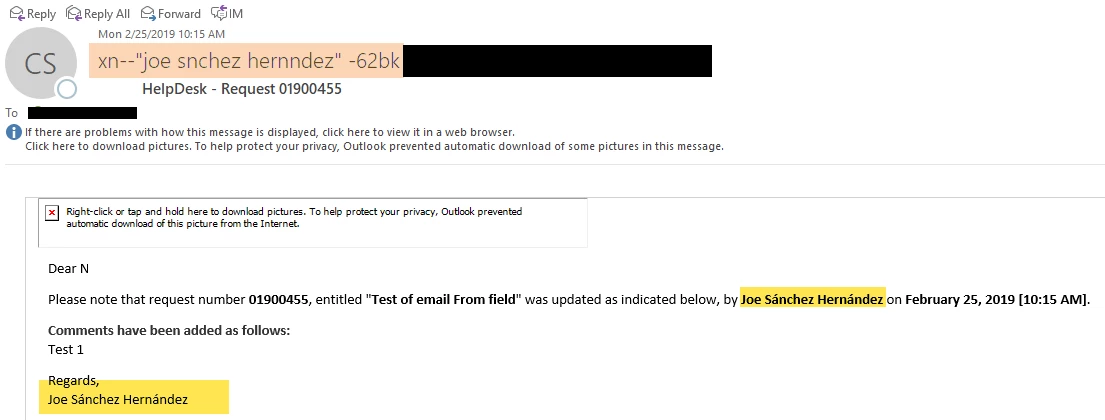
With update 9 installed (as well as 😎 the From field appears to mess up the character encoding but not that within the email body text
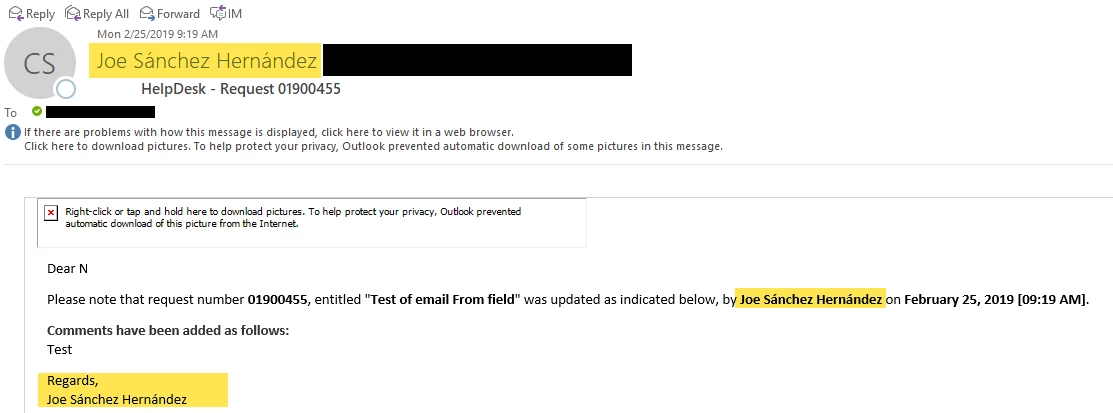
When rolled back to Update 7 everything displays okay
Thanks in advance

This topic has been closed for replies.
Correct answer James Moberg

It's an official new bug.  I've been using ASCII characters since CF 6 and only just now stopped working in CF2016u8 & 9.

Here's the bug I reported. Adobe responded within 24 hours and indicated that the bug will be fixed in an upcoming Hotfix 10 release.
https://tracker.adobe.com/#/view/CF-4204050


Until then, I've overcome this issue by adding a UDF+JAR that converts unicode to ASCII7. I added this workaround that I'm using to the bug report.

To sanitize non-ASCII7 characters from a text string, the workaround I've been using is to convert all unicode to ASCII7 using JUnidecode. (We also use this to sanitize filenames & URL path strings.)

https://gamesover2600.tumblr.com/post/182608667654/coldfusion-unicode-junidecode-demo

Using JUnidecode requires adding a JAR file to your project, but the results are much better than writing your own regex filter or using Normalizer, Transliterate or StripAccent libraries.

3 replies

Inspiring
February 28, 2019

It looks like Punycode encoding (RFC 3492) that's used for domain names that contain special/high characters.

There's a JAVA function that can do this

To get the result ending by "-62bk" the name has to be followed ba a space.

<cfdump var="#CreateObject( "java", "java.net.IDN" ).toAscii('"Joe Sánchez Hernández "')#">

<cfdump var="#CreateObject( "java", "java.net.IDN" ).toUnicode('xn--"joe snchez hernndez" -62bk')#">

Interestingly there's a space in front of the dash/minus 62bk after the quotes. The encoded result does not differ whether there's a space before or after the quote.

James Moberg
James MobergCorrect answer
Inspiring
February 27, 2019

It's an official new bug.  I've been using ASCII characters since CF 6 and only just now stopped working in CF2016u8 & 9.

Here's the bug I reported. Adobe responded within 24 hours and indicated that the bug will be fixed in an upcoming Hotfix 10 release.
https://tracker.adobe.com/#/view/CF-4204050


Until then, I've overcome this issue by adding a UDF+JAR that converts unicode to ASCII7. I added this workaround that I'm using to the bug report.

To sanitize non-ASCII7 characters from a text string, the workaround I've been using is to convert all unicode to ASCII7 using JUnidecode. (We also use this to sanitize filenames & URL path strings.)

https://gamesover2600.tumblr.com/post/182608667654/coldfusion-unicode-junidecode-demo

Using JUnidecode requires adding a JAR file to your project, but the results are much better than writing your own regex filter or using Normalizer, Transliterate or StripAccent libraries.

James Moberg
Inspiring
March 1, 2019

ColdFusion 2016 update 10 has arrived... and this hasn't been fixed.

Inspiring
March 1, 2019

The news sounded to me like the security issue was so urgent that the updater only brings the fix.

Adobe Patches Critical ColdFusion Vulnerability With Active Exploit | Threatpost

WolfShade
Legend
February 25, 2019

I don't use CF2016, however I did discover an odd glitch in CF11 that could be related.

Whenever I would use CFMAIL and either the TO or FROM value included quotation marks (like around a person's actual name, as you are doing), CFMAIL would force everything to lower case.

So "USTC WebMaster" webmaster@myDomain.com would become "ustc webmaster" webmaster@myDomain.com.

Unless there is a reason that your mail server requires names to be contained within quotation marks, try removing the quotation marks to see if that makes any changes.  Just as a workaround until Adobe fixes this issue.

HTH,

^ _ ^

James Moberg
Inspiring
February 27, 2019

WolfShade We've never encountered this issue regarding quotation marks.  We continue to use them in every outgoing CFMail message and it's never lowercased the text... until the bug in CF2016u8/9 when unicode characters are also present.

Are you sure you are using CHR(34) and not "smart quotes"?

WolfShade
Legend
February 27, 2019

I'm using the SHIFT+' direct entry method of putting quotes in.

<cfmail blah blah blah from="""WebAdmin"" <webadmin@mydomain.com>" blah></cfmail>

I don't use (or advise using) any Microsoft Word/Excel/whatever for any kind of inputting or copy/paste, although we do have a CMS (built for another department) that a few of the users LOVE to use Word for creating articles, then copy/paste into our CMS and upload to the server.  We are constantly fielding calls from the department wondering why an article isn't appearing or why an article is making the screen 'throw up' all over the place.  We constantly remind them that they can't use Word, to no avail.

V/r,

^ _ ^