Inspiring
November 12, 2014
Answered

Cold Fusion 11 refresh page image does not appear

  • November 12, 2014
  • 2 replies
  • 7929 views

Hi,


In Cold Fusion 11, when I first bring up a page the graphic image appears.

When I refresh the page, the graphic image does not appear.

This is not an issue with Cold Fusion 9.

Is there anything in the administration that needs to be configured?

Thanks,

Mike

    This topic has been closed for replies.
    Correct answer haxtbh

    I checked the IIS information per the Microsoft knowledge base article and everthing was already enabled.

    You mentioned "Turning on Failed Request Tracing". Where would this be done?

    Thanks,

    Mike


    If you open the IIS Management Console and go to the site you want to check, over on the right hand side where the Stop and Restart actions are there is a "Failed request traced" link. Click this to open it and enable it.
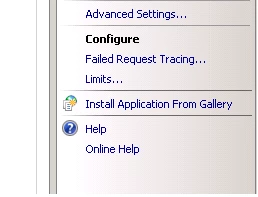
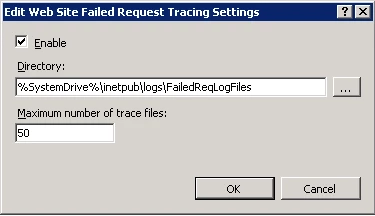
      

    Once this is enabled you can go  back to the "Home" part of the site in IIS where all the icons for configuration are. If you have the module installed as part of IIS you will have a Failed Request Tracing Rules icon to open.

    If its not there then you will need to run the server management and add it to the IIS role on the server.

    Inside here you can add content to trace. Click the add button on the right hand side and keep the "All Content" selected and then on the next page enter the status code you are getting. Apply it to all the providers on the final page and click finish.

    Now if you visit the page you have the problem with and get the 500 error a request trace may log and you can find it (by default) in directory in the screenshot above.

    They are xml files that written which you can open up in a browser. It will show you all the steps it goes through processing the page and hopefully show you where it stops and give you the reason.

    Not always guaranteed and sometimes the errors can be really obscure. The fact you have problems with images rather then an actual page may mean it doesn't work but until you try it you wouldn't know.


    2 replies

    Carl Von Stetten
    Legend
    November 12, 2014

    So that looks like a 404.2 error, which is "Not Found" and related to CGI/ISAPI restrictions.  Also looks like the image is being loaded over HTTPS.  When the image first loads fine, is it also being loaded over HTTPS?  When you refresh, is any authentication expired?

    In any case, this is definitely an IIS issue.  You might have more luck getting assistance if you jump on Microsoft Technet for IIS support or on ServerFault.

    -Carl V.

    userCold9Author
    Inspiring
    November 17, 2014

    The site is using HTTPS. I do not see anything expired.

    This issue after installing Cold Fusion 11. When Cold Fusion 9 was installed, the images worked fine.

    Thanks

    Mike

    Carl Von Stetten
    Legend
    November 17, 2014

    I still don't think this is a ColdFusion issue.  However, you mentioned CF9 - did you install CF11 on the same server CF9 was or is on?  Did you remove the CF9 IIS connectors then add the CF11 connectors?  Have you removed CF9 or just stopped the services?

    -Carl V.

    Carl Von Stetten
    Legend
    November 12, 2014

    What pages are you referring to?  In the Administrator, or your own web site?

    -Carl V.

    userCold9Author
    Inspiring
    November 12, 2014

    I am referring to the website I support.

    Mike

    Carl Von Stetten
    Legend
    November 12, 2014

    Are you using the built-in web server or fronting your site with IIS or Apache?

    Turn on your developer tools in your browser and check the network information.  Are you getting any error codes for the image files?

    -Carl V.
