
Participant
November 26, 2020
Answered

coldfusion 10 application server service not starting

  • November 26, 2020
  • 1 reply
  • 309 views

I added to JVM arguments -Dfile.encoding=UTF8 and application server service not starting.

Here is the error. So is there a way to undo what I have done.  Because there is no way access to the Administrator panel. 
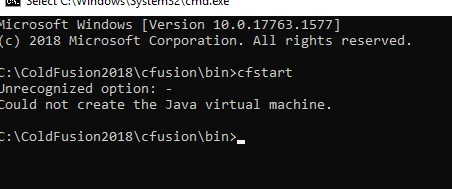


This topic has been closed for replies.
Correct answer Dave Watts

So, two things: when you edit jvm.config manually, I generally recommend backing it up first (not that you really needed to here I guess). Also, you may be able to get this file encoding option if you upgrade CF to a newer JVM. ColdFusion 10 comes with Java 6, but can be upgraded to Java 7 once you've installed update 8, and can be upgraded to Java 8 once you've installed update 14.


Dave Watts, Eidolon LLC

1 reply

Participant
November 26, 2020

For those, who would encounter the same problem,

open the ColdFusion10\cfusion\bin\jvm.config file as you would see the JVM arguments which you have added. I deleted the Dfile.encoding=UTF8 and service begin running again.

Dave WattsCommunity ExpertCorrect answer
Community Expert
November 26, 2020

So, two things: when you edit jvm.config manually, I generally recommend backing it up first (not that you really needed to here I guess). Also, you may be able to get this file encoding option if you upgrade CF to a newer JVM. ColdFusion 10 comes with Java 6, but can be upgraded to Java 7 once you've installed update 8, and can be upgraded to Java 8 once you've installed update 14.


Dave Watts, Eidolon LLC

Dave Watts, Eidolon LLC