LeaP
Participant
November 26, 2014
Answered

Coldfusion 11 administrator

  • November 26, 2014
  • 3 replies
  • 2439 views


I am having trouble accessing the cold confusion 11 administrator. I am using:

http://127.0.0.1:8501/CFIDE/administrator/index.cfm


I get:

A message stating page cannot load.


I have tried several browsers, turned of my anti-virus software and firewall but still nothing.


Can you please shed some light on this problem. I have an assignment due shortly that I really need it for.


Thank you in advance.

 

    This topic has been closed for replies.
    Correct answer rahul_u

    As you did not mention the platform, i assume its windows.

    There could be several possible causes for this issue..

    1. You need to check if ColdFusion 11 services are running.

    Goto Start --> Run --> type Services.msc, click on OK

    Find ColdFusion 10 Application Server in the list of services. Right click and start.

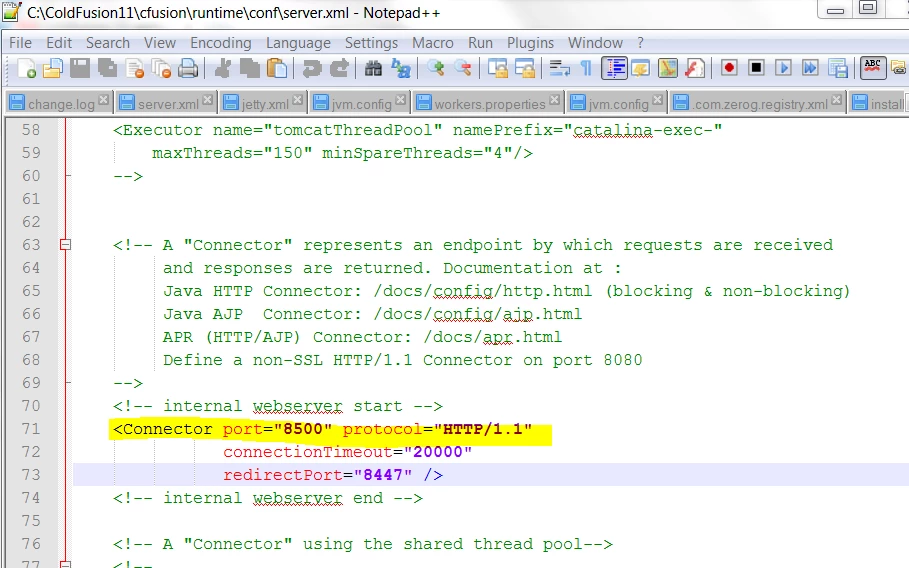
    2. Check the port number on which CF11 is running.

    You can find Port number in server.xml file which is located @ C:\ColdFusion11\cfusion\runtime\conf

    - The port number can be anything after 8500, 8501, 8502 etc.

    Use the appropriate port number to login to CF admin

    http://127.0.0.1:8500/CFIDE/administrator/index.cfm

    Please let us know if this helps.

    3 replies

    rahul_u
    Community Manager
    rahul_uCommunity ManagerCorrect answer
    Community Manager
    November 26, 2014

    As you did not mention the platform, i assume its windows.

    There could be several possible causes for this issue..

    1. You need to check if ColdFusion 11 services are running.

    Goto Start --> Run --> type Services.msc, click on OK

    Find ColdFusion 10 Application Server in the list of services. Right click and start.

    2. Check the port number on which CF11 is running.

    You can find Port number in server.xml file which is located @ C:\ColdFusion11\cfusion\runtime\conf

    - The port number can be anything after 8500, 8501, 8502 etc.

    Use the appropriate port number to login to CF admin

    http://127.0.0.1:8500/CFIDE/administrator/index.cfm

    Please let us know if this helps.

    LeaP
    LeaPAuthor
    Participant
    November 26, 2014

    Thank you Rahul. This appears to have worked. It now takes me to the login page. However, it will not accept my password (yes, it is correct). I saw a fix for this I think when I was searching for answers to this problem. I think their is a hotfix I should download. Please correct me if I am wrong.

    I really appreciate your response to my problem. Thank you so much.

    Lea

    rahul_u
    Community Manager
    Community Manager
    November 26, 2014

    Hi Lea,

    Looks like you have forgotten the admin password (We create one while installing ColdFusion).

    There is a built in password reset tool (A windows batch file) -- "passwordreset.bat"

    Location: C:\ColdFusion11\cfusion\bin

    Double click on "passwordreset.bat", it will launch a command prompt select the option 1 and then type your new password.

    Restart Coldfusion 11 services

    Goto Start --> Run --> type Services.msc, click on OK

    Find ColdFusion 11 Application Server in the list of services. Right click and Restart.

    This should work.

    Regards,

    Rahul

    Eduardo Athar
    Participating Frequently
    November 26, 2014

    Hello!

    You did something to happen on the server for this?

    You updated the server recently?

    What is the environment that is installed Coldfusion?
    Sorry but we need data in order to help = D

    Thanks!

    BKBK
    Community Expert
    Community Expert
    November 26, 2014

    The default port is 8500, so why deviate from http://127.0.0.1:8500/CFIDE/administrator/index.cfm?

    LeaP
    LeaPAuthor
    Participant
    November 26, 2014

    Because BKBK when I open that port it opens to coldfusion 10 not 11.

    BKBK
    Community Expert
    Community Expert
    November 26, 2014

    LeaP wrote:

    Because BKBK when I open that port it opens to coldfusion 10 not 11.

    Ah, OK.