
Participant
November 13, 2014
Answered

ColdFusion 11 cfcontent failing

  • November 13, 2014
  • 1 reply
  • 1441 views

I have a stumper.  Installed CF11 on our test server. Did some regression testing and am running into an issue. I have a .cfm that downloads information to Excel. It renders fine in CF10 (and prior versions). In CF11, it renders fine in IE10 and in FireFox. It however fails horribly in IE8 and since most of our users are still required to be on IE8, this is a showstopper.

Here is the code that sets up the excel dump - page name is show_table.cfm:


  <cfif IsDefined('URL.ExcelDump')>

        <cfheader name="Content-Disposition" value="filename=#Session.utilstablename#.xls">

  <cfcontent type="application/vnd.ms-excel">

  </cfif>

The website runs under SSL.  I have already turned off these lines - with no change in the below error:

       <META http-EQUIV="Pragma" CONTENT="no-cache">

       <META http-EQUIV="cache-control" CONTENT=" no-store,no-cache, must-revalidate">

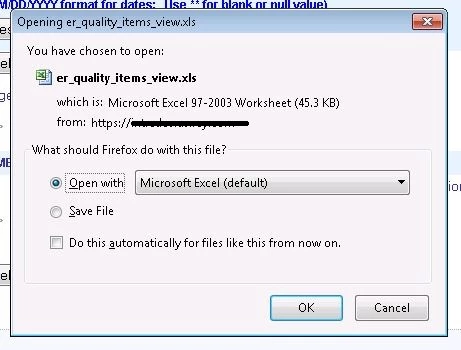
This is what I expect to happen - IE10 does a similar open/save panel:
here is what happens in IE8:
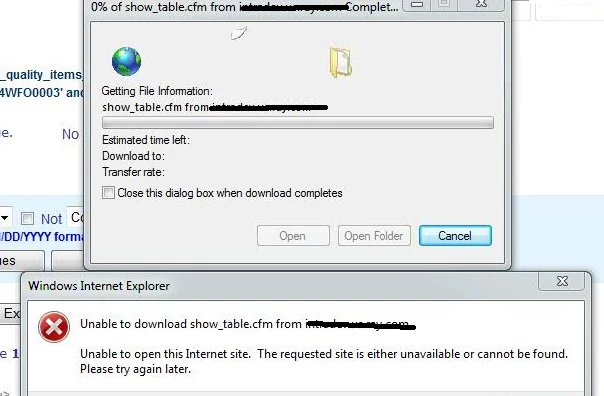
Note that the filename on the fail is the same as the .cfm page that is trying to do the download. It's like it does not see the cfheader setting it to the expected name (which for this particular download should be er_quality_items_view.xls). I tried commenting out the cfheader to make it take the default, and no change to the error.

It looks to me like this is a bug in CF11....any suggestions on how to get around this failure?

    This topic has been closed for replies.
    Correct answer AlHolden

    Specific to your problem is the behavior of some versions of IE

    Quoting MVP Erik Law (link below):

    "if a user tries to download a file over a HTTPS connection, any response headers that prevent caching will cause the file download process to fail."

    So, it's actually the provision of Cache-Control header tokens like no-cache & no-store, a Vary header or the infamous Pragma no-cache header which are causing the browser to abort the download when over ssl. Assuming Erik Law's blog link survives the test of time, you can read all about it via the link below.

    So, site-wide CFHEADER cache settings may be good in general, but you'll want to clear all that out when it comes to downloading files. Try placing this little gem above your download CFML code:
    <cfset getPageContext().getResponse().reset() />
    and test again.

    http://blogs.msdn.com/b/ieinternals/archive/2009/10/03/internet-explorer-cannot-download-over-https-when-no-cache.aspx


    https://groups.google.com/forum/?fromgroups#!topic/openbd/ke6cSVHXMfM

    1 reply

    AlHolden
    AlHoldenCorrect answer
    Inspiring
    November 21, 2014

    Specific to your problem is the behavior of some versions of IE

    Quoting MVP Erik Law (link below):

    "if a user tries to download a file over a HTTPS connection, any response headers that prevent caching will cause the file download process to fail."

    So, it's actually the provision of Cache-Control header tokens like no-cache & no-store, a Vary header or the infamous Pragma no-cache header which are causing the browser to abort the download when over ssl. Assuming Erik Law's blog link survives the test of time, you can read all about it via the link below.

    So, site-wide CFHEADER cache settings may be good in general, but you'll want to clear all that out when it comes to downloading files. Try placing this little gem above your download CFML code:
    <cfset getPageContext().getResponse().reset() />
    and test again.

    http://blogs.msdn.com/b/ieinternals/archive/2009/10/03/internet-explorer-cannot-download-over-https-when-no-cache.aspx


    https://groups.google.com/forum/?fromgroups#!topic/openbd/ke6cSVHXMfM

    casuzenAuthor
    Participant
    November 21, 2014

    adding that reset solves the problem...this fixed our issue, hope this  helps a few others on this forum.