
Known Participant
May 9, 2016
Question

Coldfusion 2016 CFChart not working with javascript

  • May 9, 2016
  • 1 reply
  • 1795 views

The pie chart below was created in ColdFusion v11
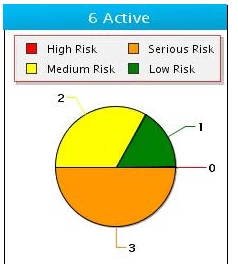
with the following javascript:

{

"graphset":[

  {

  "border-width":1,

  "background-color":"transparent",

  "foreground-color":"black",

  "plot":{

  "value-box":{"color":"black"},

  "border-color":"black",

  "tooltip-text":"%t\n%v"

  },

  "plotarea":{

  "margin":"dynamic"

  },

  "legend":{

  "border-color":"red",

  "layout":"2x",

  "x":10,

  "y":30,

  "shadow":true,

  "height":"40px"

  }

  }

  ]

}

in v2016 the JS does not work at all and received an error:

SyntaxError: unterminated string literal (zingchart-rhino.min.js#8(eval)#1) The specific sequence of files included or processed is: C:\websites\HazTrak\html\HazPortal.cfm, line: 1

if I take out the javascript the pie chart looks like:
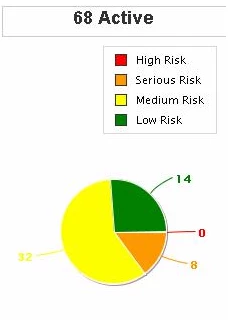
I either need a fixed so that v2016 will work with the same JS or an xml file to do the same as the js did.

    This topic has been closed for replies.

    1 reply

    Known Participant
    May 17, 2016

    The problem turned out to be the \n was causing the error. Do not know why the \n (line feed) would cause an error. It should not and did not in prior version. Also noticed that the border is not displaying correctly. Using a width of "1" will only show up on the left side. In order to have the border show up around the entire frame, you need a width of "2", but then the left border is thicker. Again, this worked fine in the previous version. And finally the size of the pie will change size depending on the placement of the titles which did not happen in prior version.

    WolfShade
    Legend
    May 17, 2016

    The \n line feed (next line / new line) is breaking the string, thus the "unterminated string literal" error message.

    Sort of like "Starting a string on one line

    and then continuing on the next line".

    In JavaScript, it should be "Starting a string on one line" +

    "and then continuing on the next line".

    I _could_ be wrong, but since the tooltip isn't appearing in an alert(), you might be able to use <br /> instead, to make the tooltip use a new line.  I know that in the overLib library you could do that.

    Just my two cents.

    HTH,

    ^_^

    Known Participant
    May 18, 2016

    the <br/> did work, but the problem is that you should not have to change code because of a new version.  If it worked in one version you should expect it to work in the next.