
Coldfusion 2016 JVM issues, CPU spikes
Upgraded to CF 2016 (on Windows 2016 64 bit VM server with 2 CPUs and 4GB of ram), and have had a lot of issues with the server hanging, going very slow, and the CPU spiking to very close to 100% and never going down. Usually a server/CF service restart fixes the issue for a while. I'm rebooting the server sometimes 3-4 times a day. This is the same code that worked fine w/o any issues like this in the past for years. After a reboot things will look like normal for hours, and then just slowly deteriorate to the point where it's unusable. It's kind of random too. Sometimes 2-3 hours. Sometimes 6, etc. Sometimes it'll happen overnight when just a few scheduled tasks are running. Things that have run for years w/o issue.
I'm trying to tweak the java arguments to help resolve this thinking this is maybe the problem. This is my jvm.config arguments:
java.args=-server -Xms1024m -Xmx1024m -XX:+PrintGCDetails -XX:+PrintGCTimeStamps -XX:+PrintHeapAtGC -verbose:gc -Xloggc:web_GC.log -Xdebug -Xrunjdwp:transport=dt_socket,server=y,suspend=n,address=5005 -XX:MaxMetaspaceSize=192m -XX:+UseParallelGC -Xbatch -Dcoldfusion.home={application.home} -Duser.language=en -Dcoldfusion.rootDir={application.home} -Dcoldfusion.libPath={application.home}/lib -Dorg.apache.coyote.USE_CUSTOM_STATUS_MSG_IN_HEADER=true -Dcoldfusion.jsafe.defaultalgo=FIPS186Random -Dorg.eclipse.jetty.util.log.class=org.eclipse.jetty.util.log.JavaUtilLog -Djava.util.logging.config.file={application.home}/lib/logging.properties -Dcoldfusion.classPath={application.home}/lib/updates,{application.home}/lib,{application.home}/lib/axis2,{application.home}/gateway/lib/,{application.home}/wwwroot/WEB-INF/flex/jars,{application.home}/wwwroot/WEB-INF/cfform/jars
I've also updated java to jre1.8.0_131 and use that for Coldfusion.
I monitor the garbage collection in GCViewier. Here is a screenshot around when one of the hangups occur. The black lines are "Full GC lines".
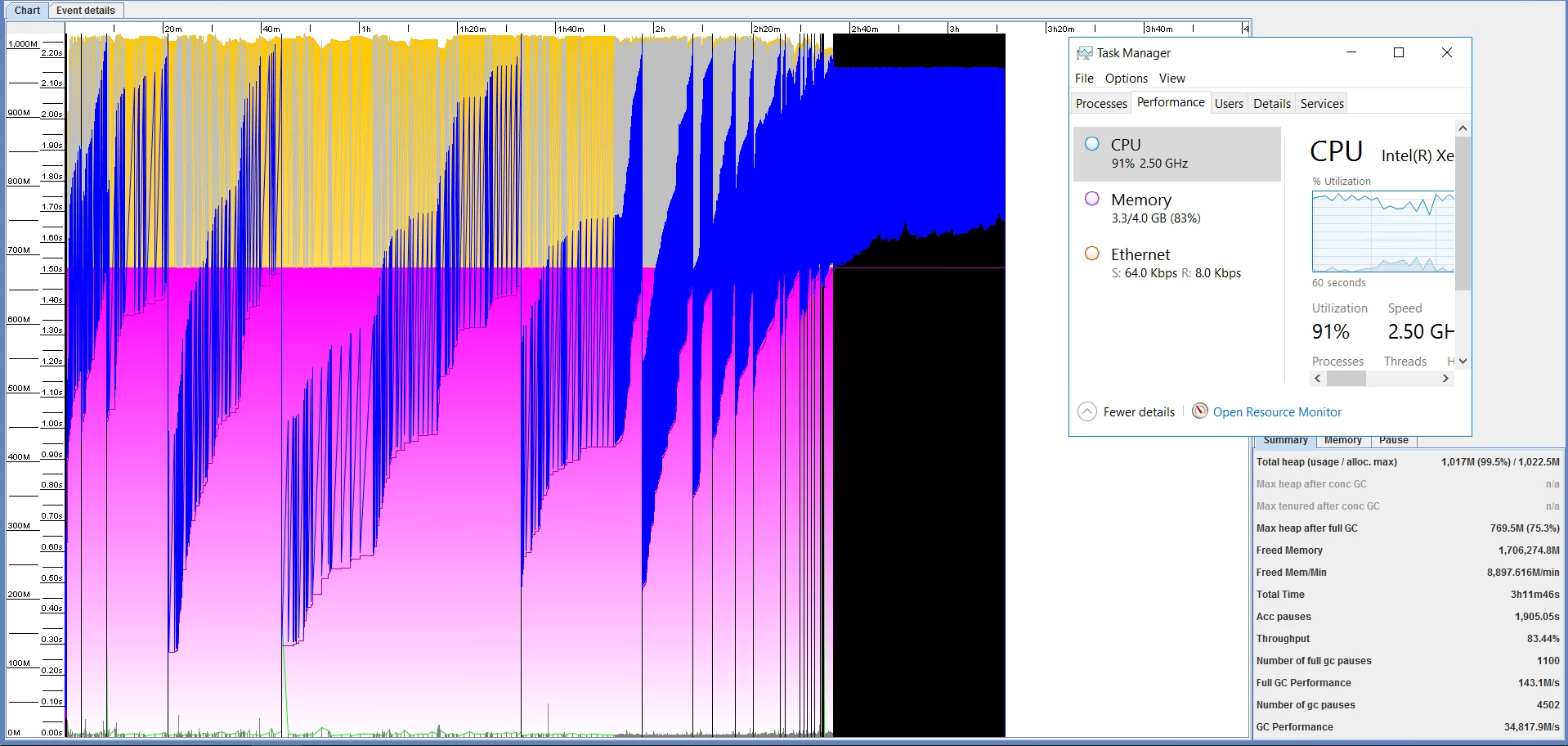
I've also done a few thread dumps and notice the ParOldGen is always maxed out around 99% when the issue occurs. I didn't see anything too obvious in the thread dump otherwise. Could post more if needed.
Heap
PSYoungGen total 334336K, used 28807K [0x00000000eab00000, 0x0000000100000000, 0x0000000100000000)
eden space 319488K, 9% used [0x00000000eab00000,0x00000000eca02ab0,0x00000000fe300000)
from space 14848K, 0% used [0x00000000fe300000,0x00000000fe300000,0x00000000ff180000)
to space 14848K, 0% used [0x00000000ff180000,0x00000000ff180000,0x0000000100000000)
ParOldGen total 699392K, used 699181K [0x00000000c0000000, 0x00000000eab00000, 0x00000000eab00000)
object space 699392K, 99% used [0x00000000c0000000,0x00000000eaacb560,0x00000000eab00000)
Metaspace used 142208K, capacity 164916K, committed 165196K, reserved 1191936K
class space used 16865K, capacity 22202K, committed 22348K, reserved 1048576K
I also installed a trial version of Seefusion just to see if anything obvious is hanging or running slow. Nothing really came up either. Right after a CF restart pages take slightly longer while things get cached, but then it looks good. We have a few different instances of CFWheels running on our site. I'm sure there's a little extra overhead there, but nothing that CF couldn't handle in the past.
I've read some information on different flags (Java HotSpot VM Options ) or swapping out "UseParallelGC" for a different type of garbage collection. Most of the Coldfusion information is from years ago. Just not sure what applies anymore, or what else could be causing this.
I checked the thread dump for any java outofmemoryerror's in the log, but don't see any. Based on some more reading, I'm thinking maybe I should try to add a -XX:Permsize= or -XX:maxpermsize= to my arguments possibly.
Any help or insight would be greatly appreciated!


 AdChoices