Participant
Feb 4, 2021 9:13 PM UTC
Answered

Coldfusion 2018 compiler

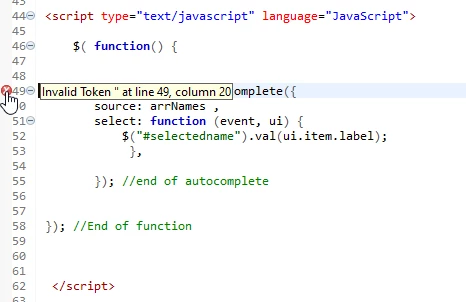
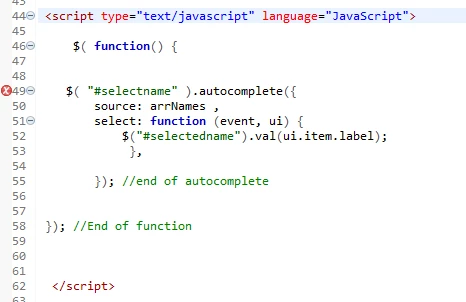
Within a cfm, I have a script section and the pre-compiler is throwing this error - it is not recognixing that $("#selectname") is valid invalid token at the second ". Any ideas on how to go around the problem? 


    This topic is closed to new replies. Start a new post to keep the conversation going.
    BKBK
    BKBKCorrect answer
    Community Expert
    Feb 5, 2021 10:42 AM UTC

    If the Javascript is not part of CF code, then use single #.

    If the Javascript is part of CF code (for example, within cfoutput tags), then use ## instead of #.


    testPage1.cfm
    
    <!--- 
    If Javascript is not part of CF code, then use single # 
    --->
    <script type="text/javascript" language="Javascript">
    $( function(){
     
      $("#selectname").autocomplete({
        source: arrNames,
        select: function(event, ui) {
          $("#selectedname").val(ui.item.value);
        },
        
      });
      
    });
    </script>
    
    
    testPage2.cfm
    
    <!--- 
    If Javascript is part of CF code (for example, 
    within cfoutput tags), then use ## 
    --->
    <cfoutput>
    <script type="text/javascript" language="Javascript">
    $( function(){
     
      $("##selectname").autocomplete({
        source: arrNames,
        select: function(event, ui) {
          $("##selectedname").val(ui.item.value);
        },
        
      });
      
    });
    </script>
    </cfoutput>


    3 replies

    Participant
    Feb 5, 2021 1:23 PM UTC

    Thanks for the quick replies - have yourselves a great day.

    Dave

    Translate
    BKBK
    Community Expert
    BKBKCommunity ExpertCorrect answer
    Community Expert
    Feb 5, 2021 10:42 AM UTC

    If the Javascript is not part of CF code, then use single #.

    If the Javascript is part of CF code (for example, within cfoutput tags), then use ## instead of #.


    testPage1.cfm
    
    <!--- 
    If Javascript is not part of CF code, then use single # 
    --->
    <script type="text/javascript" language="Javascript">
    $( function(){
     
      $("#selectname").autocomplete({
        source: arrNames,
        select: function(event, ui) {
          $("#selectedname").val(ui.item.value);
        },
        
      });
      
    });
    </script>
    
    
    testPage2.cfm
    
    <!--- 
    If Javascript is part of CF code (for example, 
    within cfoutput tags), then use ## 
    --->
    <cfoutput>
    <script type="text/javascript" language="Javascript">
    $( function(){
     
      $("##selectname").autocomplete({
        source: arrNames,
        select: function(event, ui) {
          $("##selectedname").val(ui.item.value);
        },
        
      });
      
    });
    </script>
    </cfoutput>


    Translate
    Charlie Arehart
    Community Expert
    Community Expert
    Feb 5, 2021 12:17 AM UTC

    Use ## where you are using #.


    While your code is all fine js code, if this is in a cfm page, cf sees the # as the start of a variable or expression. That's where it would complain.


    Using two #'s would "escape" the use of a single one.


    Let us know of that solves things. 

    Translate
    /Charlie (troubleshooter, carehart. org)