
Inspiring
April 24, 2019
Answered

Coldfusion 2018 - Error Executing Database Query

  • April 24, 2019
  • 5 replies
  • 12328 views

Hello,

   I am using Coldfusion 2018 with Oracle Database. One of my pages in the application gives me an error as shown below

How can this be resolved ?   I am not getting the same error on Test server where the same version of Cold fusion 2018 is installed.

Thanks

IQ

Error Executing Database Query.

  ORA-01858: a non-numeric character was found where a numeric was expected   
  The error occurred in C:/inetpub/wwwroot/TOPS/ValidateConsumptionList.cfm: line 134
Called from C:/inetpub/wwwroot/TOPS/ValidateConsumptionList.cfm: line 1
Called from C:/inetpub/wwwroot/TOPS/ValidateConsumptionList.cfm: line 134
Called from C:/inetpub/wwwroot/TOPS/ValidateConsumptionList.cfm: line 1
132 :        and dd.data_date = TO_DATE(<cfqueryparam 133 :                                   value="#time1#" 134 :                                   cfsqltype="VARCHAR" 135 :                           maxlength="28">,'YYYY/MM/DD hh24') 136 :        WHERE lu.IPN in (304305,304350,304354,304352,304309,304310,304311,304312, 304313, 304314)
and dd.data_date = TO_DATE(<cfqueryparam

133 : value="#time1#"

134 : cfsqltype="VARCHAR"

135 : maxlength="28">,'YYYY/MM/DD hh24')

136 : WHERE lu.IPN in (304305,304350,304354,304352,304309,304310,304311,304312, 304313, 304314)

    This topic has been closed for replies.
    Correct answer BKBK

    Hi friends,

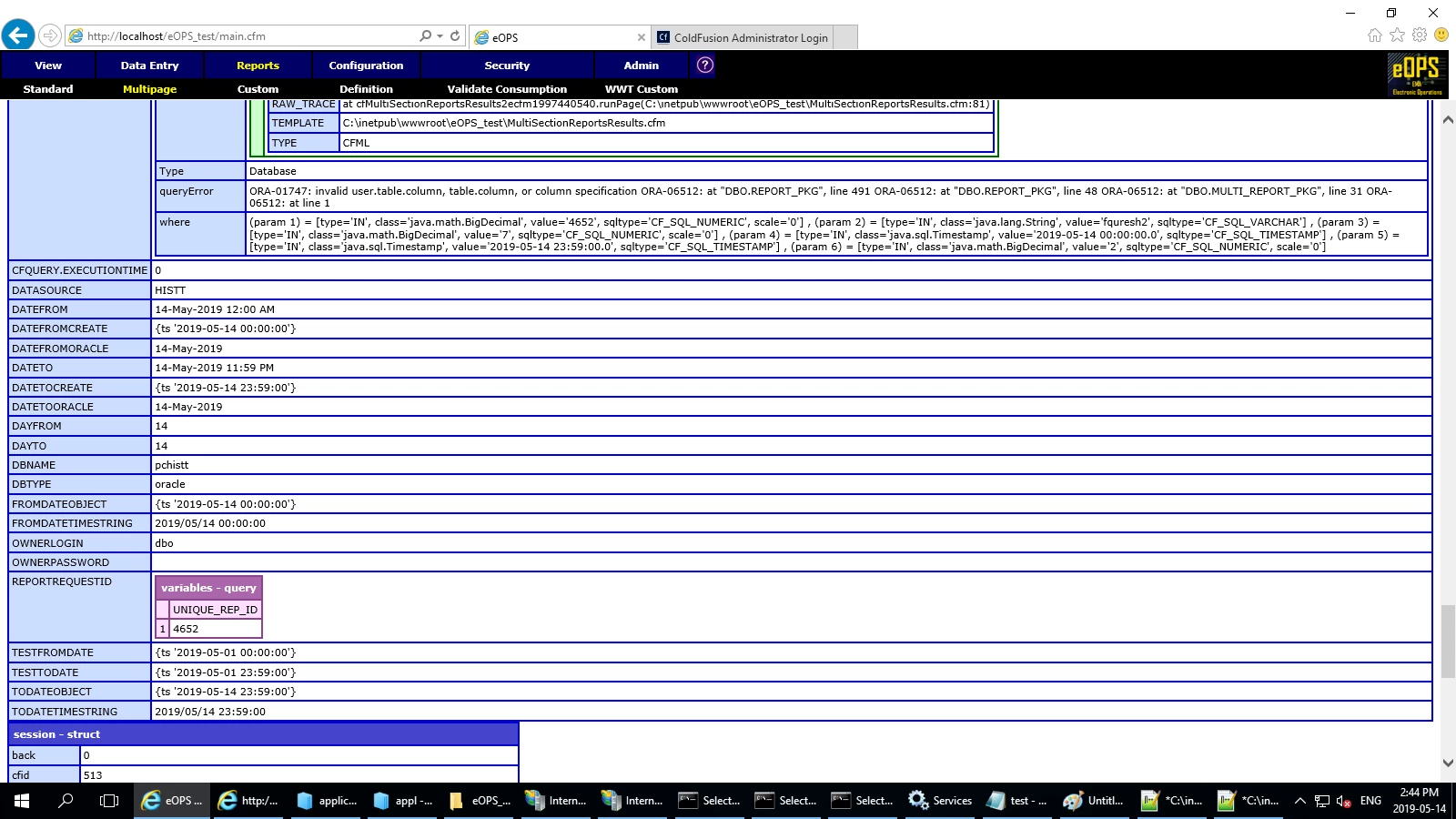
        I have used the code as suggested by BKBK but with in a CF stored procedure, here is the code I have used and the error I get now is slightly different from the previous ones.

    <cftry>

    <cfset fromDateObject=parsedateTime(datefrom)>

    <cfset toDateObject=parsedateTime(dateto)>

    <cfset fromDateTimeString=dateFormat(fromDateObject, "yyyy/mm/dd") & " " & timeFormat(fromDateObject, "HH:nn:ss")>

    <cfset toDateTimeString=dateFormat(toDateObject, "yyyy/mm/dd") & " " & timeFormat(toDateObject, "HH:nn:ss")>

      <cfstoredproc procedure="dbo.multi_report_pkg.run_multi_report" datasource="#datasource#" username="#Session.UserName#" password="#Session.password#">

        <cfprocparam  value="#Session.multi_rep_id#">

        <cfprocparam  value="#Session.UserName#">

        <cfprocparam  value="#multi_report_def_id#">

        <cfprocparam cfsqltype="CF_SQL_TIMESTAMP" value="#parsedateTime(fromDateTimeString)#">

        <cfprocparam cfsqltype="CF_SQL_TIMESTAMP" value="#parsedateTime(toDateTimeString)#">

        <cfprocparam  value="#period#">

      </cfstoredproc>

    <cfcatch type="any">

      <cfdump var="#cfcatch#" label="cfcatch" >

      <cfdump var="#variables#" label="variables">

       <cfdump var="#session#" label="session">

    </cfcatch>

    </cftry>


    We're getting there. This error says there is a problem with a column name.

    Check whether there is a column name having an illegal character. Did you perhaps use a column name that is a reserved word in Oracle?

    5 replies

    Matthew C. Parks
    Inspiring
    May 8, 2019

    Inside your cfqueryparam you have .....cfsqltype="VARCHAR"....  it needs to be  CF_SQL_VARCHAR, so it reads cfsqltype="CF_SQL_VARCHAR".

    I think that should do it.

    IQ1Author
    Inspiring
    May 8, 2019

    Changing  VARCHAR to CF_SQL_VARCHAR does not help, the error continues to remain the same.

    Matthew C. Parks
    Inspiring
    May 8, 2019

    TO_DATE(<cfqueryparam value="#datefrom#" cfsqltype="VARCHAR" maxlength="28">,'YYYY/MM/DD HH24:MI:SS','AMERICAN'),

    could be changed to this

    <cfqueryparam value="TO_DATE(#datefrom#,'YYYY/MM/DD HH24:MI:SS','AMERICAN')" cfsqltype="CF_SQL_VARCHAR">

    This way the whole to_date() function is sent in the (param 1)

    OR why dont you do like you did for the toDateTime, set a varable fromDateTIme and remove the cfqueryparam altogether.

    Another item i was screching my head on is the BEGIN and END (anonymous SQL block) that is allowed in ORACLE, I have never had luck with that personally.

    Charlie Arehart
    Community Expert
    Community Expert
    May 8, 2019

    If these efforts with bkbk don't work out, let's go back to an earlier point you made: the oracle dsn you have differs between prod and test. This could easily be the root cause of the issue, now that we know (you say) that the values of the vars are the same on both (and so the sql should be identical).

    You said that you could not see an oracle driver to pick in prod, like you could in test. So I suspect your prod is running with a cf Standard license, while perhaps test is running the free Dev editon, which runs as basically the equivalent to cf Enterprise.

    Sadly, that means your test env has access to features your prod does not, like that built-in Adobe-provided Oracle driver (This is not a problem unique to CF: it happens with SQL Server as well, and perhaps also with oracle, where free Dev editions offer enterprise features but don't allow for emulation of standard features).

    So you mentioned implementing some jdbc connection string to get thins working in prod. What is that? More important, what is the jdbc driver being used? And as you or someone seemingly had to download and implement an oracle driver jar, which was it?

    Finally, have you considered implementing that as a new dsn in test, simply for testing to see if the same problem would happen there? (You could give it a new dsn name, so as to have no impact on use of the existing one in test.) If it then had the same error, you know it's about the driver.

    Then you could focus your question on THAT, knowing not it's not really a CF question. You could even take the question to an oracle forum, but note you'd talk about it being a "parameterized query", as that's the generic term for what cfqueryparam does. That said, it would help to prove if your error with the 0 time happens even as a hard-coded sql statement, to avoid complicating things with mention of parameterized queries, if you may ask about it elsewhere.

    You may well find, perhaps in the docs of whatever driver you are using, that there's some connection string that would fix your problem. Or  maybe there's an oracle plsql function which could fix it while workibg ok with either driver, and so could work in either test or prod.

    Let us know how it goes. I really think this may be where you should turn next.

    /Charlie (troubleshooter, carehart. org)
    BKBK
    Community Expert
    Community Expert
    May 7, 2019

    IQ1  wrote

    ...

    133 : value="#time1#"

    ...

    135 : maxlength="28">,'YYYY/MM/DD hh24')

    Two points you may have to look into.

    1. Ensure that the string, time1, is of the form yyyy/mm/dd hh:mm:ss
    2. Use the full mask in the to_Date function: YYYY/MM/DD HH24:MI:SS
    IQ1Author
    Inspiring
    May 7, 2019

    Hi BKBK, This was originally how the issue started but further work on this does not seem to give the Time part separately, for now I am unable to understand why it is not working for a time format 00:00:00 it works for any other time format other than this.

    BKBK
    Community Expert
    Community Expert
    May 8, 2019

    I still wonder whether you have had a look at my suggestion. Specifically,

    1. output the string time1 and verify whether it is in the format yyyy/mm/dd hh:mm:ss
    2. in your code, replace YYYY/MM/DD HH24 with YYYY/MM/DD HH24:MI:SS
    Charlie Arehart
    Community Expert
    Community Expert
    May 7, 2019

    Separate from the discussion about the sql, I would ask also:

    Can you clarify what has changed–between when it last worked, and now, when it does not.

    If you may say you applied a cf2018 update, do check out https://coldfusion.adobe.com/2019/03/problems-applying-cf-update-check-first/.

    Also, as for the jdbc driver for oracle, is it the one that Adobe provides with CF, or one you implemented.

    Finally, what cf2018 update are you on?

    /Charlie (troubleshooter, carehart. org)
    IQ1Author
    Inspiring
    May 7, 2019

    Hi Charlie,

        I have installed cf2018 fresh on a windows 2016 server for test and prod environments. The same setup works without any errors on Test environment and on Prod environment I get the errors I have mentioned. So nothing really has changed and its not a cf update its a fresh installation of cf2018.

    Thanks

    IQ

    Charlie Arehart
    Community Expert
    Community Expert
    May 7, 2019

    Ok, and we couldn't have known so had to ask.

    But clearly something is different between the two tests run on the two different environments.

    I would recommend you now focus on the two most recent other requests from me and BKBK, numbers 8 and 10 as they are tracked here in the forums ui: what are the values of the cfqueryparams, in prod?

    They may vary from what you'd expect them to be, because of perhaps some OTHER issue/difference between your test and prod.

    /Charlie (troubleshooter, carehart. org)
    WolfShade
    Legend
    April 24, 2019

    I'm not sure if it's still done the same way in CF2018, but I know that in CF10 and CF11, the "line number" isn't always the correct line number when a query is involved.  It's usually (but not always) the last line of the query, itself.  So, in a nutshell, line #134 most likely isn't the issue.  Non-numeric character where a numeric character was expected makes me think that something is in the value that shouldn't be.

    HTH,

    ^ _ ^

    IQ1Author
    Inspiring
    May 6, 2019

    So I understand it does not have to do with the line number but what is the solution to this issue, can someone please please get back to me.

    WolfShade
    Legend
    May 6, 2019

    Could you post the whole query as you currently have it?  I'd like to see where the issue might be.  I don't think it's in the section you provided, as it's dealing with a date object, not a numeric.

    V/r,

    ^ _ ^

    UPDATE: Have you tried changing the VARCHAR to a DATE or DATETIME data type?