

elisabethf82215657
Inspiring
May 19, 2021
Answered

Coldfusion (2018) Performance Monitoring Toolset

  • May 19, 2021
  • 1 reply
  • 1867 views

I installed the PMT for Coldfusion 2018 on my Windows notebook. Everything seemd fine, but each time I want to login, I get the message: "Invalid Username / Password".
I am sure that username / password are the correct values configured during installation.

Nevertheless I uninstalled the tool and installed it again, using other values for username / password. This did not help.

Can anybody help? I did not find any information on this in the internet!
 

    Correct answer BKBK

    I was not able to login - was this not clear?


    It was unclear to me whether you could see the login form to start with, and no longer after the update.


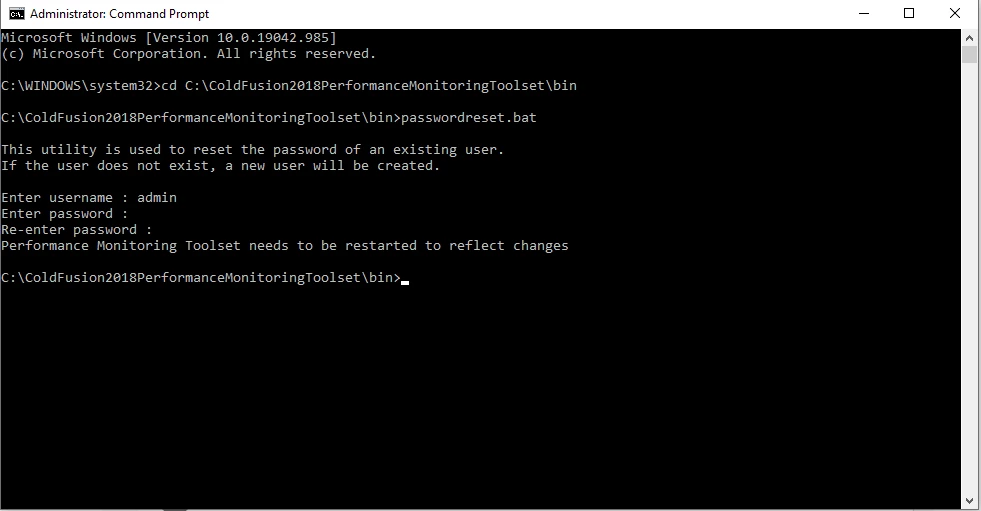
    In any case, you can easily reset your username and password. The steps are as follows (assuming you are on Windows and that you installed PMT on the default path):


    1)  Click on Windows Start and type CMD. Right-click on Command Prompt and choose to open it as Administrator.

    2) Type the DOS command cd C:\ColdFusion2018PerformanceMonitoringToolset\bin

    3) To run the password-reset tool, type passwordreset.bat

    4) I entered admin as my username. You could do the same.

    5) Enter a password. Confirm the password when prompted.

    6) Restart the Performance Monitoring Toolset.


    1 reply

    elisabethf82215657
    Inspiring
    May 19, 2021

    After installing the latest hotfix the login form is missing completely:


    Charlie Arehart
    Community Expert
    Community Expert
    May 19, 2021

    Elisabeth, sorry to hear all your challenges with the pmt.


    As for your second point, I would say that an error after an update can usually be explained as being an error DURING the update, and those are reported in the update's install log. That's found in a folder created for that uodate, which will be found in an hf-updates folder that's created when an update is run.


    This is true for cf and the pmt (though many don't realize the pmt can be updated), and this hf-updates folder would be found for cf or for the pmt in their respective root folders. Have you checked that? The installation log should report 0 fatalerrors. (I have a blog post on finding and using such cf update install logs for diagnosing update errors.) 


    That said, I'm curious how you updated the pmt when you could not log into it. Did you run the update jar manually? (For those not aware, the cf2021 pmt did finally add a page in its settings for applying updates, like in cf. Otherwise in CF2018 your ONLY option to update the pmt was to do it manually. I have a blog post on that, also.)


    As for your original problem of not being able to login to the pmt at all, that was a curious one. Given others have not reported it, it's seemingly a unique problem for you. There could be many explanations, too many to elaborate here.


    I will say that if you want to get it all working, I may well be able to get it working for you in less than 15 mins, in a Zoom session. I have helped many people solve such seemingly intractable problems, whether with cf or the pmt. If you don't find my help valuable, you'd not pay for my time. For more on my rates, approach, satisfaction guarantee, online calendar, and more, see carehart.org/consulting.


    Or share what you may find based on the above, and perhaps we or others can get it solved here. 

    /Charlie (troubleshooter, carehart. org)