
Question
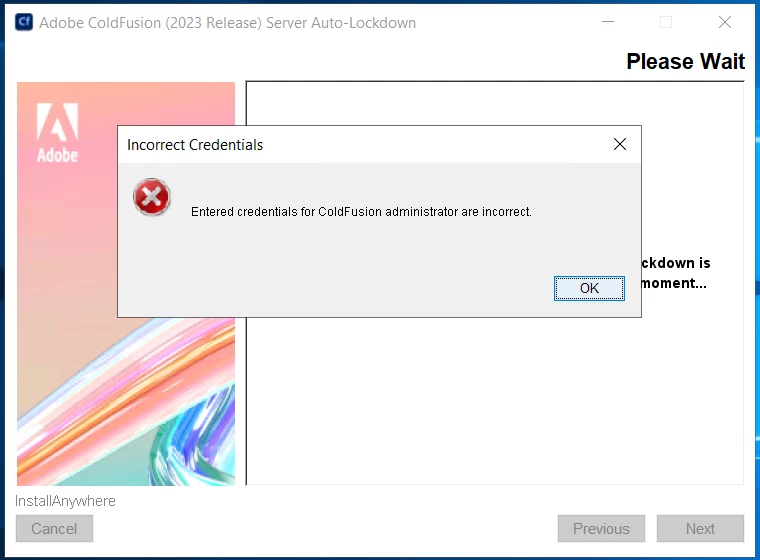
Coldfusion 2023 auto lockdown incorrect administrator credentials error
I am locking down a new CF 2023 installation using the autolockdown application but am getting an error when I enter the administrator credentials which I have triple-checked as being correct. I saw another post in the Adobe community where the solution was to install some packages in the admin, but everything is already installed as I used the GUI installer.
Log contents:
2023-11-03 13:05:14 INFO  - Path:C:\ColdFusion2023\lockdown\cfusion
2023-11-03 13:05:14 INFO  - LINE_DEBUGGER_ENABLED -> null
2023-11-03 13:05:14 INFO  - developer_enabled -> false
2023-11-03 13:05:14 INFO  - REMOTE_INSPECTION_ENABLED -> null
2023-11-03 13:05:14 INFO  - ajax_enabled -> false
2023-11-03 13:05:14 INFO  - robust_enabled -> false
2023-11-03 13:05:14 INFO  - FLASHFORMCOMPILEERRORS -> null
2023-11-03 13:05:14 INFO  - enabled -> false
2023-11-03 13:05:16 INFO  - ColdFusion is running
2023-11-03 13:05:21 INFO  - Firewall status: Domain Profile Settings: ----------------------------------------------------------------------State                                 ONPrivate Profile Settings: ----------------------------------------------------------------------State                                 OFFPublic Profile Settings: ----------------------------------------------------------------------State                                 OFFOk.
2023-11-03 13:05:21 INFO  - Value expected: ON, or: オン
2023-11-03 13:05:21 INFO  - File system type for drive: C:\ is: NTFS
2023-11-03 13:05:21 INFO  - Key found. Means IIS is installed!
2023-11-03 13:05:21 INFO  - Website name file already exists
2023-11-03 13:05:21 INFO  - Existing file deleted
2023-11-03 13:05:21 INFO  -
2023-11-03 13:05:21 INFO  -
2023-11-03 13:05:22 INFO  - blah.blahblah.com
2023-11-03 13:05:22 INFO  - blah.net
2023-11-03 13:05:22 INFO  - blah.com
2023-11-03 13:05:22 INFO  - blahblah.com
2023-11-03 13:05:22 INFO  - blahblahblah.com
2023-11-03 13:05:23 INFO  - blah.blah.com
2023-11-03 13:05:23 INFO  - blahblahblahblah.com
2023-11-03 13:05:23 INFO  - If websites which are already configured with connector with the instance: cfusion are found, they will be pre-selected in the Webites in IIS screen
2023-11-03 13:05:23 INFO  - Website already configured with connector: blah.blahblah.com
2023-11-03 13:05:23 INFO  - Website already configured with connector: blah.net
2023-11-03 13:05:23 INFO  - Website already configured with connector: blah.com
2023-11-03 13:05:23 INFO  - Website already configured with connector: blahblah.com
2023-11-03 13:05:23 INFO  - Website already configured with connector: blahblahblah.com
2023-11-03 13:05:23 INFO  - Website already configured with connector: blah.blah.com
2023-11-03 13:05:23 INFO  - Website already configured with connector: blahblahblahblah.com
2023-11-03 13:05:23 INFO  -
2023-11-03 13:05:23 INFO  -
2023-11-03 13:05:24 INFO  -
2023-11-03 13:05:24 INFO  -
2023-11-03 13:05:25 INFO  -
2023-11-03 13:05:25 INFO  -
2023-11-03 13:05:25 INFO  -
2023-11-03 13:05:26 INFO  -
2023-11-03 13:05:26 INFO  -
2023-11-03 13:05:26 INFO  -
2023-11-03 13:05:27 INFO  -
2023-11-03 13:05:27 INFO  -
2023-11-03 13:05:27 INFO  -
2023-11-03 13:05:28 INFO  -
2023-11-03 13:05:28 INFO  -
2023-11-03 13:05:28 INFO  -
2023-11-03 13:05:29 INFO  -
2023-11-03 13:05:52 INFO  - 200
2023-11-03 13:05:52 INFO  -
<html>
    <head>
        <meta http-equiv="Content-Type" content="text/html; charset=UTF-8">
        <title>Error</title>
	<link href="http://localhost:8500/cf_scripts/scripts/assets/style.css" rel="stylesheet"/>
    </head>
    <body>
	<div id="header"></div>
	<div id="spot">
	    <img src="http://localhost:8500/cf_scripts/scripts/assets/spot.png" />
	    <div id="title">Error</div>
	</div>
	<div id="content">
	    An error occurred while executing the application. Please try again or contact the administrator.
	</div>
    </body>
</html>

2023-11-03 13:06:04 INFO  - 200
2023-11-03 13:06:04 INFO  -
<html>
    <head>
        <meta http-equiv="Content-Type" content="text/html; charset=UTF-8">
        <title>Error</title>
	<link href="http://localhost:8500/cf_scripts/scripts/assets/style.css" rel="stylesheet"/>
    </head>
    <body>
	<div id="header"></div>
	<div id="spot">
	    <img src="http://localhost:8500/cf_scripts/scripts/assets/spot.png" />
	    <div id="title">Error</div>
	</div>
	<div id="content">
	    An error occurred while executing the application. Please try again or contact the administrator.
	</div>
    </body>
</html>

2023-11-03 13:18:39 INFO  - 200
2023-11-03 13:18:39 INFO  -
<html>
    <head>
        <meta http-equiv="Content-Type" content="text/html; charset=UTF-8">
        <title>Error</title>
	<link href="http://localhost:8500/cf_scripts/scripts/assets/style.css" rel="stylesheet"/>
    </head>
    <body>
	<div id="header"></div>
	<div id="spot">
	    <img src="http://localhost:8500/cf_scripts/scripts/assets/spot.png" />
	    <div id="title">Error</div>
	</div>
	<div id="content">
	    An error occurred while executing the application. Please try again or contact the administrator.
	</div>
    </body>
</html>

2023-11-03 13:23:48 INFO  - 200
2023-11-03 13:23:48 INFO  -
<html>
    <head>
        <meta http-equiv="Content-Type" content="text/html; charset=UTF-8">
        <title>Error</title>
	<link href="http://localhost:8500/cf_scripts/scripts/assets/style.css" rel="stylesheet"/>
    </head>
    <body>
	<div id="header"></div>
	<div id="spot">
	    <img src="http://localhost:8500/cf_scripts/scripts/assets/spot.png" />
	    <div id="title">Error</div>
	</div>
	<div id="content">
	    An error occurred while executing the application. Please try again or contact the administrator.
	</div>
    </body>
</html>


 AdChoices