That's not the stand alone example I proposed, but let's move on. If you may be thinking "something broke in CF2023, since it worked in CF2021", I can confirm I now have a running cfselect with an ajax bind to a CFC working in CF2023. I suspect you'll find it's a configuration issue on your end--either in the web server or the CF Admin settings.
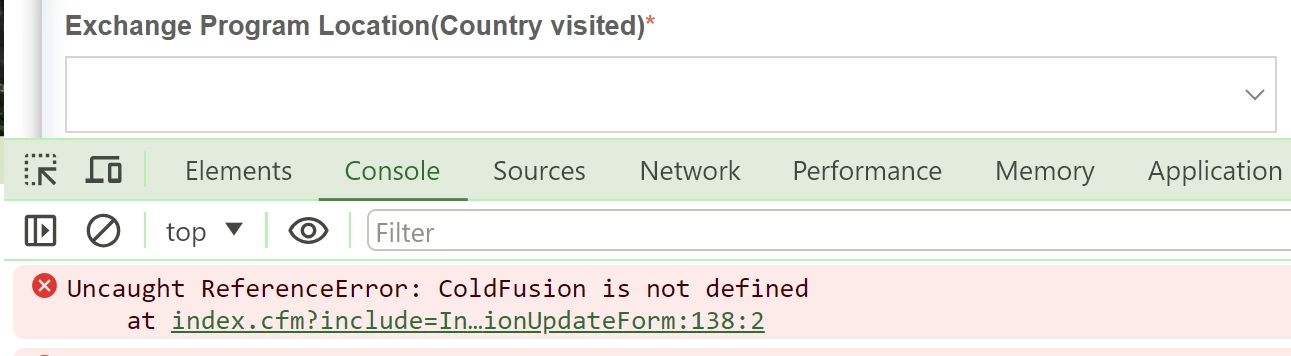
Indeed, as for that error you get ("Coldfusion is not defined"), if you were to search for that, one of the discussions you'll find (https://stackoverflow.com/questions/56841983/cf2018-cfselect-binding-failure) also suggests the problem may be with your web server not serving correctly the cfscripts directory. And I have now confirmed that I can cause that same error in CF2023 by misconfiguring that.
But you said originally that "scripts and everything is alligned". Can you clarify? Are you saying that if you go to the Network tab of the developer tools (that you show using in the first post), there are no 404 errors for all the requests, especially to the cfajax.js file?
To be clear, by default the folder for those is cf_scripts (in the cfusion/wwwroot folder) in CF2016 and above, whereas it was cfscripts--without an underscore (in the cfusion/wwwroot/CFIDE folder) in CF11 and earlier. And if you're using a web server like IIS or Apache, the CF web server connector would automatically create a virtual directory/alias within those, to point to this folder. Again, the default for that would be cf_scripts.
Then as you may know there is a CF admin settings page to allow one to change the name of this "default script src path" (to something other than cf_scripts), if you somehow want to use a different one. In that case, the value of the virtual directory/alias in the web server has to be set to use that name.
All these things have to be "aligned", and that's what you'd want to see succeeding in that Network tab. In a default setup, this url would return javascript: http://<yoursite>/cf_scripts/scripts/ajax/package/cfajax.js. What does it return for you?
Let us know if this gets you going, or what you find.
Thank you @Charlie Arehart for your help, web server and cf admin are configured perfectly fine. cf_scripts directory is automatically configured during installation and it has all the required packages and cfajax.js, http://<yoursite>/cf_scripts/scripts/ajax/package/cfajax.js putting our website domain, gives us the required cfajax.js file. While exploration other workarounds, we found that some meta tag is conflicting with the cfselect bind which was working perfectly fine in cf2021. We have included
<!--[if IE]><meta http-equiv='X-UA-Compatible' content="IE=edge,IE=9,IE=8,chrome=1" /><![endif]-->
This meta tag was conflicting with cfselect bind, after removal of this tag, all the cfselect with binding has started working.



 AdChoices