Participating Frequently
June 12, 2024
Answered

coldfusion 2023 debugging ip address list does not work

  • June 12, 2024
  • 2 replies
  • 1999 views

I am using Coldfusion 2023 (developer version, for now while I test it).


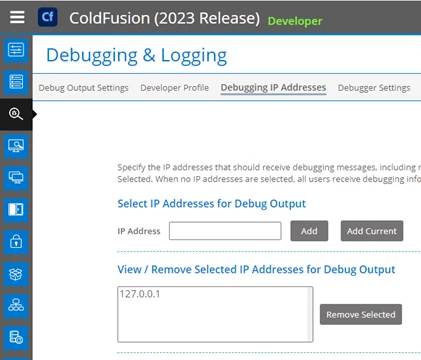
In the debugging IP address section (see image below) I have entered 127.0.0.1


But, it doesn't matter what IP address I connect from, I still see the debugging info when I test with a .cfm page that has an error in it.

I thought that debugging info would only show if I connected from the ip address in the debugging list.


Is there something else that I need to configure?


This topic has been closed for replies.
Correct answer Charlie Arehart

If I may step in, there's no bug here to report, for reasons I will explain. And I'll offer a couple alternatives besides your wise decision to go with an error handler.  With all due respect to everyone trying to help so far, this issue is one that can trip up lots of folks--so don't feel bad for struggling with it, Jeff . 🙂 


First and to the main concern you raised here, the debug output setting and ip address features in fact have ZERO to do with the error details you're reporting and are concerned to hide (rightfully so). Instead, note that on that Cf admin debug output settings page there is the "robust exception handling" option, which controls how much DETAIL is shown in error messages. Unchecking that, alone may have suited your need.


(It's indeed unfortunate that this setting is on that page. It can lead to reasonable confusion with other debug output which IS controlled by that debug ip list.) 


Second, as you've now found, using an error handler (site-wide or app-level) is indeed the way to prevent a user seeing ANY error info from CF. And yes, you could send that error info to yourself in such an error handler (and/or log it, or store it in a db, etc.)


And finally to further address the reasonable security concern over error messages, note that cf10 and above offer a secure profile feature (in the admin security section), which if enabled would set a site wide error handler--if you've not set one yourself--and that would show the user a blue ball and only a very brief indication that there was an error (and it also logs the error). 


Hope that's helpful, and sorry I'm only now seeing this. I was out of the country last week at the cfcamp conference in Germany. This is a great topic to help get clarified for the community every once in a while! 🙂


I welcome any feedback. As always, just trying to help. (Sadly, the intent behind words on screen can often be misconstrued.  I've tried to write carefully here.) 

2 replies

Charlie Arehart
Community Expert
Charlie ArehartCommunity ExpertCorrect answer
Community Expert
June 21, 2024

If I may step in, there's no bug here to report, for reasons I will explain. And I'll offer a couple alternatives besides your wise decision to go with an error handler.  With all due respect to everyone trying to help so far, this issue is one that can trip up lots of folks--so don't feel bad for struggling with it, Jeff . 🙂 


First and to the main concern you raised here, the debug output setting and ip address features in fact have ZERO to do with the error details you're reporting and are concerned to hide (rightfully so). Instead, note that on that Cf admin debug output settings page there is the "robust exception handling" option, which controls how much DETAIL is shown in error messages. Unchecking that, alone may have suited your need.


(It's indeed unfortunate that this setting is on that page. It can lead to reasonable confusion with other debug output which IS controlled by that debug ip list.) 


Second, as you've now found, using an error handler (site-wide or app-level) is indeed the way to prevent a user seeing ANY error info from CF. And yes, you could send that error info to yourself in such an error handler (and/or log it, or store it in a db, etc.)


And finally to further address the reasonable security concern over error messages, note that cf10 and above offer a secure profile feature (in the admin security section), which if enabled would set a site wide error handler--if you've not set one yourself--and that would show the user a blue ball and only a very brief indication that there was an error (and it also logs the error). 


Hope that's helpful, and sorry I'm only now seeing this. I was out of the country last week at the cfcamp conference in Germany. This is a great topic to help get clarified for the community every once in a while! 🙂


I welcome any feedback. As always, just trying to help. (Sadly, the intent behind words on screen can often be misconstrued.  I've tried to write carefully here.) 
/Charlie (troubleshooter, carehart. org)
BKBK
Community Expert
Community Expert
June 21, 2024

I still think there are grounds to report a bug. The instruction in ColdFusion Administrator reads:


Specify the IP addresses that should receive debugging messages, including messages for the AJAX Debug Log window. 

To include an IP address in the list, enter the address and click Add. To delete an IP address from the list, select the address and click Remove Selected. 

When no IP addresses are selected, all users receive debugging information.


That is clear. Hence, @jeff38011374seqk 's expectation that no IP other than 127.0.0.1 should display debug output.


If ColdFusion does not behave as it says on the tin, then one is right to suspect a bug.

Charlie Arehart
Community Expert
Community Expert
June 21, 2024

Nope, Alfred (bkbk). You're continuing to confuse matters.


"Debug output" is that stuff that appears at the end of a request...if enabled and if your ip matches any in the list.


Again, Jeff's concern was about details in an error message. That's NOT controlled by these two things. That's NOT a bug. 


If you're wanting to claim that "something needs to change", I'll repeat that the confusion on all this stems from the "robust exception handling" being on this debug output settings page. THAT should be moved. Feel free to file a tracker ticket for it, or ask Jeff if he will, or I could.


But I'm OK to wait and see how this discussion concludes, should you or anyone else have more to say. (Sometimes this is how nothing changes, as the discussion goes quiet without any action being taken.)


All that said, I hope what I shared helps everyone following this discussion. Again, it's a good one to have as this confusion arises once in a while. And even very experienced and smart people (including from Adobe) can slip in connecting all the dots. 

/Charlie (troubleshooter, carehart. org)
Community Expert
June 13, 2024

What IP address do you see in the CF debug output?


Dave Watts, Eidolon LLC 

Dave Watts, Eidolon LLC
Participating Frequently
June 13, 2024

I'm testing from a remote computer (see below). So, I wouldn't expect the remote computer to get debugging messages since it isn't in the IP debugging list. I am assuming there must be something else that needs to get configured, but I can't figure out what that might be.


Priyank Shrivastava.
Community Manager
Community Manager
June 13, 2024

Hi @jeff38011374seqk 


If you are using remote server debugging then use the "Add current" and it will add your machine IP address and it will show the debugging info.


Also, enable debugging in CF Admin so you can see what debugging info you are looking for.

Thanks, Priyank Shrivastava