
ColdFusion 2023 Installer - Previous Serial Number Question
I have a server that is running ColdFusion 2018. I'm running the CF2023 installer and get to this screen:
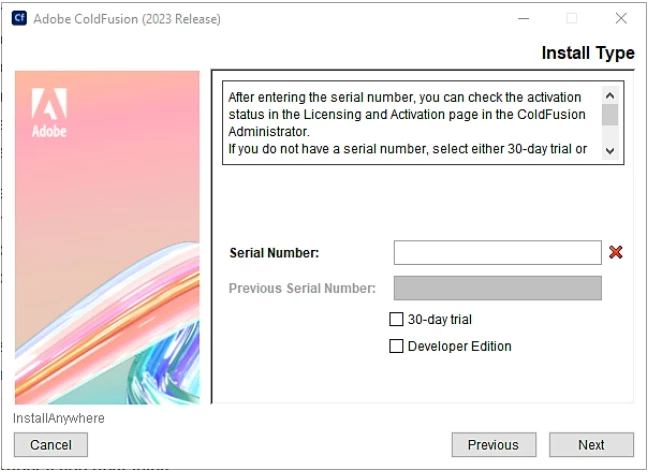
Accrording to the official online documentation (Install the server configuration (adobe.com)) it says:
Previous Serial Number: Enter the serial number of a previously installed version of ColdFusion. Enter this number along with the serial number for the new ColdFusion installation.
Use the previous serial number if you upgrading ColdFusion from a previous version.
What I don't understand is why the Previous Serial Number text box remains greyed out and allowing no input no matter what what choices are made. I can input my CF2023 Enterprise serial and get the green checkmark, but the Previous Serial Number remains greyed out. I tried check the check box options which also made no difference. I do have the CF2018 Enterprise key to provide if it would let me. Could it be that it's because I'm upgrading from CF2018 and not CF2021?
I'm asking mainly out of curiosity because I did decide to just input my CF2023 serial and click Next and run through the installer. Near the end of the install it indicated that it found the CF2018 instance and that it was migrating the settings. The installer completed without errors.


 AdChoices