
Participant
June 16, 2011
Question

Coldfusion Builder 2 Debugger Error

  • June 16, 2011
  • 2 replies
  • 1422 views

Hi everyone,

I am using CF9 as remote server for development. We have decided to move on CFBuilder to use its debugger feature.

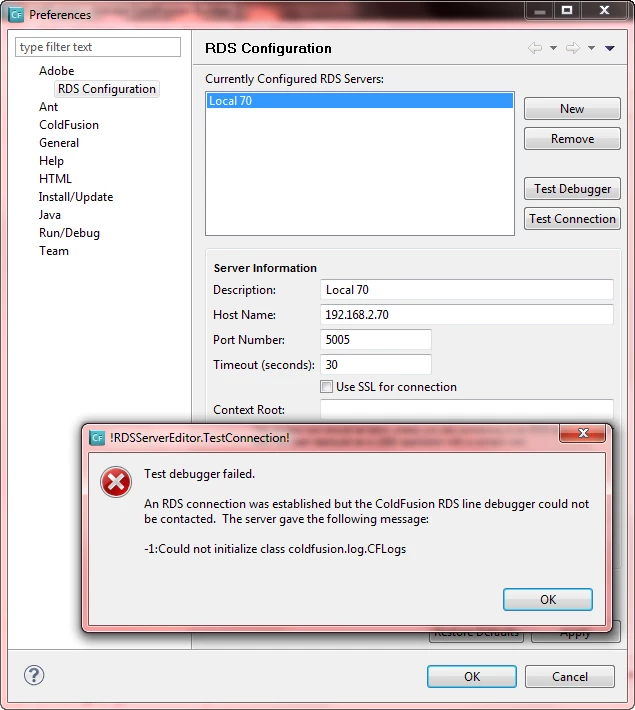
I am getting an error while testing Coldfusion Builder 2 Debugger.

I have googled for this error but didn't find any related post.

Below is the snapshot with error.
This topic has been closed for replies.

2 replies

Participant
September 6, 2011

This issue has been resolved. Port Number must be your HTTP port like "80".

Thanks for Help.

Participant
June 17, 2011

is someone there????

Big Mad Kev
Participating Frequently
June 17, 2011

When you say remote, do you mean shared hosting?

The erro is due to the CF Line Debugger not enabled in the CF Admin.

If your using shared hosting, I'd suggest you'd need to setup CF9 locally and connect that way.

Participant
June 18, 2011

CF Line Debugger is enabled. every thing is configured perfectly. This is a error which I've never seen before.

Actually, I am a IT Manager in a Software company and we need to setup a remote CF9 Server for development and testing with debugging. This is a centralize server for my team to work and test. Currently we are working using dreamviewer and every thing is going fine with this tool but as you know there is no good debugger tool in DW so we have decided to work in CFBuilder 2. Below you will find the jvm config in my CF Server.

=================================================================================================================

-Xdebug -Xrunjdwp:transport=dt_socket,server=y,suspend=n,address=5005 -server -Dsun.io.useCanonCaches=false -XX:MaxPermSize=192m -XX:+UseParallelGC -Xbatch -Dcoldfusion.rootDir={application.home}/../ -Dcoldfusion.libPath={application.home}/../lib -Duser.language=en -Duser.country=US -Dfile.encoding=UTF-8 -DDEBUGGER_SERVER_PORT=5005 -DDEBUGGER_TRACE=true

=================================================================================================================