Inspiring
May 21, 2017
Answered

ColdFusion Builder 2016 small icons on high resolution.

  • May 21, 2017
  • 19 replies
  • 2771 views

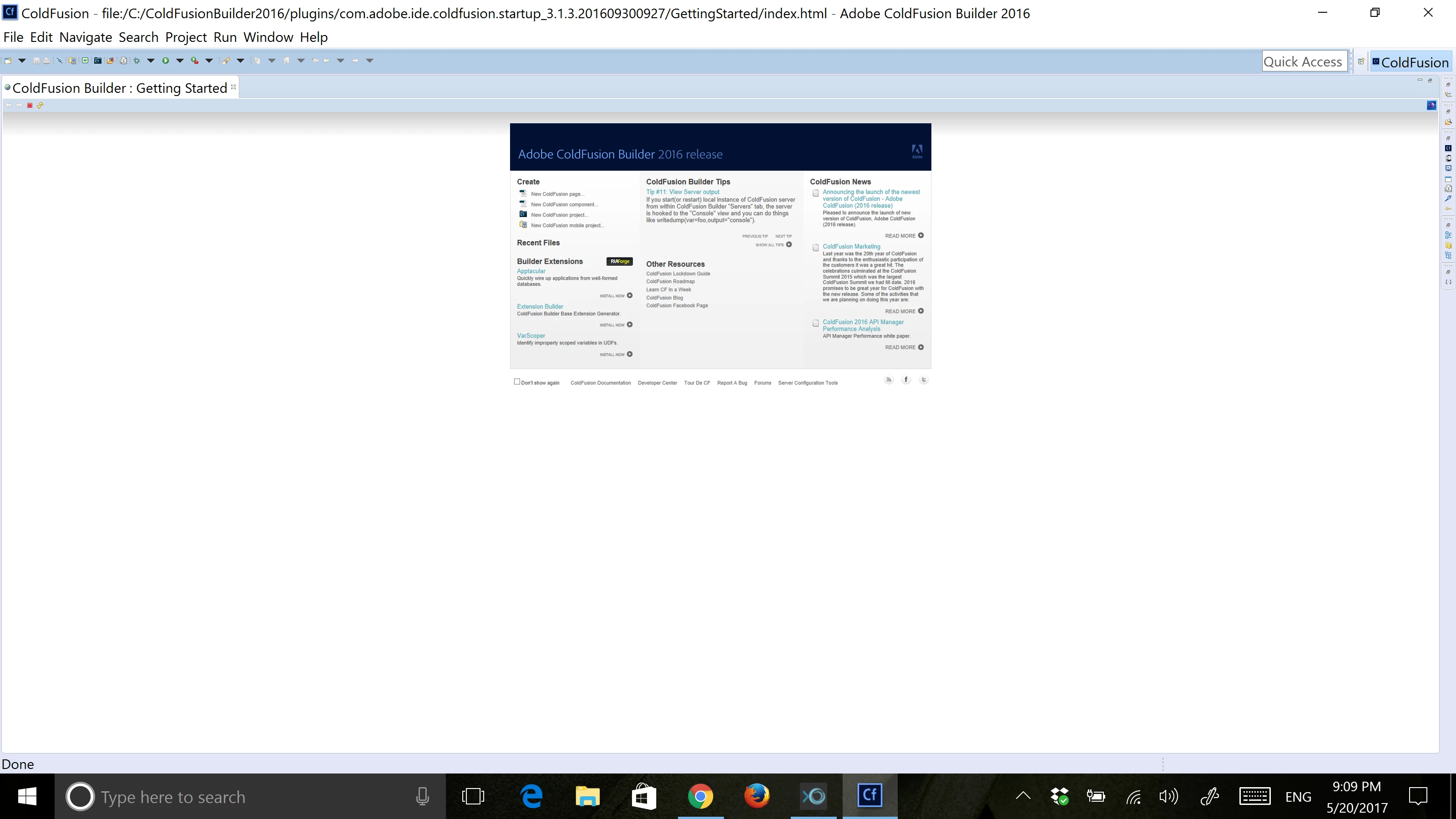
I just change my laptop to a new one that has 3200 x 1800 resolution, but when opening CF Builder the tool bars and icons display very small, even the home screen shows very small.

I tried with a lower resolution but the IDE displays the same.

Is there any fix to this?

Thanks.

This topic is closed to new replies. Start a new post to keep the conversation going.
Correct answer angel-chrystian

The solution is:

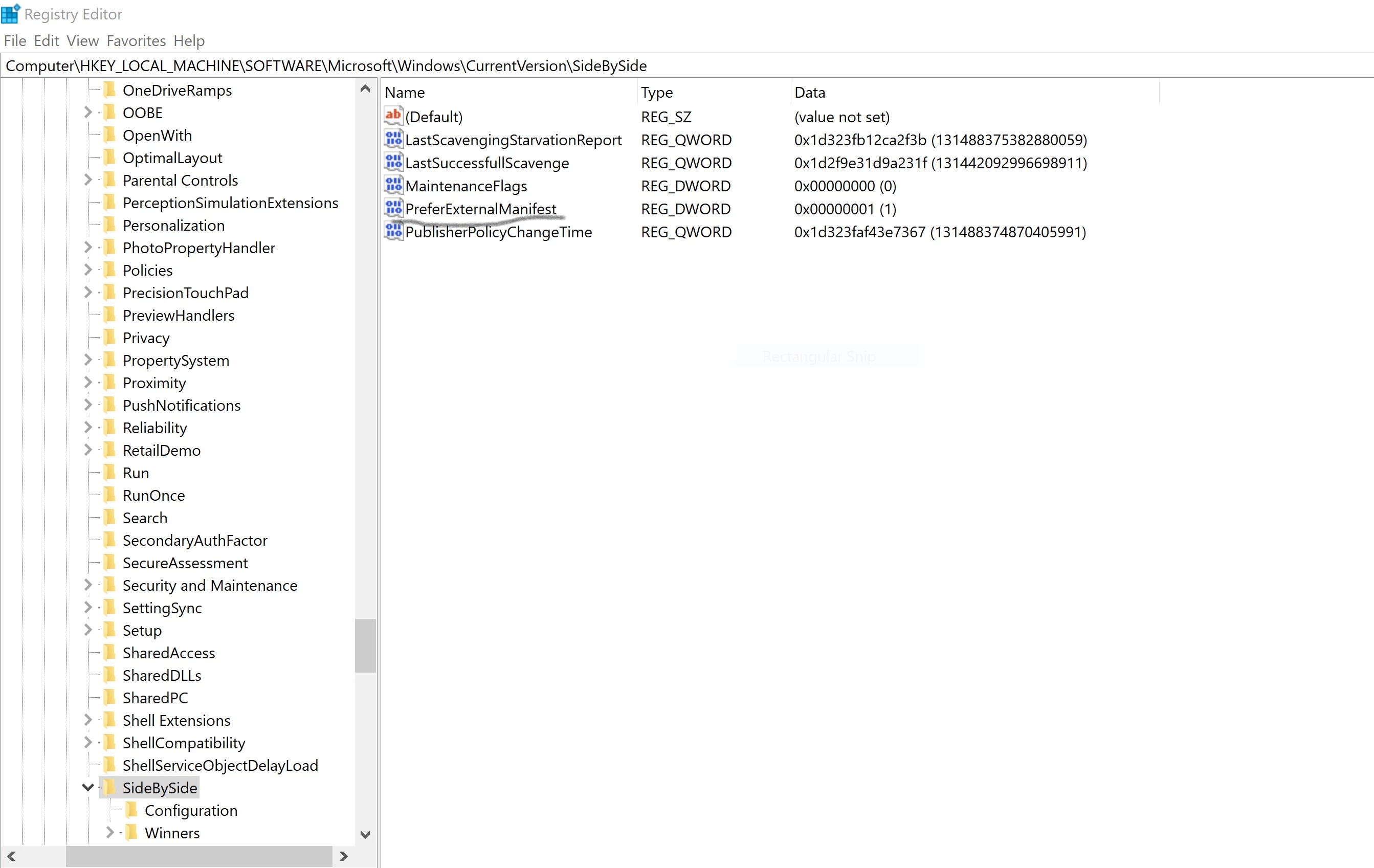
  1. Open the Registry and navigate to this path Computer\HKEY_LOCAL_MACHINE\SOFTWARE\Microsoft\Windows\CurrentVersion\SideBySide, add a new DWORD record named "PreferExternalManifest" with value "1"
  2. In the CF builder installation directory (C:\ColdFusionBuilder2016) create a file named CFBuilder.exe.manifest with this content

<?xml version="1.0" encoding="UTF-8" standalone="yes"?>

<assembly xmlns="urn:schemas-microsoft-com:asm.v1" manifestVersion="1.0" xmlns:asmv3="urn:schemas-microsoft-com:asm.v3">

    <description>eclipse</description>

    <trustInfo xmlns="urn:schemas-microsoft-com:asm.v2">

        <security>

            <requestedPrivileges>

                <requestedExecutionLevel xmlns:ms_asmv3="urn:schemas-microsoft-com:asm.v3"

                               level="asInvoker"

                               ms_asmv3:uiAccess="false">

                </requestedExecutionLevel>

            </requestedPrivileges>

        </security>

    </trustInfo>

    <asmv3:application>

        <asmv3:windowsSettings xmlns="http://schemas.microsoft.com/SMI/2005/WindowsSettings">

            <ms_windowsSettings:dpiAware xmlns:ms_windowsSettings="http://schemas.microsoft.com/SMI/2005/WindowsSettings">false</ms_windowsSettings:dpiAware>

        </asmv3:windowsSettings>

    </asmv3:application>

</assembly>

3. Restart.

*Note: Some windows updates will remove the PreferExternalManifest record from the registry so you only need to add the record again.

19 replies

angel-chrystianAuthorCorrect answer
Inspiring
September 2, 2017

The solution is:

  1. Open the Registry and navigate to this path Computer\HKEY_LOCAL_MACHINE\SOFTWARE\Microsoft\Windows\CurrentVersion\SideBySide, add a new DWORD record named "PreferExternalManifest" with value "1"
  2. In the CF builder installation directory (C:\ColdFusionBuilder2016) create a file named CFBuilder.exe.manifest with this content

<?xml version="1.0" encoding="UTF-8" standalone="yes"?>

<assembly xmlns="urn:schemas-microsoft-com:asm.v1" manifestVersion="1.0" xmlns:asmv3="urn:schemas-microsoft-com:asm.v3">

    <description>eclipse</description>

    <trustInfo xmlns="urn:schemas-microsoft-com:asm.v2">

        <security>

            <requestedPrivileges>

                <requestedExecutionLevel xmlns:ms_asmv3="urn:schemas-microsoft-com:asm.v3"

                               level="asInvoker"

                               ms_asmv3:uiAccess="false">

                </requestedExecutionLevel>

            </requestedPrivileges>

        </security>

    </trustInfo>

    <asmv3:application>

        <asmv3:windowsSettings xmlns="http://schemas.microsoft.com/SMI/2005/WindowsSettings">

            <ms_windowsSettings:dpiAware xmlns:ms_windowsSettings="http://schemas.microsoft.com/SMI/2005/WindowsSettings">false</ms_windowsSettings:dpiAware>

        </asmv3:windowsSettings>

    </asmv3:application>

</assembly>

3. Restart.

*Note: Some windows updates will remove the PreferExternalManifest record from the registry so you only need to add the record again.

Participant
January 24, 2018

So, they charge $200.00 for this program and we have to do Registry Edits to be able to use it.  LoL

I only have 1980x1020 res and I cannot see diddly in this program. 

Not only are the icons/buttons too tiny to have a clue what they are, the actual fonts in the pages I'd like to work on are unreadable.

In the case of the fonts, the size is ok, they're just stippled, faded and unreadable.  Like trying to read in an app from the 1990's.

Charlie Arehart
Community Expert
Community Expert
November 13, 2021

Looks like it's changed again.  I have a new install of cfb 2018. From the Product page it says Version: 3.2.1
Build: 313943.  Going to install details, I see  Adobe ColdFusion Builder 3.2.1.201902041055

In this version, I do not see any sign of that manifest file.  And this still mentions Eclipse, so it's not Charlie's new VS Code based version. 🙂

I found some info on Stack Overflow that worked for me:

at https://stackoverflow.com/questions/48473037/very-small-fonts-and-icons-on-4k-screens/48473038#48473038 


Bummer to hear it happening. It doesn't happen to all (not to me, I can definitely report), so it seems there's something environmental at play.


But thanks for sharing the workaround for folks. 

/Charlie (troubleshooter, carehart. org)
EddieLotter
Inspiring
May 31, 2017

Press Ctl+0 (that's a zero) to reset the zoom, or hold down the Ctrl key and move the mouse wheel to change the amount of zoom.

I tested this in CFB3, but it should also work in CFB2016.

Cheers

Eddie

Inspiring
June 1, 2017

Thanks for your answer Eddie, but that only works for the working area, the zoom does not affect the size of the toolbar and/or the buttons in the right and top of the interface.

I read in another post that this issue comes from eclipse and there is a fix for Eclipse but I think adobe will still need to put hands on it also as I tried but it didn't work.

Solution for Eclipse with High Resolution laptops / Perfecto Mobile Community

EddieLotter
Inspiring
June 1, 2017

Sorry, I overlooked your mentioning the toolbar when I looked at your screenshot. Yes, this is a "High DPI awareness" issue that application developers have to explicitly take into account when developing applications for current environments. Unfortunately it looks like Eclipse isn't high DPI aware.

Cheers

Eddie