Answered
ColdFusion Builder 3 Not Able to Update. And too much Slow to use.
HI We are using to CF Builder 3.1.0 and its too much slow. We are trying to Update it But its throwing error.
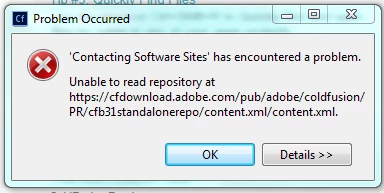
Need Help !!!

HI We are using to CF Builder 3.1.0 and its too much slow. We are trying to Update it But its throwing error.
Need Help !!!
Yes, that can be frustrating. Just as in Eclipse, the installation stops or crashes because it is unable to find one file.
There is a way around this. Instead of selecting to 'Help => Check for Updates', select 'Help => Install New Software'. Then follow these steps:
1) Click on Add. Then add the following respective values for name and location:
CFBuilderUpdate20170207
https://cfdownload.adobe.com/pub/adobe/coldfusion/PR/cfb31standalonerepo
That is the current URL of the update site.
Press OK.
2) Click on the link Available Software Sites. You will get a user interface showing the list of available update sites. The list includes the site you have just added, CFBuilderUpdate20170207.
3) Uncheck all checkboxes, except the checkbox for CFBuilderUpdate20170207.
Press OK.
Press Cancel.
4) Click on File menu, and select Restart.
5) Select Help => Check for Updates
Already have an account? Login
Enter your E-mail address. We'll send you an e-mail with instructions to reset your password.


 AdChoices