Known Participant
April 22, 2014
Answered

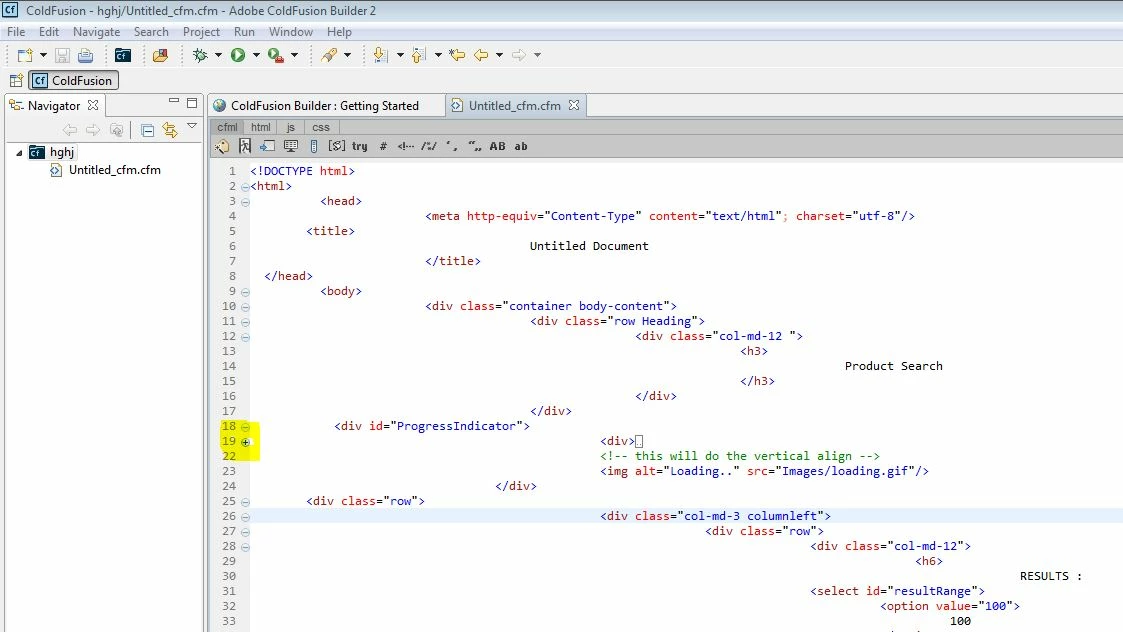
coldfusion builder2 not minimize(collapse) block of code proper way

  • April 22, 2014
  • 1 reply
  • 1074 views

Like for this code collapse not work properly:

<!DOCTYPE html>

<html>

          <head>

                         <meta http-equiv="Content-Type" content="text/html"; charset="utf-8"/>

        <title>

                                        Untitled Document

                         </title>

  </head>

          <body>

                         <div class="container body-content">

                                        <div class="row Heading">

                                                       <div class="col-md-12 ">

                                                                      <h3>

                                                                                     Product Search

                                                                      </h3>

                                                       </div>

                                        </div>

            <div id="ProgressIndicator">

                                                  <div>


                                                  </div>

                                                  <!-- this will do the vertical align -->

                                                  <img alt="Loading.." src="Images/loading.gif"/>

                                   </div>

        <div class="row">

                                                  <div class="col-md-3 columnleft">

                                                                 <div class="row">

                                                                                <div class="col-md-12">

                                                                                               <h6>

                                                                                                              RESULTS :

                                                                                <select id="resultRange">

                                                                                          <option value="100">

                                                                                                    100

                                                                                          </option>

                                                                                          <option value="200">

                                                                                                    200

                                                                                          </option>

                                                                                          <option value="500">

                                                                                                    500

                                                                                          </option>

                                                                                          <option value="1000">

                                                                                                    1000

                                                                                          </option>

                                                                                          <option value="2000">

                                                                                                    2000

                                                                                          </option>

                                                                                          <option value="3000">

                                                                                                    3000

                                                                                          </option>

                                                                                          <option value="4000">

                                                                                                    4000

                                                                                          </option>

                                                                                          <option value="5000">

                                                                                                    5000

                                                                                          </option>

                                                                                </select>

                                                                      </h6>

                                                            </div>

                                                  </div>

                                        </div>

                              </div>

                    </div>

          </body>

</html>

This topic has been closed for replies.
Correct answer Anit_Kumar

Shraddha,

Since my post on April 25th, Adobe has released the actual ColdFusion Builder version 3 (not beta).  Download the trial version and see if the problems are fixed.  If they are, then you can decide whether to buy the CFBuilder upgrade.

-Carl V.


Moreover, I tried your code snippet. If you look at the below screen shot, the code collapses properly.

And its not collapsing the code below that. If you close a parent tag, then the sub tags will also close.

Regards,

Anit Kumar

1 reply

Carl Von Stetten
Legend
April 22, 2014

Screenshot of the problem? Or are you talking about the indenting being off?

-Carl V.

Known Participant
April 23, 2014

In this screen shot you can see that blcok of div not collapse proper way...When i try to minimize div block then all the code after that div minimize.

Carl Von Stetten
Legend
April 24, 2014

I'm not seeing anything obviously wrong with that code.  That said, the Aptana plugin used by CFBuilder 2 has always been a bit "dodgy".  If you can, try downloading the beta version of CFBuilder 3 ( http://www.adobe.com/cfusion/entitlement/index.cfm?e=labs_coldfusion11 ) and try it out.  They ripped out Aptana and rewrote the HTML-handling parts.  It's much faster and seems much more reliable.

-Carl V.